Automotive / Car Audio
User Manual for AudioControl ACP-DANTE-E-POE 2-Channel Dante Encoder
Comprehensive user guide for the AudioControl ACP-DANTE-E-POE 2-channel analog-to-Dante encoder. Includes installation, Dante Controller configuration, multicast flow setup, and technical specifications.
Quick answers from the manual
Quick answer
- The ACP-DANTE-E-POE is a 2-channel analog-to-Dante encoder. It converts analog RCA audio signals for distribution over a Dante network. It supports PoE or local 5V power and requires the Audinate Dante Controller software for configuration. p. 4, 7
Key actions
- Connect power via PoE or included 5V adapter. p. 7
- Connect audio source to RCA inputs. p. 7
- Use Dante Controller to route audio. p. 9
First start
- Connect power, audio source, and network cable. The device will be automatically discovered by Dante Controller software on the network. p. 7
Problems and fixes
LEDs not lighting up
Ensure power is connected (PoE or 5V), check cable length (max 100m), or re-terminate RJ-45 connectors.
p. 8Maintenance and reset
- Factory reset can be performed via the Device Config or Network Config tabs in the Dante Controller software. p. 10, 11
Technical specifications
| Parameter | Value | Meaning | Pages |
|---|---|---|---|
| Frequency Response | 20-20kHz | Audio frequency range | p. 5 |
| Sample Rates | 44.1, 48, 88.2, 96 kHz | Supported audio sample rates | p. 5 |
| Bit Depth | 16, 24, 32-bit | Supported audio bit depths | p. 5 |
Where to find it in the PDF
- Front Panel and Connections p. 6
- Installation p. 7
- Dante Configuration p. 9, 10
Table of contents
Manual images
Click an image to enlargeQuick guide from the manual
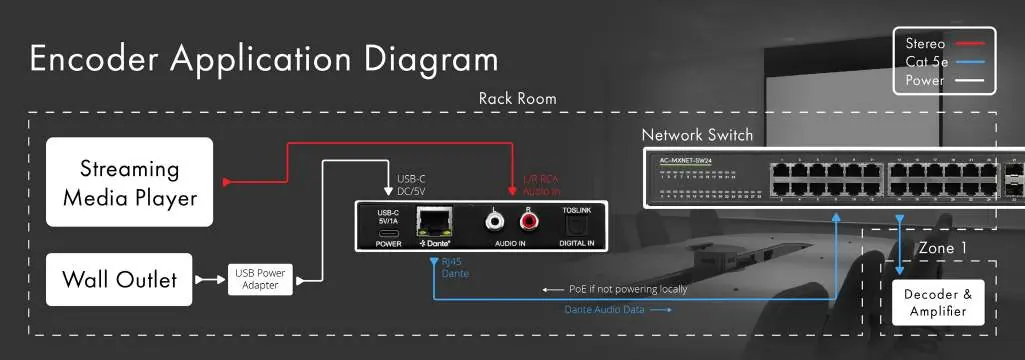
The AudioControl ACP-DANTE-E-POE is a compact, 2-channel analog stereo-to-Dante encoder. It allows you to interface analog audio sources (RCA) with a Dante network. The device supports PoE (Power over Ethernet) or local 5V power and requires the Audinate Dante Controller software for configuration and signal routing.
Product Overview
The unit is designed for professional audio distribution in environments like houses of worship, education, and conference rooms. It features analog RCA inputs, a digital Toslink input, and an RJ-45 Dante network port.
Box Contents
- ACP-DANTE-E-POE unit
- 5V 1A USB Power Adapter
- European Adapter
- USB-A to USB-C Cable
- Mounting Brackets and Screws
Front and Rear Panels
The front panel features LED indicators for status monitoring:
- Mute: Red LED illuminates when the Dante audio stream is muted.
- Power: Blue LED indicates power is present.
- Analog/Digital: Blue LEDs indicate when audio is present on the respective inputs.
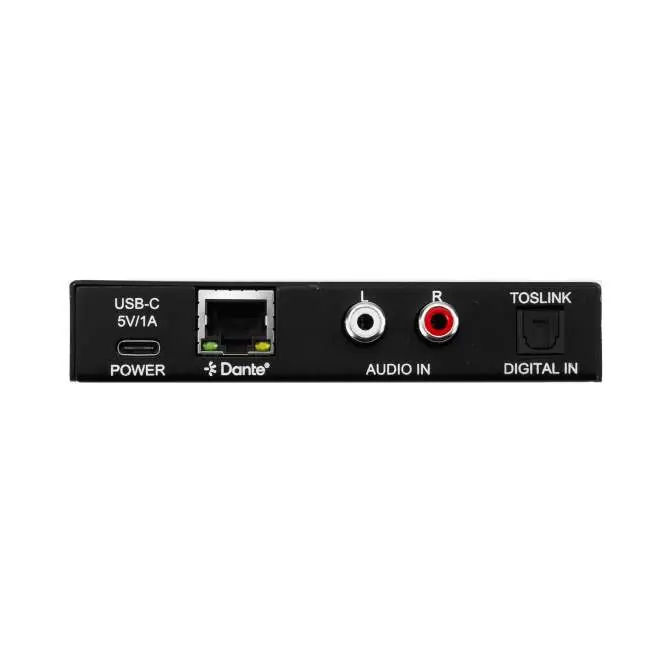
The rear panel contains the connectivity ports:
- USB-C: For 5V 1A power supply.
- Dante (RJ-45): For network connection and PoE power.
- Audio In: Stereo RCA analog input.
- Digital In: Toslink digital input.
Installation
Follow these steps to set up the device:
- Power: Connect the provided USB-A to USB-C cable to the DC/5V port, or use a PoE-enabled network switch.
- Audio Source: Connect your audio source device to the AUDIO IN port using a stereo RCA cable.
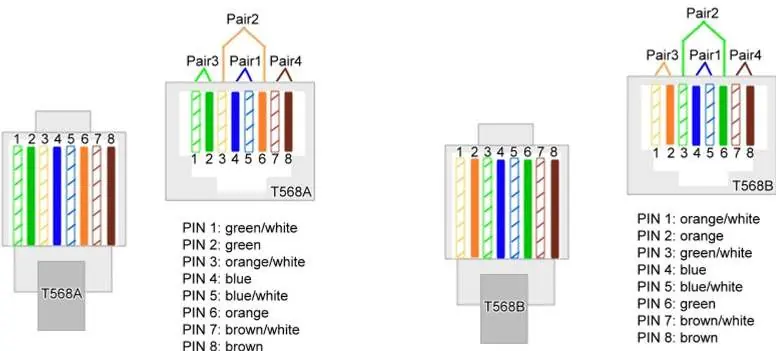
- Network: Connect a CAT5e (or better) cable from the DANTE port to your network switch.
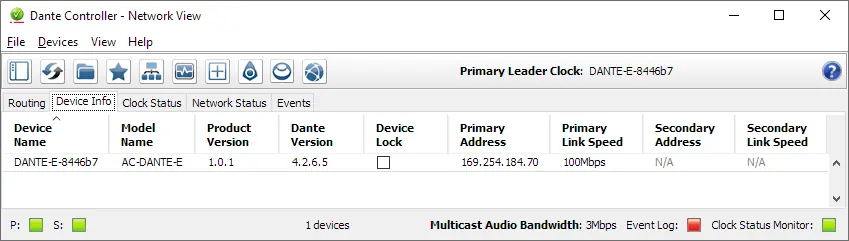
- Configuration: Ensure your computer is connected to the same network and running the Dante Controller software. The device will be automatically discovered.
Device Configuration
Configuration is performed via the Audinate Dante Controller software.
Dante Flow Subscription
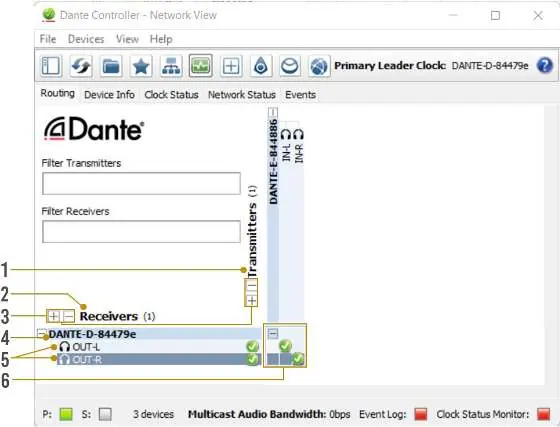
Open the Routing tab in Dante Controller. Signal routing is achieved by clicking the box at the intersection of the desired transmitter (the ACP-DANTE-E-POE) and receiver channels. A green check mark indicates a successful subscription.
Multicast Dante Flows
If you need to route audio to a higher receive channel count, you can create multicast flows. Double-click the device name to open Device View, click the flow icon, select the channels, and click Create.
Network and AES67 Configuration
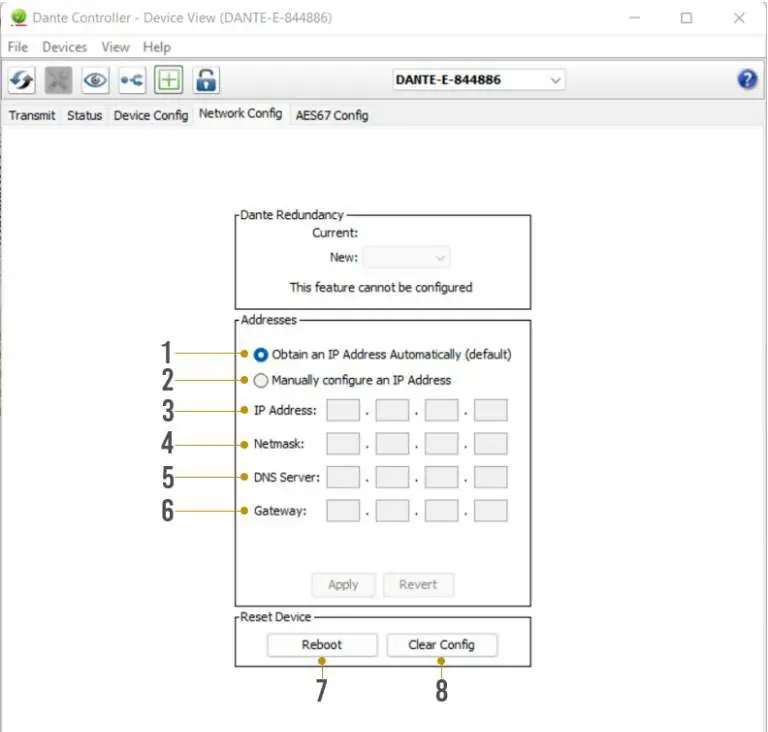
You can assign static IP addresses or configure AES67 multicast transmission by navigating to the Network Config or AES67 Config tabs within the Device View.
Technical Specifications
- Frequency Response: 20-20kHz
- Sample Rates: 44.1kHz, 48kHz, 88.2kHz, 96kHz
- Bit Depths: 16, 24, 32-bit
- Power: 5VDC, 1A or PoE
- Dimensions: 110 x 96 x 25 mm
Practical help
Common problems
LEDs not illuminating
Ensure the device is powered via the DC/5V port or PoE. Verify cable length is within 100 meters (328 feet) and re-terminate RJ-45 connectors if necessary.
Device not discovered by Dante Controller
Ensure the computer running Dante Controller and the encoder have a physical connection to the same Dante network.
Before use
- Verify power source (PoE or included 5V adapter)
- Use CAT5e or better cabling for network connections
- Install Audinate Dante Controller software on your computer
- Connect audio source via RCA cables
Specs in practice
- Frequency Response
- 20-20kHz range for full audio spectrum coverage
- Sample Rates
- Supports 44.1, 48, 88.2, and 96 kHz for high-quality audio
Images and diagrams
- Front panel LEDs provide visual confirmation of Mute, Power, and Audio signal status.
- Rear panel layout clearly separates power, network, and audio input connections.
Model compatibility
- Requires Dante Controller software for configuration.
- Supports AES67 multicast transmission for non-Dante devices.
- Compatible with CAT5e or better cabling.

Manual page author
David Miller
Documentation analyst
Organizes user manual content into clear summaries, with attention to model details, product context, and everyday usability.