Electronics / AV Converters
User Manual for MuxLab 500550 Dante 2-Channel USB Audio Encoder/Decoder
Quick guide for the MuxLab 500550 Dante 2-Channel USB Audio Encoder/Decoder. Learn about installation, connection, technical specifications, and operation of this audio interface.
Quick answers from the manual
Quick answer
- The MuxLab 500550 is a Dante 2-Channel USB Audio Encoder/Decoder. It converts 2-channel USB audio to Dante digital signals and vice versa. It is powered via PoE or USB and is plug-and-play. p. 4
Key actions
- Connect the device to a PC using the provided USB cable. p. 6
- Connect the device to a network switch using an RJ45 cable for Dante audio and PoE power. p. 6
Technical specifications
| Parameter | Value | Meaning | Pages |
|---|---|---|---|
| Audio Formats | PCM 2.0 44.1kHz/48kHz/96kHz up to 24bit | Supported audio sampling rates and bit depth. | p. 5 |
| Power Supply | USB 5V or PoE IEEE802.3af Class 0 | Supported power input methods. | p. 5 |
Where to find it in the PDF
- Safety Precautions p. 3
- Specifications p. 5
- Operation Controls p. 6
Table of contents
Manual images
Click an image to enlargeQuick guide from the manual
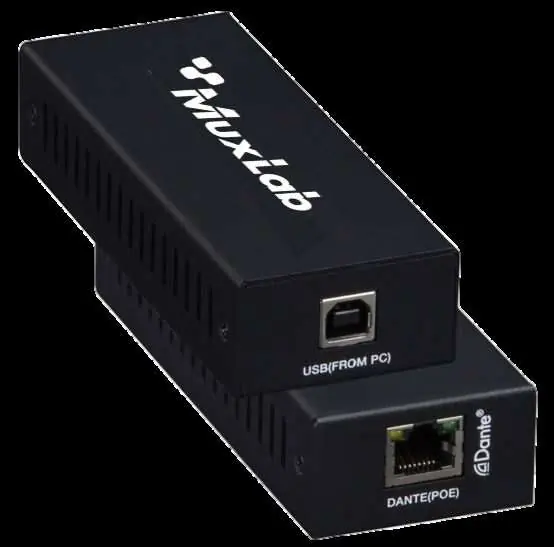
The MuxLab 500550 is a Dante 2-Channel USB Audio Encoder/Decoder designed to encode 2-channel USB audio to a Dante digital signal and decode a Dante digital signal to 2-channel USB audio. The unit is plug-and-play and can be powered via PoE from a network switch or via 5V from the connected USB device.
Safety Precautions
- Do not dismantle or modify the housing to avoid electrical shock or burns.
- Do not expose the unit to rain, moisture, or water.
- If liquid or objects fall into the housing, unplug the module immediately.
- Do not use liquid or aerosol cleaners; unplug the power before cleaning.
- Ensure adequate ventilation to prevent overheating.
- Refer all servicing to qualified service personnel.
- Unplug the power when the device is unused for long periods.
Features
- Compliant with USB 2.0 Full Speed Operation.
- Compliant with USB Audio Device Class Specification V1.0.
- Analog sound card supporting MIC input and SPK output.
- Audio sampling rate supports 44.1kHz, 48kHz, and 96kHz (24bit).
- Dante solution supports AES67 RTP audio transmission.
- Supports USB 5V power supply and PoE function (IEEE802.3af Class0).
Package Contents
- One (1) Dante 2-Channel USB Audio Encoder/Decoder
- One (1) USB Cable (6FT USB A to USB B)
- One (1) User manual
Operation Controls and Functions
1. USB (From PC): 2-channel USB digital audio signal port for L/R stereo input and output. Also serves as a USB 5V power input port.
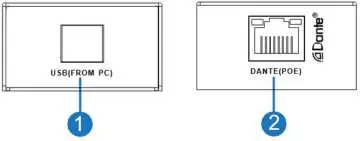
2. Dante PoE: Dante digital audio input and output port. Connect to a Network Switch through an RJ45 cable. Supports PD power supply. The green LINK LED flashes during data transmission, and the yellow DATA LED remains on after a normal connection.
Application Diagram
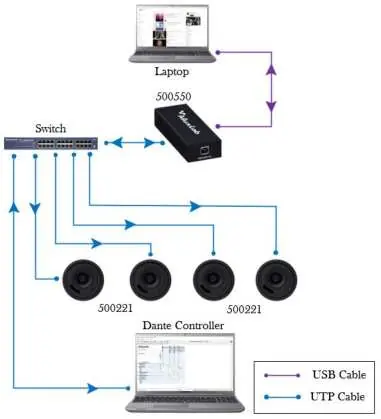
The device connects to a laptop via USB and to a network switch via an RJ45 cable. The network switch connects to other Dante-enabled devices (such as speakers) and a computer running Dante Controller software.
Specifications
- Video Network Bandwidth: 100M
- Audio Formats: PCM 2.0 44.1kHz/48kHz/96kHz up to 24bit
- Transmission Distance: 100m (CAT6/6A)
- Input & Output: 1 x USB-B, 1 x DANTE (RJ45, PoE)
- Power Supply: USB input: 5V-500MA; PoE input: IEEE802.3af Class 0
- Dimensions: 120mm x 47mm x 26mm
- Weight: 186g
Practical help
Common problems
Device does not power on
Ensure the USB cable is connected to a powered PC port or the RJ45 cable is connected to a PoE-enabled network switch.
No audio transmission
Verify the Dante Controller software settings and ensure the network switch connection is active (check LINK/DATA LEDs).
Before use
- Ensure you have a CAT6/6A cable for the Dante network connection.
- Ensure you have a USB A to USB B cable for the PC connection.
- Verify that your network switch supports PoE (IEEE802.3af Class0) if not using USB power.
- Install Dante Controller software on your computer.
Specs in practice
- Audio Sampling Rate
- Supports high-quality audio at 44.1kHz, 48kHz, and 96kHz (24bit).
- Transmission Distance
- Maximum distance of 100m using CAT6/6A cabling.
- Power Consumption
- Low power consumption of 1W.
Images and diagrams
- The application diagram illustrates the connection between a laptop (USB), the 500550 unit, a network switch (RJ45), and Dante-enabled speakers.
Model compatibility
- Compatible with USB 2.0 Full Speed.
- Supports AES67 RTP audio transmission.
- Compatible with Dante Controller software.

Manual page author
Emily Carter
User documentation editor
Prepares concise manual descriptions and highlights the most useful setup, operation, and maintenance information for readers.