Electronics / Microphones
User Manual for BOYA Caster X1 Audio Interface
Quick guide for the BOYA Caster X1 audio interface. Learn how to connect your device, manage audio settings, update firmware, and understand technical specifications.
Quick answers from the manual
Quick answer
- The BOYA Caster X1 is a user-friendly audio interface designed for content creators. It features a high-performance preamplifier, minimalist controls, and bidirectional audio transmission for computers, smartphones, and tablets. p. 1, 2
Key actions
- Connect the device to a computer via USB-C. p. 1, 2
- Use the BOYA Central app to manage audio channels and settings. p. 1, 2
- Use the control knob to adjust gain, headphone volume, and mix ratio. p. 1
First start
- Download BOYA Central, connect the device via USB-C, and open the app for quick setup. p. 2
Technical specifications
| Parameter | Value | Meaning | Pages |
|---|---|---|---|
| Sample Rates | 44.1kHz - 192kHz | Audio resolution | p. 2 |
| Phantom Power | 48V | Power for microphones | p. 2 |
Where to find it in the PDF
- Product Overview p. 1
- Specifications p. 2
Table of contents
Manual images
Click an image to enlargeQuick guide from the manual
The BOYA Caster X1 is an audio interface designed for content creators. To get started, download the BOYA Central application from the official website, connect the device to your computer using the USB-C cable, and open the application to perform the quick setup.
Product Overview
The device features a minimalist control panel:
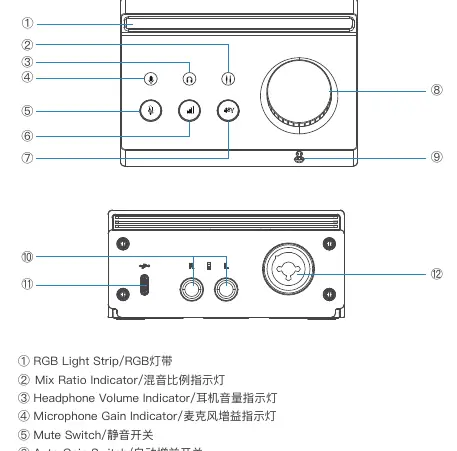
- Control Knob: Used for gain adjustment, headphone volume, and mix ratio. Short press to switch modes, double-tap to open the system browser.
- Indicators: RGB light strip, mix ratio, headphone volume, and microphone gain indicators.
- Switches: Mute switch, Auto Gain switch, and 48V Phantom Power switch.
- Ports: Monitoring headphone jack, monitor speaker jacks, USB-C port, and XLR port.
Device Connection
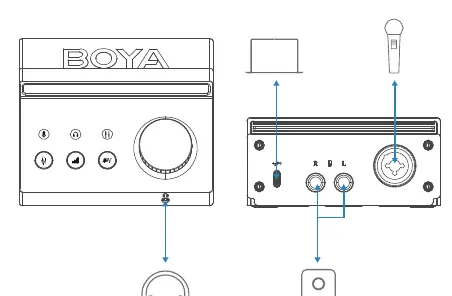
Connect your monitoring headphones, microphone, and monitoring speakers to the respective jacks on the Caster X1. Use the USB-C cable to connect the interface to your computer.
Firmware Updates
When an update is available, a prompt will appear in the BOYA Central interface. Keep the device connected via USB until the update is complete.
Safety Information
Do not disassemble or modify the device. Keep the device dry and avoid extreme temperatures. To prevent hearing damage, do not listen to music at high volumes for long periods. Follow the provided OSHA guidelines regarding maximum sound pressure level exposure.
Technical Specifications
The device supports sample rates up to 192kHz. It provides 48V phantom power for microphones and has a frequency response of 20Hz – 20kHz.
Practical help
Common problems
Device not recognized or audio issues
Ensure the USB-C cable is securely connected to both the Caster X1 and your computer.
Hearing damage risk
Avoid listening at high volumes for long periods; follow OSHA guidelines provided in the manual.
Firmware update fails
Keep the device connected via USB throughout the entire update process until completion.
Before use
- Download and install the BOYA Central application from boyamic.com/support/download.
- Connect the Caster X1 to your computer using the provided USB-C cable.
- Connect your monitoring headphones, microphone, and speakers to the appropriate jacks.
Specs in practice
- 48V Phantom Power
- Provides power to condenser microphones.
- Sample Rates
- Supports up to 192kHz for high-quality audio recording.
Images and diagrams
- The control knob is multi-functional: press to switch modes (gain, headphone volume, mix ratio) and double-tap to open the default browser.
Model compatibility
- Requires Windows 10+, macOS 10.15+, iOS 16+, or Android 12.0+.

Manual page author
Michael Turner
Technical manual editor
Reviews PDF manuals for structure, safety notes, and practical product details so readers can find the right information quickly.