Electronics / Headphones Earbuds
User Manual for Av Link 100.315UK Digital USB Type-C Wired Earphones
Quick guide for Av Link 100.315UK USB Type-C earphones. Learn how to use inline controls, manage calls, activate voice assistants, and check device compatibility.
Table of contents
Manual images
Click an image to enlargeQuick guide from the manual
The Av Link 100.315UK earphones feature an in-built digital chip for HiFi sound and an inline control panel. Before using, ensure your device has a USB Type-C socket. Note that while the earphones are compatible with a wide range of devices, some models (specifically Apple and Samsung devices listed in the manual) are restricted to music playback only and do not support call functions.
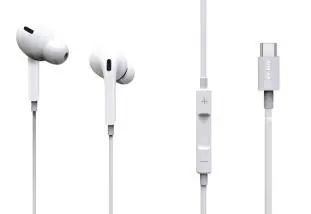
Product Overview
The inline control panel consists of three buttons:
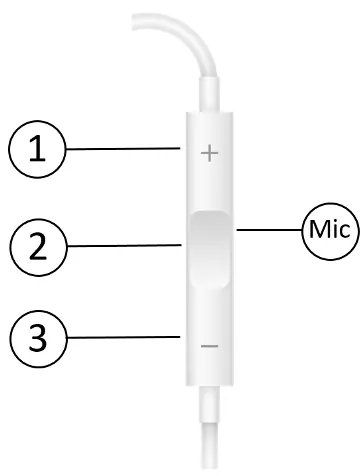
- 1. Volume up button: Increases the master volume.
- 2. Multi-Function button: Used for play/pause, track navigation, voice assistant, and call management.
- 3. Volume down button: Decreases the master volume.
Usage Instructions
Follow these steps to operate your earphones:
- Connecting: Plug the earphones into a compatible device with a USB Type-C socket.
- Volume Control: Press the volume up (1) or volume down (3) buttons to adjust the volume.
- Music Playback: Press the Multi-Function button (2) once to play or pause. Press it twice to skip to the next track, and three times to move to the previous track.
- Voice Assistant: Press and hold the Multi-Function button (2) to activate your device's voice assistant mode. Note: This feature depends on device compatibility.
- Call Management: When receiving a call, press the Multi-Function button (2) to accept. Press it repeatedly to complete the call. To reject an incoming call, press the Multi-Function button (2) twice.
Safety and Maintenance
- Do not attempt to service the product yourself; opening covers may result in fire, electric shock, or equipment damage and will invalidate the warranty.
- The product is designed for indoor use only.
- Keep the earphones away from water, high humidity, high temperatures, and direct sunlight.
- Prolonged listening at high volumes can cause hearing damage.
- Keep away from young children as small parts pose a choking hazard.
Specifications
- Speaker drivers: 10mm
- Sensitivity: 105dB±3
- Impedance: 32 Ohms
- Frequency response: 20Hz-20kHz
- Cable length: 1.2m
- Weight: 12g
- Connector: USB Type-C
Practical help
Common problems
Functions not working on all devices
Check the compatibility list. Some devices, such as Apple and Samsung models, are limited to music playback only and do not support call functions.
Voice assistant not activating
Ensure your device is compatible with this feature. Check your device's own user guide for specific settings regarding wired accessory support.
Before use
- Ensure your device has a USB Type-C socket.
- Verify if your specific device model supports call functions or is limited to music playback only.
- Keep the earphones away from water and high humidity environments.
Specs in practice
- Speaker drivers (10mm)
- The size of the internal speaker component, influencing sound output quality.
- Impedance (32 Ohms)
- Standard electrical resistance suitable for most mobile devices and smartphones.
- Frequency response (20Hz-20kHz)
- The range of sound frequencies the earphones can reproduce, covering the full human hearing spectrum.
Images and diagrams
- Button 1: Volume Up.
- Button 2: Multi-Function button for play/pause, track skipping, and call management.
- Button 3: Volume Down.
Model compatibility
- Some devices (e.g., Apple, Samsung) are limited to music playback only and do not support call functions.

Manual page author
Michael Turner
Technical manual editor
Reviews PDF manuals for structure, safety notes, and practical product details so readers can find the right information quickly.