Electronics / Headphones Earbuds
User Manual for Av Link InFuse 100.573UK True Wireless Earphones
Quick start guide and user manual for Av Link InFuse 100.573UK True Wireless Earphones. Learn how to pair, charge, use touch controls, and troubleshoot connection issues.
Table of contents
Important Information
Before using your Av Link InFuse earphones for the first time, it is highly recommended to fully charge both the earphones and the charging case. Use the provided USB cable or the wireless charging plate for approximately 2 hours. Ensure your Bluetooth device is enabled and set to discoverable mode for successful pairing.
Product Overview
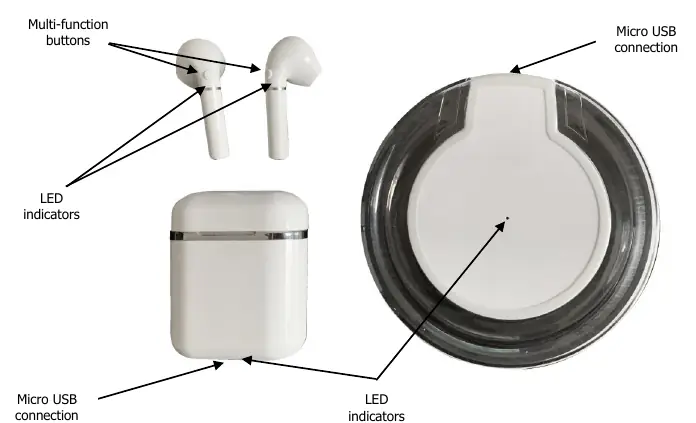
The set includes two true wireless earphones, a compact magnetic charging case, and a wireless charging plate. The earphones feature touch-sensitive multi-function buttons for music control and hands-free calling. LED indicators on both the case and the earphones provide status updates during charging and pairing.
Charging the Earphones and Case
Charging the earphones: Place the earphones into the corresponding ports in the charging case. Charging starts automatically. The LED indicator on the case will light up blue while charging and turn off when complete.
Charging the case: You can charge the case using the provided USB cable or by placing it on the center of the supplied wireless charging plate. When using the plate, the LED on the plate will flash blue to indicate charging. The case takes approximately 3 hours to fully charge. Remove the case from the power source once fully charged to avoid overcharging.
Pairing in True Wireless Mode
- Remove both earphones from the charging case.
- Power them on; you will hear "POWER ON". The LEDs will flash blue and red slowly.
- The earphones will attempt to pair with each other. Once successful, one earphone will flash blue and red quickly, while the other flashes blue intermittently, and you will hear "CONNECT SUCCESSFULLY".
- Open the Bluetooth settings on your smartphone or tablet, search for "AV:Link InFuse", and select it.
- Once connected, you will hear "CONNECT SUCCESSFULLY" again.
Resetting: If pairing fails, double-click the multi-function button on one earphone. Both will flash blue and red, followed by "DISCONNECT CONNECTION". You can then restart the pairing process.
Multi-function Controls
- Play/Pause: Press the multi-function button on either earphone once.
- Increase Volume: Press the multi-function button on the right earphone twice.
- Decrease Volume: Press the multi-function button on the left earphone twice.
- Next Track: Press the multi-function button on the right earphone three times.
- Previous Track: Press the multi-function button on the left earphone three times.
- Voice Assistant: Press and hold either button for 3 seconds until you hear "Voice dial".
Hands-free Operation
To accept an incoming call, press the multi-function button on either earphone once. To reject a call, press and hold the button for 2-3 seconds. To end a call, press the button once.
Troubleshooting
- Earphones won't pair: Ensure they are in pairing mode, Bluetooth is enabled on your device, and the device is set to 'discoverable'.
- Disconnection: Ensure there is a clear line of sight between the earphones and your device. Avoid large metallic objects or other wireless signal sources.
- Won't reconnect: Find the earphones in your device's Bluetooth list, select "forget this device", and perform the pairing procedure again.
- Charging issues: Ensure the charging plate is connected to a 5W compatible power source and the case is placed squarely in the center.
Practical help
Common problems
Earphones will not pair with device
Ensure earphones are in pairing mode, Bluetooth is enabled on your device, and the device is set to 'discoverable'.
Disconnection within 10m range
Ensure a clear line of sight between earphones and device. Avoid interference from large metallic objects or other wireless transmitters.
Earphones won't reconnect
Select 'forget this device' in your Bluetooth settings and follow the pairing instructions again.
Charging case won't charge on plate
Ensure the charging device is 5W compatible and the case is placed squarely on the center of the charging plate.
Before use
- Fully charge the earphones and case for approximately 2 hours before first use.
- Ensure Bluetooth is enabled on your smartphone or tablet.
- Remove earphones from the charging case to power them on.
- Check that the charging plate is connected to a suitable USB power source.
Specs in practice
- Bluetooth Range
- Up to 10m (clear line of sight).
- Battery Life (Earphones)
- Up to 2.5 hours max.
- Battery Life (Case)
- Up to 7.5 hours.
Images and diagrams
- Multi-function buttons are located on the outer surface of the earphones.
- LED indicators are present on both the earphones and the charging case.
- Micro USB ports are located on the charging case and the wireless charging plate.
Model compatibility
- Compatible with iOS and Android devices.
- Wireless charging plate is compatible with other 5W wireless charging devices.

Manual page author
Michael Turner
Technical manual editor
Reviews PDF manuals for structure, safety notes, and practical product details so readers can find the right information quickly.