Electronics / Headphones Earbuds
User Manual for Av Link 100.575UK True Wireless Earphones
Quick guide for Av Link 100.575UK True Wireless Earphones. Learn how to pair, control music, manage calls, and charge your earbuds and power case.
Table of contents
Quick guide from the manual
The Av Link 100.575UK Ear Shots are true wireless earphones featuring Bluetooth 5.0 connectivity. Before first use, it is highly recommended to fully charge both the earphones and the power case for approximately 2 hours. The earphones provide up to 3 hours of playback, with the power case offering an additional 9 hours of charge.
Charging
Earphones: Place the earbuds into the magnetic ports of the power case and press the charging button on the back of the case once. The case LED will light blue and the earbud LEDs will light red. Charging takes approximately 60 minutes. When complete, the LEDs will turn off.
Power Case: Connect the case to a suitable USB power source using the provided cable. The LED indicator on the front will flash red while charging and turn constant red when fully charged.
Pairing
- Press and hold the MF (Multi-Function) button on both earbuds for about 5 seconds until the LED indicators flash red and blue and a voice prompt says "pairing".
- Double-press the MF button on one earbud; it will search for the other.
- Once paired, you will hear a beep and a "connected" voice message, and the blue LEDs will flash.
- Open the Bluetooth settings on your device, search for "AV:LINK EAR SHOTS", and select it.
- If prompted for a pairing code, enter "0000".
Controls
The MF buttons on the earbuds allow for the following operations:
- Play/Pause: Press the MF button once on either earbud.
- Voice Assistant: Double-press the MF button on either earbud.
- Increase Volume: Press the MF button three times on the right earbud.
- Decrease Volume: Press the MF button three times on the left earbud.
- Next Track: Press and hold the MF button on the right earbud.
- Previous Track: Press and hold the MF button on the left earbud.
- Accept Call: Press the MF button once on either earbud.
- Reject Call: Press the MF button twice on either earbud.
- End Call: Press the MF button once on either earbud.
Disconnecting and Reconnecting
To switch off, press and hold the MF button on either earbud for 2-3 seconds until the LED turns red and you hear "power off". To reconnect, press and hold the MF button on both earbuds for 2-3 seconds until the LEDs turn red and blue; they will automatically pair with the last connected device.
Troubleshooting
- Earphones won't pair: Ensure they are in pairing mode, Bluetooth is enabled on your device, and the device is set to 'discoverable'.
- Connection drops: Ensure a clear line of sight between the earphones and your device. Large metallic objects or other wireless signals may interfere.
- Won't reconnect: If the device is locked, find the earphones in your Bluetooth list, select "forget this device", and repeat the pairing process.
Specifications
- Bluetooth: 5.0
- Range: Up to 10m (clear line of sight)
- Battery: 40mAh (earphones), 400mAh (case)
- Charge Time: 60 mins (earphones), 2 hours (case)
- Frequency Response: 20Hz - 20kHz
Practical help
Common problems
Earphones will not pair with the device
Ensure the earphones are in pairing mode, Bluetooth is enabled on your device, and the device is set to 'discoverable'.
Connection drops within 10m range
Ensure a clear line of sight between the earphones and your device. Avoid large metallic objects or other devices transmitting radio/wireless signals nearby.
Earphones won't reconnect
The device or earphones may be in a locked state. Select 'forget this device' in your Bluetooth settings and re-follow the pairing instructions.
Before use
- Fully charge the power case and earbuds for 2 hours before first use.
- Ensure Bluetooth is enabled on your smartphone or audio device.
- Keep the earphones within 10m of your device for stable connection.
Specs in practice
- Bluetooth 5.0
- Provides stable wireless connectivity and device compatibility.
- Battery Life
- 3 hours of playback for earphones, with up to 9 additional hours provided by the power case.
Images and diagrams
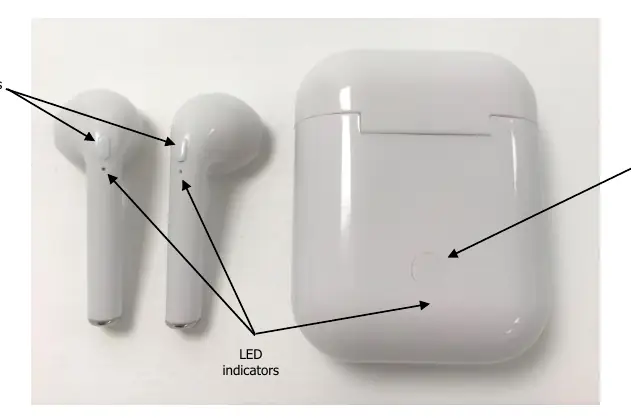
- MF buttons: Located on the earphones for music and call control.
- LED indicators: Located on the earphones and power case to show pairing and charging status.
- Charging button: Located on the back of the power case to initiate charging.
Model compatibility
- Compatible with iOS and Android devices.

Manual page author
David Miller
Documentation analyst
Organizes user manual content into clear summaries, with attention to model details, product context, and everyday usability.