Electronics / Headphones Earbuds
User Manual for av-link Isolate SE Active Noise Cancelling Bluetooth Headphones
Quick guide for av-link Isolate SE headphones. Learn how to pair via Bluetooth, use active noise cancelling, control playback, charge the battery, and troubleshoot connection issues.
Table of contents
Important Information
The av-link Isolate SE headphones feature active noise cancelling (ANC) and Bluetooth 5.0 connectivity. Before using the device for the first time, ensure it is fully charged using the provided USB Type-C cable. The headphones offer up to 24 hours of playback in Bluetooth mode or 15 hours with ANC enabled at 50% volume.
Product Overview and Controls
The headphones feature intuitive controls located on the earcups. Refer to the diagram for the location of these components:
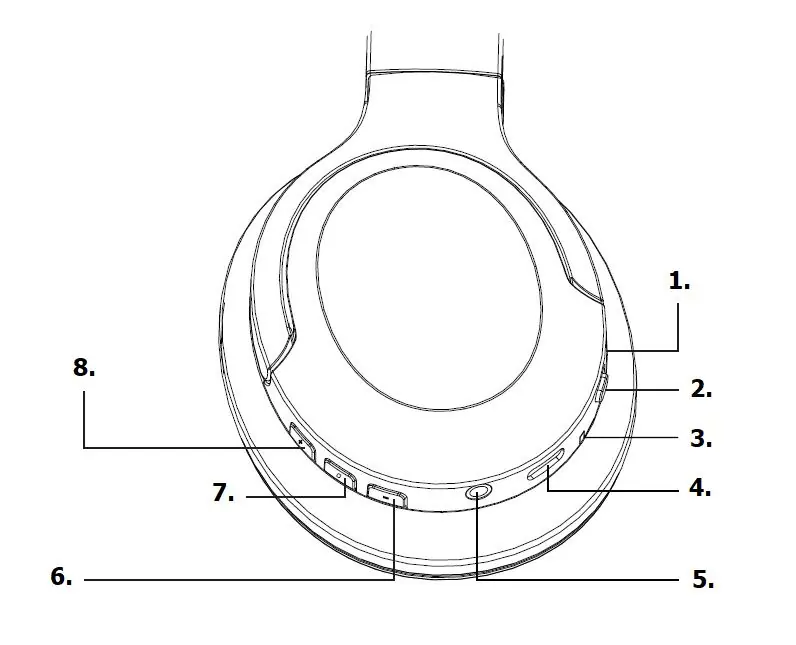
- 1. Built-In Microphone: Used for hands-free calls.
- 2. ANC ON/OFF Switch: Slide to activate or deactivate active noise cancelling. The LED indicator turns green when active.
- 3. LED Indicator: Shows charging status (red) and Bluetooth connection status (blue).
- 4. USB Type-C Charging Port: For charging the internal battery.
- 5. 3.5mm (AUX) Port: Allows wired connection. Note that earcup controls are disabled in this mode, but ANC can still be used.
- 6. Volume Down/Previous Track: Short-press for volume down, long-press for previous track.
- 7. ON/OFF/Play/Pause/Call Button: Press and hold to power on/off. Short-press to play/pause or answer/end calls.
- 8. Volume Up/Next Track: Short-press for volume up, long-press for next track.
Getting Started and Pairing
To pair the headphones with your device:
- Press and hold the ON/OFF/Play/Pause/Call button (7) to turn the headphones on.
- The device will announce "power on" and enter pairing mode. The LED indicator will flash red and blue.
- On your Bluetooth device, search for 'AV:LINK-Isolate SE' and select it.
- If prompted for a code, enter '0000'.
- Once connected, the device will announce "connected" and the LED will glow blue.
Operation
Active Noise Cancelling: Slide the ANC switch (2) to turn the feature on or off. The LED indicator will illuminate green when ANC is active.
Wired Mode: Connect the provided 3.5mm audio lead to the AUX port (5). The headphones will automatically power down to save battery. Note that playback controls on the headphones will not function in this mode.
Troubleshooting
If you encounter issues, try the following steps:
- Pairing issues: Ensure the headphones are in pairing mode, Bluetooth is enabled on your device, and the device is set to 'discoverable'.
- Connection drops: Ensure there is a clear line of sight between the headphones and your device. Avoid large metallic objects or other wireless interference.
- Won't reconnect: Turn the headphones off, go to your device's Bluetooth settings, select "forget this device", and perform the pairing process again.
Safety and Maintenance
Do not attempt to service the product yourself, as opening covers may result in electric shock or fire and will invalidate the warranty. Keep the headphones away from water, high humidity, direct sunlight, and high temperatures. Dispose of the device according to local council guidelines for electronic waste.
Practical help
Common problems
Headphones will not pair with device
Ensure headphones are in pairing mode (flashing red/blue), Bluetooth is enabled on your device, and the device is set to 'discoverable'.
Connection drops within 10m range
Ensure a clear line of sight between the headphones and the device. Remove large metallic objects or other wireless transmitters from the vicinity.
Headphones won't reconnect
Turn the headphones off, select 'forget this device' in your phone's Bluetooth settings, and re-pair the headphones.
Before use
- Charge the headphones fully using the provided USB Type-C cable before first use.
- Ensure the headphones are in pairing mode (LED flashing red and blue).
- Keep the device within 10m of the headphones for stable connection.
- If using wired mode, ensure the 3.5mm cable is fully inserted.
Specs in practice
- Battery Life
- Up to 15 hours with ANC on, or 24 hours in standard Bluetooth mode at 50% volume.
- Bluetooth Range
- Up to 10 meters in a clear line of sight.
Images and diagrams
- 1. Built-In Microphone
- 2. ANC ON/OFF Switch
- 3. LED Indicator
- 4. USB Type-C charging port
- 5. 3.5mm (AUX) port
Model compatibility
- Compatible with Bluetooth devices.
- Compatible with any device featuring a 3.5mm jack output for wired mode.
- Pairing code is '0000' if requested.

Manual page author
David Miller
Documentation analyst
Organizes user manual content into clear summaries, with attention to model details, product context, and everyday usability.