Electronics / AV Switchers
User Manual for av:link 128.303UK 2:4 Audio Management Speaker Selector
Quick guide for the av:link 128.303UK speaker selector. Learn how to connect amplifiers, set up speaker zones, adjust volume, and ensure proper impedance matching for your audio system.
Table of contents
Quick guide from the manual
The av:link 128.303UK is a matrix switcher designed to route audio from 2 amplifiers to 4 different speaker zones. This guide provides essential information on installation, wiring, and operation to ensure optimal performance and safety.
Product Description
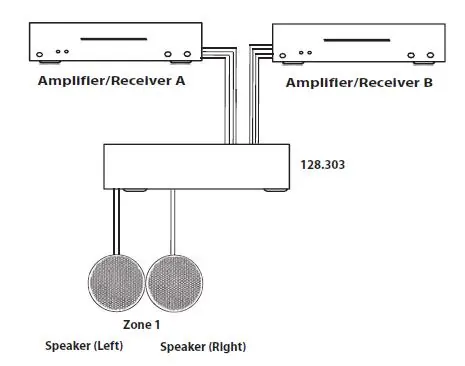
This device allows you to connect two separate amplifiers to four pairs of speakers. You can route any input to any output, or combine them. It features individual volume controls and A/B switches for each zone, built-in overload protection, and a durable black aluminium housing.
Installation
Proper installation is critical for sound quality and equipment safety. Follow these steps to connect your system:
- Prepare wires: Strip 1/4 inch of insulation from the end of each speaker wire and twist the ends tightly to prevent fraying.
- Connect to terminals: Insert each wire into the appropriate hole on the removable terminals. Use a small screwdriver to tighten the wire in place.
- Secure connections: Insert the connector plug into the socket on the device and lock it by tightening the captive screws on the side of the connector.
- Polarity: Ensure you connect negative (-) to negative (-) and positive (+) to positive (+) for all speakers.
- Avoid interference: Speaker wires can act as antennas. Route them away from light dimmers or electrical switches to prevent buzzing or popping sounds.
Operation
To prevent distortion, DC clipping, or amplifier damage, follow this procedure for setting up your audio levels:
- Ensure the amplifier power is OFF and set the volume to the minimum.
- Set the volume control on the speaker selector for the desired zone to the maximum (fully clockwise).
- Locate the on/off button for the speaker pair you wish to use and set it to the ON position.
- Gradually turn up the amplifier volume to an acceptable listening level. Be careful not to overdrive the amplifier.
- To turn off speakers, turn the volume control on the selector fully anti-clockwise or press the on/off button.
Technical Specifications
- Inputs: 2x Stereo
- Outputs: 4x Stereo (4 to 16 ohms)
- Power per channel: 100W max
- Wiring gauge: 14 to 22 gauge
- Dimensions: 432 x 133 x 64mm
- Weight: 2.67kg
Safety Warnings
- Never immerse the device in water or expose it to damp conditions.
- Do not use the device if it is damaged.
- Do not attempt to repair or disassemble the unit, as this will invalidate the warranty.
- Ensure your amplifier does not exceed 180 Watts per channel at 8 ohms.
Practical help
Common problems
Buzzing or popping sound through speakers
Speaker wires are likely picking up electrical noise. Route speaker wires away from light dimmers or electrical switches.
Amplifier goes into protection mode
This is caused by an overworked amplifier or improper load. Check impedance matching and ensure volume levels are not set too high.
Device not functioning properly
Verify that input/output connections are not reversed. Ensure all wires are securely tightened in the terminals.
Before use
- Ensure amplifier power is OFF before making connections.
- Verify that your amplifier power rating does not exceed 180W per channel at 8 ohms.
- Use 8-ohm speakers for best results.
- Strip 1/4 inch of insulation from speaker wires.
- Ensure positive (+) and negative (-) terminals are matched correctly.
- Do not install more than 1 pair of speakers per pair of channels.
Specs in practice
- Wiring gauge
- Supports 14 to 22 gauge speaker cable.
- Power per channel
- Maximum power handling is 100W per channel.
Images and diagrams
- The wiring diagram illustrates how to connect two amplifiers (A and B) to the inputs of the 128.303UK unit and how to connect speaker zones to the outputs.
Model compatibility
- Designed for 4-16 ohms speakers.
- Recommended to use 8-ohm speakers.
- Maximum amplifier power: 180W per channel at 8 ohms.

Manual page author
Emily Carter
User documentation editor
Prepares concise manual descriptions and highlights the most useful setup, operation, and maintenance information for readers.