Lighting / Stage Lighting
User Manual for Ayrton Domino LT Moving Head Light
Quick guide for the Ayrton Domino LT moving head light. Includes installation, DMX setup, menu navigation, error codes, and maintenance instructions.
Table of contents
Manual images
Click an image to enlargeQuick guide from the manual
The Ayrton Domino LT is a professional moving head lighting fixture designed for indoor and outdoor stage use. Before operation, ensure the device is earthed and the voltage matches the specifications. If the device has been exposed to temperature changes, allow it to reach room temperature before powering on to prevent condensation damage. Always ensure the lens is not pointed at the sun, even when powered off, to avoid internal damage.
Product Overview
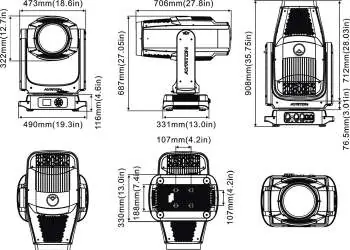
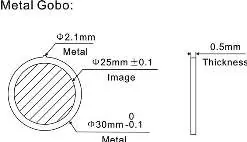
The fixture features a 1050W white LED light source with a 15:1 zoom range. It includes advanced liquid cooling, a framing system with shutter blades, and integrated wireless CRMX TiMo RDM receiver. The housing is IP65 rated, constructed from die-cast aluminium and composite alloy.
Installation
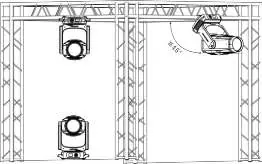
Installation must be carried out by qualified technicians. The support structure must be able to hold 10 times the weight of the fixture. Always use a secondary safety attachment, such as a safety rope, when rigging. Ensure the fixture is at least 0.1 m away from flammable materials. When installing outdoors, ensure the front lens is not facing the sun.
DMX Control
The fixture supports DMX-512, DMX-RDM, ArtNet, and sACN protocols. Connect the controller to the fixture using a 5-pin XLR cable. For long distances or electrically noisy environments, use a DMX terminator (120 Ohm resistor between pins 2 and 3). The device also features an internal wireless DMX system; use the 'Unlink W-DMX' option in the menu to pair with a transmitter.
Menu and Display
The fixture is controlled via a graphic LCD display and 5 menu buttons. The main menu is accessed by double-clicking the center button. Users can configure DMX addresses, operating modes (Stand-alone, Basic, Extend, etc.), fan speeds (Auto, Stage, Silence, Super Silence), and reset options. The display automatically turns off after 1 minute of inactivity if no signal is detected.
Error Messages
Upon startup, the device performs a reset. If an error occurs, the display will show 'Err channel is XX'. This indicates a sensor or motor issue on the specified channel. If errors persist after multiple resets, contact your dealer or manufacturer for service. Self-repair is not allowed.
Cleaning and Maintenance
Regular maintenance is essential for longevity. Clean the outside lens and fans weekly to prevent dust accumulation and ensure efficient cooling. A detailed electrical check by an approved electrician is recommended every quarter. Always disconnect from the mains before maintenance. After any maintenance, perform an IP test using the Ayrton IP test kit to ensure the seal integrity is maintained.
Practical help
Common problems
Device does not power on immediately after temperature change
Allow the device to reach room temperature to avoid condensation damage.
Error message 'Err channel is XX'
Indicates a sensor or motor issue. Perform a reset. If the error persists, contact service.
No DMX signal
Check DMX cable connections or ensure the wireless transmitter is correctly paired.
Overheating or poor performance
Clean fans and lenses weekly to ensure proper airflow and light output.
Before use
- Ensure the device is earthed (protection-class I).
- Verify available voltage matches manual specifications.
- Check that the lens is not pointed at the sun.
- Ensure safety cable is attached.
- Confirm sealing rubber covers on connectors are fitted if not in use.
Specs in practice
- Power Consumption
- 1,600 W maximum.
- Light Source
- White LED 1050 W, 8200±400 K.
- Operating Temperature
- -10 °C to 45 °C.
Images and diagrams
- Fixture Overview: Identifies lens, tilt lock, display, buttons, and ports.
- Rigging: Illustrates omega bracket installation and safety cable attachment.
- DMX Connection: Pinout diagram for 5-pin XLR.
Model compatibility
- Compatible with DMX-512 and DMX-RDM protocols.
- Supports ArtNet and sACN.
- Integrated wireless CRMX TiMo receiver.

Manual page author
Michael Turner
Technical manual editor
Reviews PDF manuals for structure, safety notes, and practical product details so readers can find the right information quickly.