Tools / Drills
User Manual for Bauer 1721C-B Portable Clamping Work Station
Quick guide for the Bauer 1721C-B Portable Clamping Work Station. Includes setup instructions, operation steps, maintenance tips, and safety precautions.
Quick answers from the manual
Quick answer
- The Bauer 1721C-B is a portable clamping work station with a 600 lb weight capacity. It uses a foot-operated pedal system to clamp workpieces securely. p. 2
Key actions
- Setup the work station by unfolding the rear leg, rear foot, pedal, and front legs, ensuring all locks are engaged. p. 4, 5
- Clamp a workpiece by placing it between the jaws, sliding the jaw against it, locking the Vise Switch, and stepping on the pedal. p. 5
First start
- Unpack and inspect for damage. Ensure all parts are present before assembly. p. 1
Problems and fixes
Clamp does not move smoothly
Lubricate under the Sliding Jaw using general-purpose grease.
p. 6Maintenance and reset
- Inspect before each use for loose hardware, misalignment, or damaged parts. p. 6
Technical specifications
| Parameter | Value | Meaning | Pages |
|---|---|---|---|
| Weight Capacity | 600 lb | Maximum load, centered above Work Station | p. 2 |
Where to find it in the PDF
- Safety and Specifications p. 1, 2
- Functions and Setup p. 3, 4
- Operation and Maintenance p. 5, 6
- Parts List p. 7
Table of contents
Manual images
Click an image to enlargeQuick guide from the manual
The Bauer 1721C-B Portable Clamping Work Station is designed for securing workpieces for various tasks. It features a foot-operated clamping mechanism and a maximum weight capacity of 600 lb. Always ensure the unit is set up on a hard, flat surface and that all locks are fully engaged before use.
Functions
The work station consists of several key components:
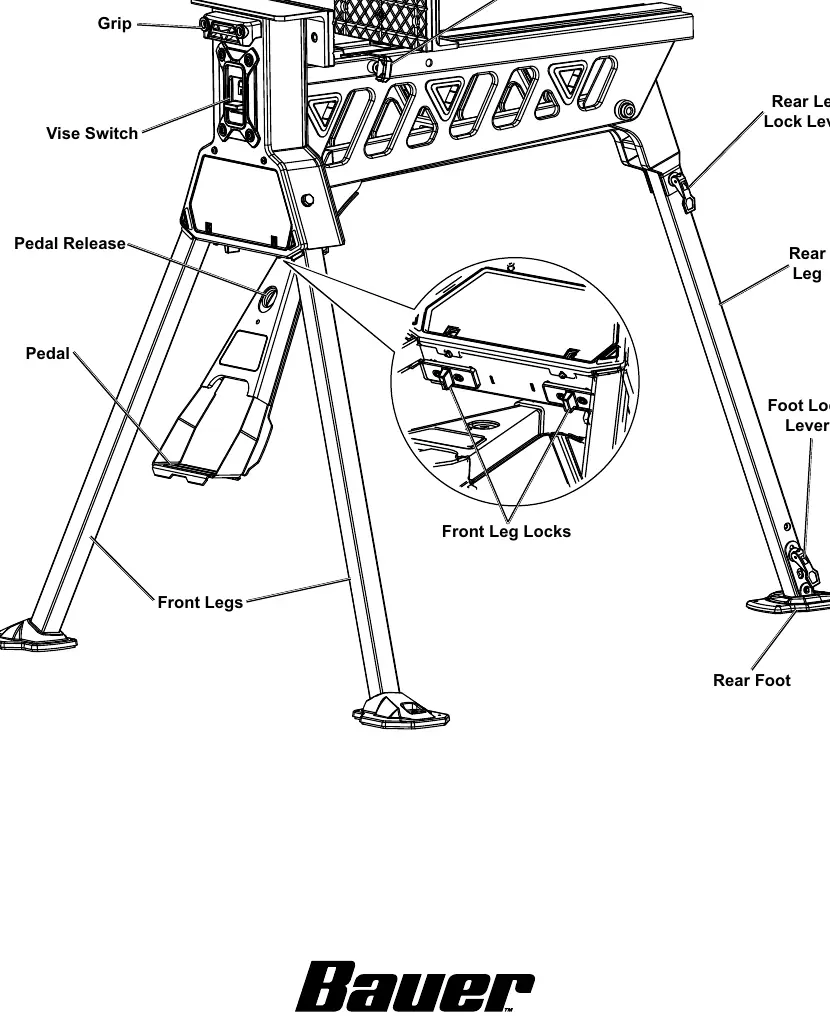
- Sliding Jaw & Fixed Jaw: Used to clamp the workpiece.
- Vise Switch: Controls the locking and unlocking of the jaws.
- Pedal: Used to secure the workpiece by stepping on it.
- Leg Locks: Secure the front and rear legs in the open position.
- Slide Knob: Used to adjust the position of the sliding jaw.
Setup
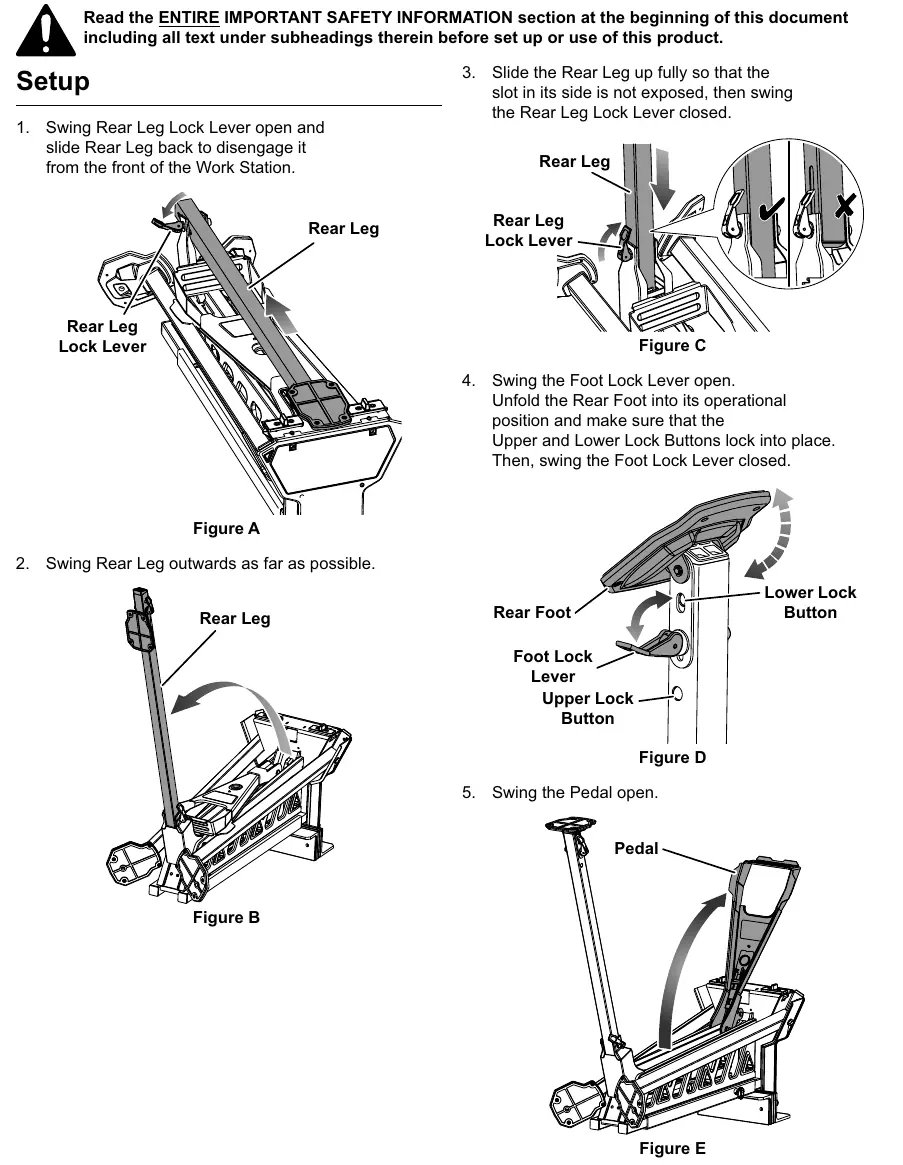
- Rear Leg: Swing the Rear Leg Lock Lever open, slide the leg back to disengage, swing it outwards, and slide it up until the slot is covered. Close the lock lever.
- Rear Foot: Swing the Foot Lock Lever open, unfold the foot, ensure the Upper and Lower Lock Buttons click into place, and close the lever.
- Pedal: Swing the pedal open.
- Front Legs: Pull the Front Leg Locks inward and swing the legs out until they lock in place.
- Final Check: Turn the unit upright on a flat, hard surface and verify all locks are engaged.
Operation
Clamping a Workpiece:
- Loosen the Slide Knob and slide the Vise Switch to the unlock position.
- Open the Sliding Jaw.
- Place the workpiece between the jaws, ensuring the center of gravity is centered.
- Slide the Sliding Jaw against the workpiece.
- Slide the Vise Switch to the lock position.
- Step on the Pedal repeatedly to secure the workpiece. Warning: Do not jump on the pedal.
Releasing a Workpiece:
- Slide the Vise Switch to the unlock position.
- Step down slightly on the pedal and allow it to rise to release pressure.
Maintenance
Before each use, inspect the tool for loose hardware, misalignment, or damaged parts. If the clamp does not move smoothly, apply general-purpose grease under the Sliding Jaw. Do not use damaged equipment.
Practical help
Common problems
Clamp does not move smoothly
Lubricate under the Sliding Jaw using general-purpose grease.
Parts missing or broken upon unpacking
Call 1-888-866-5797 as soon as possible.
Before use
- Inspect for loose hardware or housing.
- Check for misalignment or binding of moving parts.
- Ensure all locks are fully engaged.
- Verify the work surface is hard, flat, and stable.
- Confirm the workpiece weight is within the 600 lb capacity.
Specs in practice
- Weight Capacity
- 600 lb, centered above the Work Station.
Images and diagrams
- The functions diagram identifies the Sliding Jaw, Vise Switch, Pedal, and various Lock Levers required for setup and operation.
- The parts list diagram provides a detailed breakdown of all components for maintenance and identification.
Model compatibility
- Use on hard, flat surfaces only.
- Not a toy; keep children away.

Manual page author
Emily Carter
User documentation editor
Prepares concise manual descriptions and highlights the most useful setup, operation, and maintenance information for readers.