Tools / Drills
User Manual for Bauer 1967E-B Variable Speed Precision Crafting Rotary Tool
Quick guide for the Bauer 1967E-B rotary tool. Includes setup, accessory installation, operating instructions, maintenance, and troubleshooting tips.
Quick answers from the manual
Quick answer
- The Bauer 1967E-B is a variable speed rotary tool used for sanding, polishing, and carving. It operates on 120VAC power and features a variable speed range of 4,000 to 20,000 RPM. p. 1, 11
Key actions
- Install an accessory by pressing the Spindle Lock, loosening the Collet Nut, inserting the accessory, and tightening the nut. p. 15
- Adjust speed using the Variable Speed Dial on the top of the tool. p. 12, 16
First start
- Ensure the switch is off, plug into a grounded outlet, select an accessory, and press the power button. p. 16
Problems and fixes
Tool will not start
Check power connection, outlet, or thermal reset breaker.
p. 18Maintenance and reset
- If the tool has a thermal reset breaker, turn off the tool, allow it to cool, and press the reset button. p. 18
Technical specifications
| Parameter | Value | Meaning | Pages |
|---|---|---|---|
| Electrical Rating | 120VAC / 60Hz / 0.08A | Power requirements | p. 11 |
| No Load Speed | 4000-20000/min | RPM range | p. 11 |
Where to find it in the PDF
- Safety Information p. 3, 4, 5, 6
- Specifications p. 11
- Operating Instructions p. 15, 16
Table of contents
Quick guide from the manual
The Bauer 1967E-B is a variable speed rotary tool designed for sanding, polishing, and carving. Before use, ensure the tool is unplugged, the switch is in the off position, and you are wearing appropriate personal protective equipment (eye and hearing protection). Always inspect the tool and accessories for damage before starting.
Safety Information
General Safety: Keep the work area clean and well-lit. Do not operate in explosive atmospheres. Keep children and bystanders away.
Electrical Safety: Ensure the power tool plug matches the outlet. Do not modify the plug. Avoid body contact with grounded surfaces. Do not expose the tool to rain or wet conditions.
Vibration Safety: Repeated exposure to vibration may cause injury. Grip the tool lightly, take vibration-free breaks, and wear suitable gloves.
Setup and Functions
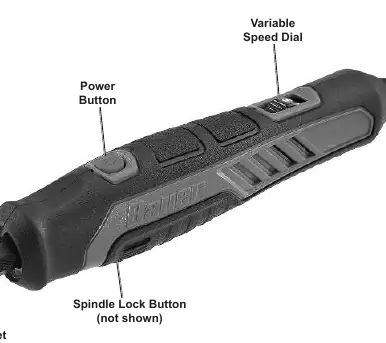
The tool features a Variable Speed Dial, Power Button, Spindle Lock Button, and a Collet Nut. Familiarize yourself with these controls before operation.
Accessory Installation
- Press and hold the Spindle Lock Button and rotate the collet until the shaft is engaged.
- Loosen the Collet Nut using the provided wrench.
- Insert the shank of the accessory into the collet.
- Tighten the Collet Nut securely while holding the Spindle Lock.
- Release the Spindle Lock and pull on the accessory to ensure it is secure.
Operating Instructions
- Select the appropriate accessory for your task.
- Plug the power cord into a grounded 120VAC outlet.
- Start the tool by pressing the Power Button.
- Use the Variable Speed Dial to adjust the speed according to the material and accessory type.
- Apply the accessory to the workpiece.
- When finished, turn off the tool, wait for it to stop spinning, and unplug it.
- Allow the accessory to cool before removing it.
Maintenance
Before each use, inspect the tool for loose hardware, damaged cords, or binding parts. After use, wipe external surfaces with a clean cloth. Store in a dry, indoor area out of reach of children.
Practical help
Common problems
Tool will not start
Check if the cord is connected, check the power outlet, or check if the thermal reset breaker has tripped (allow to cool and press reset).
Tool operates slowly
Reduce pressure on the workpiece or eliminate the use of an undersized extension cord.
Overheating
Allow the tool to work at its own rate, clear blocked motor vents, or remove unnecessary extension cords.
Before use
- Inspect tool for loose hardware or damaged wiring.
- Ensure the power switch is in the off position before plugging in.
- Wear ANSI-approved eye protection and hearing protection.
- Secure the workpiece with clamps or a vise.
- Verify the accessory is compatible and properly installed.
Specs in practice
- Electrical Rating
- 120VAC / 60Hz / 0.08A power requirement.
- No Load Speed
- Variable speed range from 4,000 to 20,000 RPM.
- Maximum Chuck Capacity
- Supports accessories with a 1/8 inch (3.2mm) shank.
Images and diagrams
- Variable Speed Dial: Adjusts the RPM of the tool.
- Power Button: Turns the tool on and off.
- Spindle Lock Button: Holds the shaft stationary for accessory changes.
- Collet Nut: Secures the accessory in the tool.
Model compatibility
- Do not use accessories that require liquid coolants.
- Use only rotary accessories with the correct shank diameter.
- Do not use toothed saw blades.

Manual page author
David Miller
Documentation analyst
Organizes user manual content into clear summaries, with attention to model details, product context, and everyday usability.