Home Appliances / Small Kitchen Appliances
User Manual for Blackstone Cascade Rechargeable Personal Fan
Quick guide for the Blackstone Cascade Rechargeable Personal Fan. Learn how to charge, operate, adjust speed, use oscillation, and maintain your fan.
Quick answers from the manual
Quick answer
- The Blackstone Cascade Rechargeable Personal Fan is charged via a USB-C port using a 5V, 2A power source. It features three speed settings, oscillation, and a 10-degree tilt adjustment. p. 1, 2
Key actions
- Charging the fan p. 2
- Adjusting tilt p. 2
First start
- Charge the fan fully before first use using a 5V, 2A charger. p. 2
Problems and fixes
Fan does not operate
Charge the fan battery until the red light above the power button turns off.
p. 1Maintenance and reset
- Clean with a soft cloth; do not use water or chemicals. Store in a dry place. p. 1
Technical specifications
| Parameter | Value | Meaning | Pages |
|---|---|---|---|
| Voltage | 5V | Operating voltage | p. 1 |
| Current | 2A Max | Maximum charging current | p. 1 |
| Battery Capacity | 4,000 mAh | Internal battery capacity | p. 1 |
Where to find it in the PDF
- Cleaning, Troubleshooting, and Warranty p. 1
- Safety, Charging, and Operation p. 2
Table of contents
Manual images
Click an image to enlargeQuick guide from the manual
The Blackstone Cascade Rechargeable Personal Fan is a portable device featuring a 4000 mAh battery, USB-C charging, three speed settings, and oscillation. Before first use, ensure the device is fully charged using a 5V, 2A power source.
Safety instructions
- Always unplug the unit before assembly, disassembly, or cleaning.
- Do not submerge the fan in water or liquid.
- Do not operate the fan with a damaged cord, plug, or charging port.
- Keep the fan away from open flames or other heating appliances.
- Do not insert fingers or any objects into the grill.
- Use only on a dry, level surface.
- Do not use the fan outdoors.
Fan charging instructions
The fan includes a USB-C charging cable. To charge the battery:
- Plug a charger rated 5Vdc, Max 2A into a wall outlet.
- Plug the USB-C tip into the charging port on the back of the fan.
- A red light will illuminate above the oscillation button to indicate charging. The light will turn off when the battery is fully charged.
The fan can be used while it is charging.
Operation and controls
The fan features a push-button control panel located on the base:
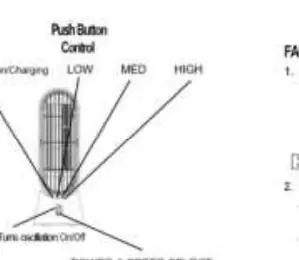
- Power & Speed Select: Press the button to cycle through Low, Med, High, and Off settings.
- Oscillation: Press the oscillation button to turn oscillation on or off.
- Indicator Lights: The control panel displays status for oscillation, charging, and speed levels.
Tilt function
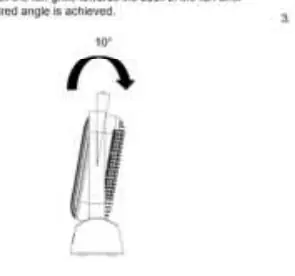
The fan grille can be tilted forward by 10 degrees. To adjust the angle, grasp the carry handle of the fan with one hand and use your other hand to gently push the top of the fan grille towards the back until the desired angle is achieved.
Cleaning and storage
- Turn the fan OFF and unplug from the charger before cleaning.
- Use a soft cloth to wipe the housing. Do not use water or chemical cleaners.
- Do not attempt to take the fan apart.
- Store in a dry place away from excessive heat and direct sunlight.
- Do not kink the cable when storing or in use.
Troubleshooting
If the fan does not operate, the battery charge may be insufficient. Connect the fan to a power source and charge until the red light turns off.
Manufacturer information
Blackstone Products
Practical help
Common problems
Fan does not operate
Battery charge is insufficient. Connect the fan to a 5V 2A power source and charge until the red light turns off.
Before use
- Ensure the fan is fully charged before first use.
- Use a charger rated 5Vdc, Max 2A.
- Ensure the surface is dry and level.
- Check that the charging port is free of debris.
Images and diagrams
- The control panel features a push button for speed selection and a separate button for oscillation.
- The charging indicator light is located above the oscillation button.
- The tilt function allows for a 10-degree forward adjustment by pushing the top of the grille.
Model compatibility
- Use only the provided USB-C charging cable.
- Do not use with any solid-state speed control device.

Manual page author
Emily Carter
User documentation editor
Prepares concise manual descriptions and highlights the most useful setup, operation, and maintenance information for readers.