Tools / Drills
User Manual for Bosch GSR 12V-35 and GSB 12V-35 Cordless Drill/Driver
Quick guide for the Bosch GSR 12V-35, GSR 12V-35 HX, and GSB 12V-35 cordless drill/drivers. Includes setup, operation, maintenance, and safety instructions.
Table of contents
Manual images
Click an image to enlargeQuick guide from the manual
This manual covers the operation of the Bosch GSR 12V-35, GSR 12V-35 HX, and GSB 12V-35 cordless drill/drivers. Before using the tool, ensure the battery is fully charged. Always remove the battery before performing maintenance, changing tools, or transporting the device to prevent accidental activation.
Product Description
The tool is designed for driving and loosening screws and drilling in wood, metal, ceramic, and plastic. The GSB model also features impact drilling for brick, masonry, and stone.
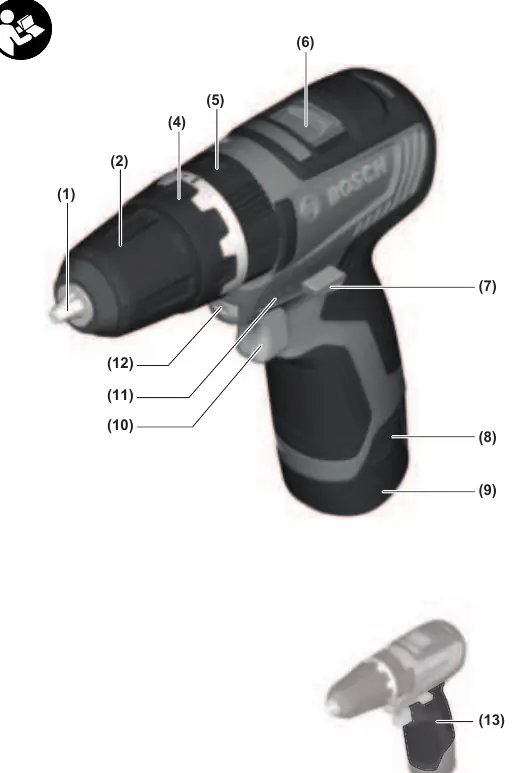
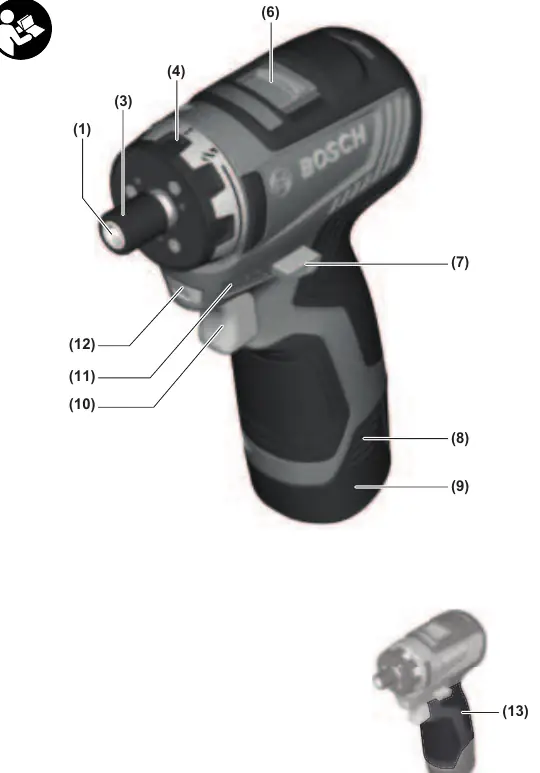
Assembly
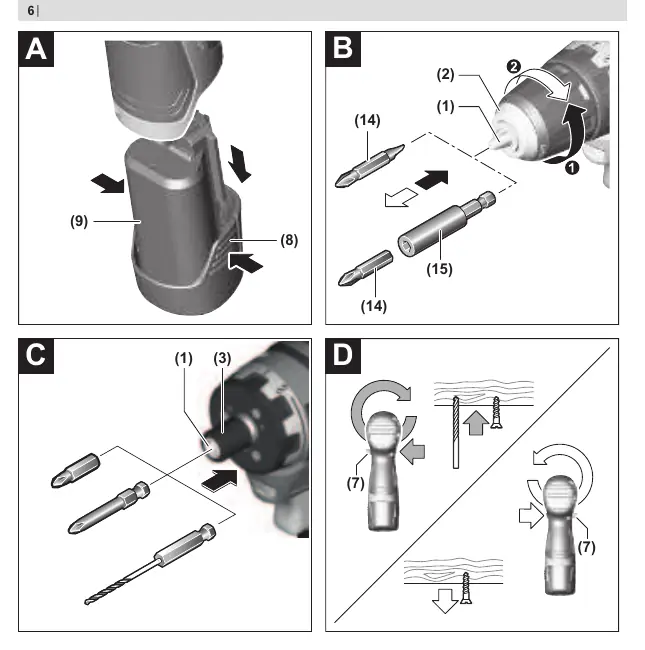
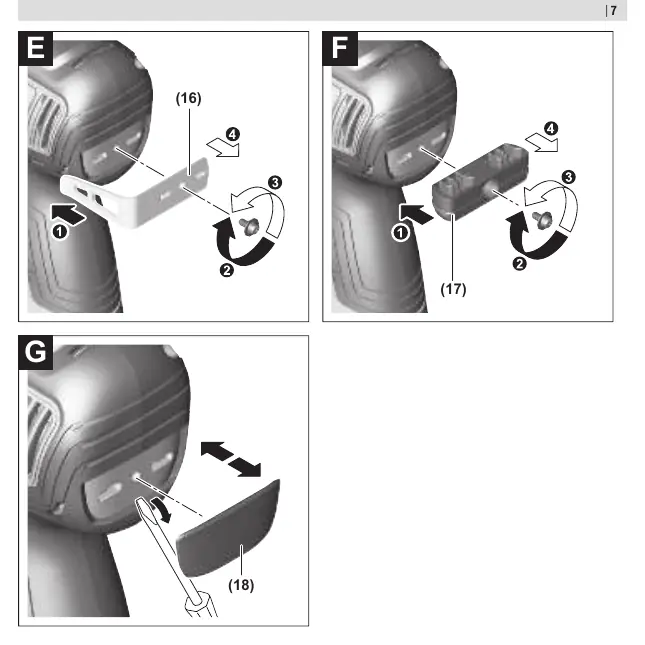
Charging the Battery
Use only the chargers listed in the technical data. The battery is supplied partially charged; charge it fully before the first use. The lithium-ion battery is protected against deep discharge by Electronic Cell Protection (ECP).
Changing the Tool
- GSR 12V-35 HX: Pull the locking sleeve (3) back, insert the tool into the holder (1), and release the sleeve to lock.
- GSB 12V-35 / GSR 12V-35: Open the keyless chuck (2) by turning it in the direction of rotation 1. Insert the tool and tighten the chuck firmly by hand in the direction of rotation 2.
Operation
Setting the Rotational Direction
Use the rotational direction switch (7) to change the direction. Set it to the middle position to prevent accidental starting. Press to the left for right rotation (drilling/screwing) and to the right for left rotation (loosening screws).
Preselecting the Torque
Use the torque presetting ring (4) to select one of 20 torque stages. In the drilling position, the overload clutch is deactivated.
Mechanical Gear Selection
Use the gear selector switch (6) only when the tool is not in use. Gear I is for low speed (screwdriving/large drilling diameters), and Gear II is for high speed (small drilling diameters).
Operating Modes
For GSB models, use the operating mode presetting ring (5) to switch between drilling, screwdriving, and impact drilling.
Maintenance and Service
Always keep the tool and ventilation slots clean for safe operation. If the tool is overloaded, the electronics will switch it off until it returns to the optimal operating temperature. This is indicated by the battery charge indicator LEDs flashing in a chase sequence.
Manufacturer information
Bosch
Practical help
Common problems
Tool stops during operation
The tool may be overloaded. The electronics will switch it off until it reaches the optimal operating temperature. Wait for the LEDs to stop flashing.
Battery charge indicator flashes rapidly
The battery temperature is outside the operating range (-20 to +50 °C). Allow the battery to reach a safe temperature.
Tool will not start
Ensure the rotational direction switch is not in the middle (locked) position.
Before use
- Charge the battery fully before first use.
- Ensure the rotational direction switch is set correctly.
- Select the appropriate gear (I or II) for the task.
- Check that the tool bit is securely inserted in the chuck or holder.
- Verify the torque setting is appropriate for the screw size.
Specs in practice
- Rated voltage
- 12V DC system.
- No-load speed
- 0-460 rpm (Gear I) / 0-1750 rpm (Gear II).
Images and diagrams
- (1) Tool holder
- (2) Keyless chuck
- (4) Torque presetting ring
- (6) Gear selector
- (7) Rotational direction switch
Model compatibility
- Compatible with GBA 12V batteries.
- Use only chargers listed in technical data (GAL 12..., GAX 18...).

Manual page author
David Miller
Documentation analyst
Organizes user manual content into clear summaries, with attention to model details, product context, and everyday usability.