Electronics / Microphones
User Manual for BOYA Mini 16 Wireless Microphone System
Quick guide for the BOYA Mini 16 wireless microphone system. Learn about setup, pairing, AI noise reduction, charging, and technical specifications.
Quick answers from the manual
Quick answer
- The BOYA Mini 16 is a 2.4GHz wireless microphone system that pairs automatically. It features AI noise reduction and is compatible with USB-C, Lightning, and 3.5mm TRS devices. p. 1
Key actions
- Pairing the transmitter p. 1
- Charging the case p. 2
First start
- The transmitter powers on automatically when removed from the charging case. p. 1
Maintenance and reset
- Clean the device only with a soft, dry cloth. p. 1
Technical specifications
| Parameter | Value | Meaning | Pages |
|---|---|---|---|
| Transmission Type | 2.4GHz digital | Wireless frequency | p. 2 |
| Weight (Transmitter) | 5g | Weight of the transmitter unit | p. 2 |
| Operating Range | 100m | Maximum distance without obstacles | p. 2 |
Where to find it in the PDF
- Safety and Introduction p. 1
- Specifications p. 2, 3
Table of contents
Quick guide from the manual
The BOYA Mini 16 is a 2.4GHz ultracompact wireless microphone system designed for content creation, live streaming, vlogging, and mobile journalism. It features automatic pairing, AI-powered noise reduction, and a long transmission range of up to 100 meters. The system is available in versions compatible with USB-C, Lightning, and 3.5mm TRS devices.
Safety Precautions
- Do not disassemble the device; this should only be done by professionals.
- Keep the device away from heat sources such as radiators or spotlights.
- Do not remove the battery without professional assistance.
- Clean the device only with a soft, dry cloth.
- Avoid exposure to dust and moisture during use and storage.
- Do not press on the microphone capsule cover.
Operation and Features
Pairing: The transmitter(s) will automatically power on when removed from the charging case and power off when placed back. If not paired, the transmitter will automatically shut down after 10 minutes.
Noise Reduction: This feature is off by default. It cannot be toggled while the transmitter is in the process of reconnecting to the receiver. The noise reduction level can only be adjusted after the feature is enabled on the transmitter.
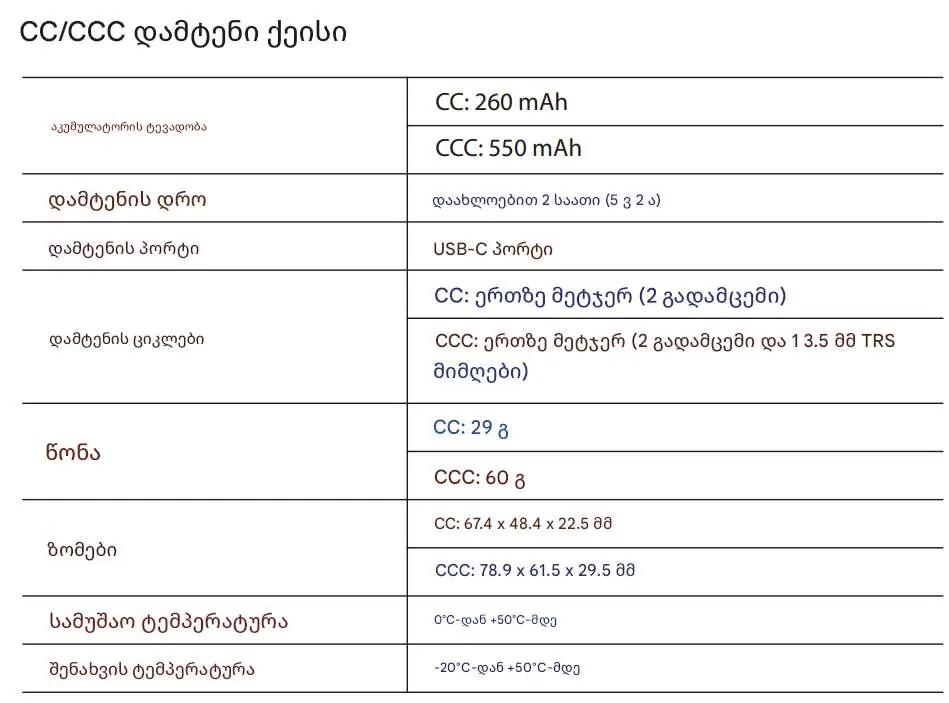
Charging: Charge the charging case as soon as the indicator flashes red. It takes approximately 1.5 hours to charge the transmitter from 0% to 100%.
Technical Specifications
The system supports CD-quality audio with a 48kHz sampling rate and 16-bit bit depth. The transmitter weighs only 5g. Operating temperature ranges from 0°C to +50°C, and storage temperature from -20°C to +50°C.
Support
For further assistance, contact [email protected] or visit www.boyamic.com.
Official resources from the manual
Practical help
Common problems
Transmitter turns off automatically
The transmitter will automatically power off after 10 minutes if it is not paired with a receiver.
Cannot toggle noise reduction
Noise reduction cannot be enabled or disabled while the transmitter is in the reconnection mode.
Charging case indicator flashes red
The charging case needs to be charged as soon as possible.
Before use
- Ensure the charging case is fully charged.
- Verify that the receiver type (USB-C, Lightning, or 3.5mm TRS) matches your recording device.
- Keep the microphone capsule clean and free of dust.
- Ensure the transmitter is removed from the case to power it on.
Specs in practice
- Transmission Type
- 2.4GHz digital frequency for wireless audio.
- Operating Range
- Up to 100 meters in an environment without obstacles.
- Battery Life
- Approximately 6 hours of continuous use for the transmitter.
- Sampling Rate
- 48kHz, providing CD-quality audio.
Model compatibility
- Compatible with smartphones, tablets, and computers.
- Available in three receiver variants: USB-C, Lightning, and 3.5mm TRS.

Manual page author
David Miller
Documentation analyst
Organizes user manual content into clear summaries, with attention to model details, product context, and everyday usability.