Electronics / Microphones
User Manual for BOYA WMic5 Wireless Microphone System
Comprehensive user guide for the BOYA WMic5 series wireless microphone system. Includes instructions for pairing, operating the transmitter and receiver, adjusting gain, using noise cancellation, and connecting to various devices.
Quick answers from the manual
Quick answer
- The BOYA WMic5 is a 2.4GHz wireless microphone system. To pair, turn on both units and press the power button twice on each to enter pairing mode. Wait for the indicators to turn static blue. p. 9, 10
Key actions
- Pairing the system p. 9, 10
- Adjusting gain p. 4, 6
- Toggling Noise Cancellation p. 4
First start
- Power on the transmitter and receiver by holding the power button for 3 seconds. p. 9, 10
Problems and fixes
Signal interference
Avoid obstacles like walls and keep away from other 2.4GHz devices.
p. 10Technical specifications
| Parameter | Value | Meaning | Pages |
|---|---|---|---|
| Operating Range | Up to 196 ft (60 m) | Maximum distance without obstacles. | p. 11, 12 |
| Battery Life | 10h (TX) / 20h (RX) | Approximate operating time. | p. 11, 12 |
Where to find it in the PDF
- Transmitter Structure p. 3, 4
- Receiver Structure p. 5, 6, 7, 8
- Specifications p. 11, 12
Table of contents
Manual images
Click an image to enlargeQuick guide from the manual
The BOYA WMic5 is an ultracompact 2.4GHz wireless microphone system designed for content creation, vlogging, and mobile journalism. It supports up to two people and is compatible with cameras, smartphones, tablets, and computers. The system comes pre-paired from the factory, but manual pairing instructions are provided if connection is lost.
Product Structure
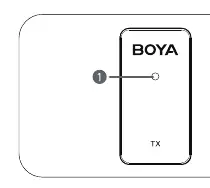
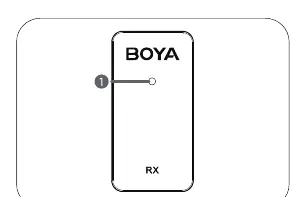
The system consists of a transmitter (WMic5-TX) and various receiver options (WMic5-RX, WMic5-RXD, WMic5-RXU). Each unit features status indicators to show pairing, battery, and mode status.
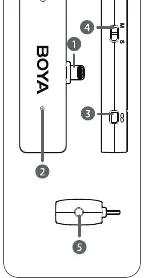
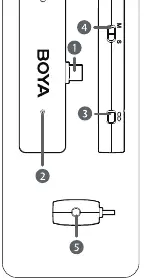
Wireless Transmitter (WMic5-TX)
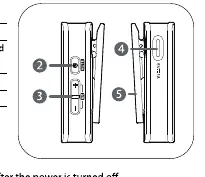
- Status Indicator: Shows pairing status (blue), mute (red), noise cancellation (green), and battery status.
- Power Button: Press and hold for 3 seconds to power on/off. Press twice to enter pairing mode.
- +/- Buttons: Adjust microphone gain (6 levels).
- NR Button: Press both + and - buttons simultaneously to toggle noise cancellation.
Wireless Receiver (WMic5-RX)
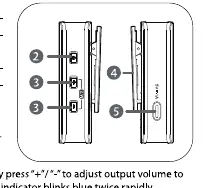
- Status Indicator: Shows pairing, output mode (Mono/Stereo), and battery status.
- M/S Button: Press both + and - buttons simultaneously to toggle between Mono and Stereo output modes.
- Headphone Output: 3.5mm jack for real-time monitoring.
Operation and Pairing
The system is pre-paired at the factory. If you need to re-pair the devices:
- Turn on the transmitter and receiver by holding the power button for 3 seconds.
- Press the power button twice on both units to enter pairing mode. The indicators will blink blue rapidly.
- Wait for the indicators to turn static blue, confirming a successful connection.
Settings and Adjustments
- Gain Control: Use the +/- buttons on the transmitter to adjust input gain or on the receiver to adjust output volume.
- Noise Cancellation: Toggle on/off using the NR button on the transmitter.
- Output Mode: Toggle between Mono and Stereo on the receiver using the M/S button. In Mono mode, left and right channels are mixed. In Stereo mode, they are separated.
Cautions
- Do not disassemble the device.
- Keep away from heat sources, dust, and moisture.
- Do not block the microphone capsule cover with your hand during use.
- Use only a soft, dry cloth for cleaning.
Practical help
Common problems
Devices are not connecting
Ensure both units are powered on. If disconnected, press the power button twice on both units to re-enter pairing mode.
Signal interference or dropouts
Avoid obstacles like walls and buildings. Keep away from other 2.4GHz devices like high-power Wi-Fi antennas or radios.
Low battery indicator
The status indicator will blink red rapidly. Connect the device to a power source using the included USB-C cable.
Before use
- Charge the transmitter and receiver fully before first use.
- Identify your receiver type (RX, RXD, or RXU) and ensure it is compatible with your recording device.
- Check that the microphone capsule is not covered by your hand.
- Ensure the transmitter and receiver are within the 60m operating range.
Specs in practice
- 2.4GHz ISM Frequency
- The wireless transmission band used for the connection.
- Omnidirectional
- The microphone picks up sound from all directions.
- 10mW RF Output Power
- The strength of the wireless signal transmission.
Images and diagrams
- The status indicator blinks blue slowly when unpaired and static blue when paired.
- The status indicator blinks red slowly when muted.
- The status indicator is static green when noise cancellation is active.
- The status indicator blinks red rapidly when the battery is low.
Model compatibility
- WMic5-RXD is designed for iOS devices with a Lightning connector.
- WMic5-RXU is designed for devices with a USB-C port.
- WMic5-RX includes a 3.5mm output for cameras, recorders, and mixers.

Manual page author
Michael Turner
Technical manual editor
Reviews PDF manuals for structure, safety notes, and practical product details so readers can find the right information quickly.