Electronics / Microphones
User Manual for BOYA mini 2 Wireless Microphone System
Quick guide for the BOYA mini 2 wireless microphone system. Learn how to pair, use noise cancellation, charge, and troubleshoot your device.
Quick answers from the manual
Quick answer
- The BOYA mini 2 is a wireless microphone system that pairs automatically. To use, connect the receiver to your device, power on the transmitter, and ensure indicators are solid blue. Use the BOYA Central app for gain and noise reduction settings. p. 10, 11
Key actions
- Pairing the transmitter and receiver p. 10
- Enabling noise reduction p. 5, 6, 7
First start
- Remove transmitter from case to power on, connect receiver to device, and ensure solid blue indicators. p. 10
Problems and fixes
No sound
Check receiver connection.
p. 12
Intermittent sound
Remove interference/obstacles.
p. 12Maintenance and reset
- Clean charging contacts with a soft, dry cloth if charging fails. p. 2, 12
Technical specifications
| Parameter | Value | Meaning | Pages |
|---|---|---|---|
| Operating Range | Up to 100 m | Maximum distance without obstacles. | p. 13, 14 |
| Battery Life (TX) | Approx. 6 hours | With noise reduction disabled. | p. 13 |
Where to find it in the PDF
- Transmitter Structure p. 4
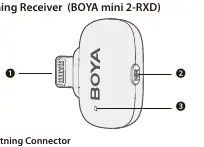
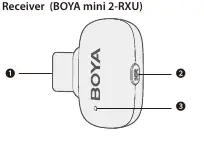
- Receiver Structure p. 6, 7
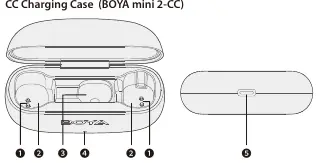
- Charging Case p. 8
Table of contents
Manual images
Click an image to enlargeQuick Start Guide
The BOYA mini 2 is a wireless microphone system designed for smartphones, tablets, and other devices. The system comes pre-paired from the factory. To begin, remove the transmitter from the charging case to power it on automatically. Connect the receiver to your device's port (Lightning or USB-C). If the devices are not paired, follow the pairing procedure described in the operations section.
Product Structure
The system consists of three main components:
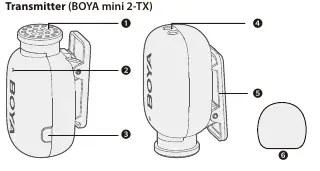
- Transmitter (BOYA mini 2-TX): Features an in-built condenser microphone, indicator light, power button, charging contacts, and belt clip.
- Receiver (BOYA mini 2-RXD/RXU): Available in Lightning or USB-C versions. Features a connector, noise reduction button, and indicator light.
- Charging Case (BOYA mini 2-CC): Used for storing and charging the transmitters and receiver. Includes a battery level indicator.
Operations and Settings
Power and Pairing
- Power On/Off: Press and hold the power button on the transmitter for 2 seconds. The transmitter also powers on/off automatically when removed from or placed into the charging case.
- Pairing: If disconnected, connect the receiver to your device. Press and hold the noise reduction button on the receiver for 5 seconds (blinks blue quickly). With the transmitter powered off, press and hold its power button for 5 seconds (blinks blue quickly). Pairing is successful when indicators glow solid blue.
Noise Reduction
Press the power button on the transmitter or the noise reduction button on the receiver once to enable or disable noise reduction. The indicator will glow solid green when enabled.
Charging
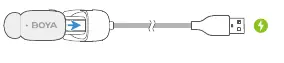
Place the transmitter into the charging case to charge. The case indicator displays the battery level: blinking red (30% or lower), blinking green (31%-99%), or solid green (100%). Use the USB-C port on the case to charge the case itself.
App Information
Download the BOYA Central app to check battery levels, adjust microphone gain, configure noise cancellation, and perform firmware upgrades. The app requires iOS 15.6 or later, or Android 7.0 or later.
Troubleshooting
- No Sound: Ensure the receiver is securely connected to your device.
- Intermittent Sound: Ensure there is no interference between the transmitter and receiver. Avoid obstacles like walls or high-power Wi-Fi antennas.
- Charging Issues: Ensure charging contacts are clean and in full contact. If the unit fails to charge, wipe the contacts with a clean cloth.
Specifications
The system operates on a 2.4 GHz digital frequency with a range of up to 100 meters (without obstacles). The transmitter features a 6-hour battery life (with noise reduction disabled), which can be extended using the charging case.
Practical help
Common problems
No sound from the unit
Ensure the receiver connector is securely plugged into your device and the microphone is selected in your recording app.
Intermittent sound or limited range
Avoid obstacles like walls and buildings. Keep away from high-power Wi-Fi antennas or other 2.4 GHz devices.
Charging case fails to charge the unit
Clean the charging contacts with a dry cloth. Ensure the transmitter is pushed down fully into the slot.
Before use
- Charge the transmitter and charging case fully before first use.
- Ensure the receiver connector matches your device (Lightning or USB-C).
- Check that the transmitter and receiver are paired (solid blue indicator).
- Download the BOYA Central app for advanced settings.
- Test audio levels before recording.
Specs in practice
- 2.4 GHz Frequency
- The wireless transmission band; susceptible to interference from Wi-Fi and other wireless devices.
- 100m Operating Range
- Maximum distance between transmitter and receiver without obstacles.
- 48 kHz / 24-bit
- High-quality digital audio sampling rate and bit depth.
Images and diagrams
- Transmitter: Includes microphone, indicator, and power button.
- Receiver: Includes connector, noise reduction button, and indicator.
- Charging Case: Includes slots for transmitters/receiver and battery level indicator.
Model compatibility
- Lightning receiver is for iOS devices with Lightning ports.
- USB-C receiver is for iPhone 15+, Android, tablets, and computers.
- App requires iOS 15.6+ or Android 7.0+.

Manual page author
Emily Carter
User documentation editor
Prepares concise manual descriptions and highlights the most useful setup, operation, and maintenance information for readers.