Industrial / Space Heaters
User Manual for Clarke DEVIL 2000PTC Electric Fan Heater
Get the most out of your Clarke DEVIL 2000PTC electric fan heater with this comprehensive user guide. Learn about safe positioning, operation, maintenance, and troubleshooting.
Quick answers from the manual
Quick answer
- The Clarke DEVIL 2000PTC is a 2kW electric fan heater for indoor use in well-insulated areas. It features three settings: Fan only, Heat Setting 1 (1000W), and Heat Setting 2 (2000W). p. 1, 2, 8
Key actions
- Adjusting the angle p. 9
- Operating the heater p. 8
First start
- Place on a level surface, connect to 230V supply, set thermostat to max, select heat setting. p. 8
Problems and fixes
Heater does not operate
Check plug connection, fuse, or power source.
p. 9Maintenance and reset
- Disconnect power before maintenance. Clean with a soft, damp cloth. p. 6, 10
Technical specifications
| Parameter | Value | Meaning | Pages |
|---|---|---|---|
| Heat Output | 2000W | Maximum heat output setting. | p. 2 |
| Voltage | 230V | Operating voltage. | p. 2 |
Where to find it in the PDF
- Safety Rules p. 4, 5
- Operation p. 8
- Parts List & Diagram p. 11
Table of contents
Manual images
Click an image to enlargeImportant Information
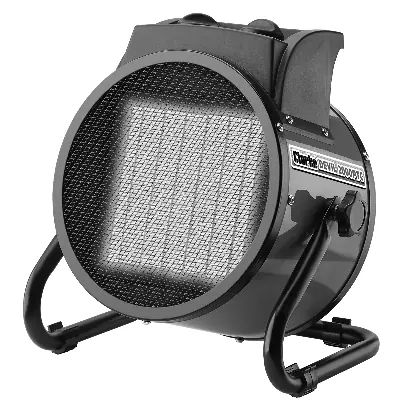
The Clarke DEVIL 2000PTC is a 2kW electric fan heater designed for indoor use in well-insulated areas. It is not intended to be the primary heat source for a building. The unit features three settings: Fan only, Heat Setting 1 (1000W), and Heat Setting 2 (2000W).
Safety Rules
- Electrical Safety: The heater must be earthed. Do not use extension cables. Regularly inspect the power cable for damage.
- General Safety: Do not operate the heater when tired or under the influence of alcohol or drugs. Do not stand on the heater. Do not use with wet hands.
- Usage Restrictions: Do not use for drying clothes or laundry. Do not use in small rooms occupied by persons unable to leave the room on their own without supervision.
Positioning
- Use indoors only.
- Maintain a 2-metre clearance all around the heater.
- Do not place near flammable materials, liquids, or gases.
- Do not place near water sources like baths, showers, or swimming pools.
- Do not place immediately below an electrical outlet.
- Ensure the heater is on a level surface and cannot topple over.
- Ensure the air inlet and outlet grilles are not blocked.
Operation
1. Place the heater on a level surface at a safe distance from flammable materials.
2. Connect the heater to a suitable 230V power supply.
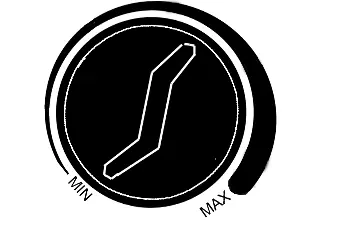
3. Set the thermostat control to the maximum setting (fully clockwise).
4. Set the mode selector to the desired setting: Off, Fan Only, Fan + Heat Setting 1, or Fan + Heat Setting 2.
5. Once the room reaches the desired temperature, turn the thermostat control slowly counter-clockwise until it clicks. The heater will maintain this temperature.
6. To turn off, switch the mode selector to the OFF position.
Adjusting the Angle
The heater angle can be adjusted to direct airflow:
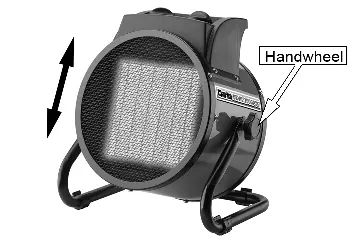
- Loosen both handwheels on the sides of the unit.
- Adjust the heater to the required angle.
- Retighten the handwheels to secure the position.
Maintenance
Warning: Always disconnect the heater from the power supply and allow it to cool down before performing any maintenance.
- Clean the heater with a soft, damp cloth. Do not use solvents or abrasives.
- Ensure the heater grille is not blocked by dust or debris.
- Do not attempt to repair the heater yourself. Contact the Clarke service department for any repairs.
Electrical Connections
The heater should be connected to a standard 230V (50Hz) supply through an approved 13 amp BS 1363 plug. Wiring colors are: Blue (Neutral), Brown (Live), and Yellow/Green (Earth). It is strongly recommended to use a Residual Current Device (RCD).
Troubleshooting
If the heater does not operate, check the plug connection, fuse, or circuit breaker. If the heating element glows hot, ensure the air inlet is not blocked and the input voltage is correct. If the heater fails to heat, ensure the switch is set to a heating level and the thermostat has not tripped.
Technical Specifications
- Heat Output: Fan only (25W), Setting 1 (1000W), Setting 2 (2000W)
- Voltage: 230V / 50Hz
- Weight: 1.74 kg
- Ingress Protection: IP20
- Sound Pressure Level: 43 dB
Manufacturer information
Clarke International
Practical help
Common problems
Heater does not operate
Check if the plug is loose, the fuse is blown, or if there is no power at the socket.
Heating element glowing hot
Ensure the air inlet grille is not blocked and the input voltage is correct.
Heater fails to heat
Ensure the control switch is set to a heating level and the thermostat has not tripped.
Abnormal noise
Ensure the heater is placed on a level surface.
Before use
- Ensure the area is well-insulated.
- Check that there is 2m clearance around the heater.
- Verify the heater is on a level surface.
- Check the power cable for any damage.
- Ensure the power supply is 230V/50Hz.
Specs in practice
- Ingress Protection (IP20)
- The unit is not waterproof; keep away from water and high condensation areas.
Images and diagrams
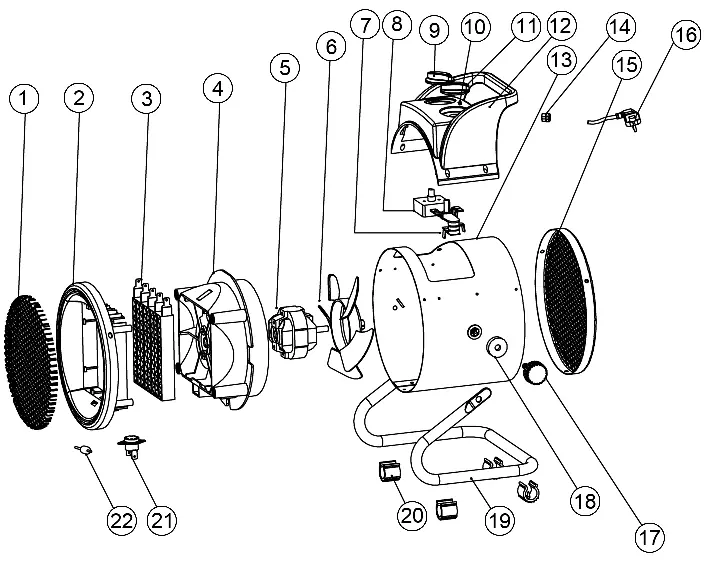
- The parts diagram illustrates the internal components including the PTC heating element, fan, motor, and thermostat.
- The wiring diagram shows the correct connection for a 13A BS1363 plug.
Model compatibility
- Not suitable for drying clothes or laundry.
- Do not use with a programmable timer.
- Not designed to be the primary heat source.

Manual page author
David Miller
Documentation analyst
Organizes user manual content into clear summaries, with attention to model details, product context, and everyday usability.