Electronics / Two-Way Radios
User Manual for Cobra microTALK FRS 120 2-Way Radio
Quick guide for the Cobra microTALK FRS 120 2-Way Radio. Learn how to install batteries, operate channels, use the Maximum Range Extender, and maintain your device.
Quick answers from the manual
Quick answer
- The Cobra FRS 120 is a 14-channel 2-way radio. To operate, install 3 AA batteries, turn on the unit, select the same channel as your party, and use the Talk button to communicate. p. 2, 4, 5, 6
Key actions
- Install Batteries p. 4
- Select Channel p. 5
First start
- Install 3 AA batteries, turn on using the On/Off Volume switch, and tune to the desired channel. p. 4, 5
Problems and fixes
Cannot communicate
Ensure both units are on the same channel.
p. 5, 6Maintenance and reset
- Handle unit gently, keep away from dust, water, and extreme temperatures. p. 14
Technical specifications
| Parameter | Value | Meaning | Pages |
|---|---|---|---|
| Range | Up to 2 miles | Maximum effective communication distance. | p. 9 |
Where to find it in the PDF
- Controls and Indicators p. 3
- Battery Installation p. 4
Table of contents
Manual images
Click an image to enlargeQuick Guide
The Cobra microTALK FRS 120 is a 14-channel 2-way radio designed for short-range communication. To get started, install three AA alkaline batteries, turn the unit on using the volume switch, and ensure all radios in your group are tuned to the same channel. Use the Talk button to communicate and the Call button to alert others.
Product Overview
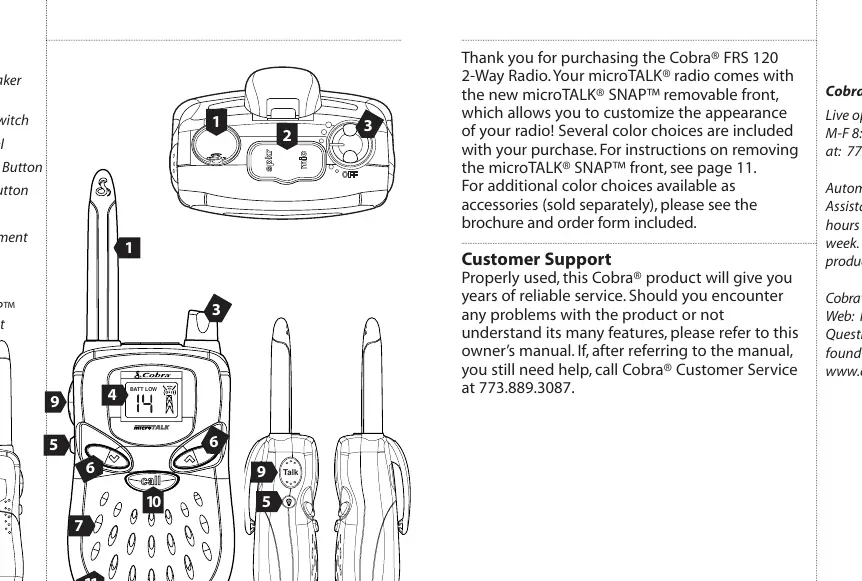
The radio features a backlit LCD display, a removable SNAP front panel for customization, and a microphone/speaker jack for hands-free accessories. Key controls include the On/Off Volume switch, Channel Select buttons, Talk button, Call button, and the Light/Max Range button.
Getting Started
Battery Installation:
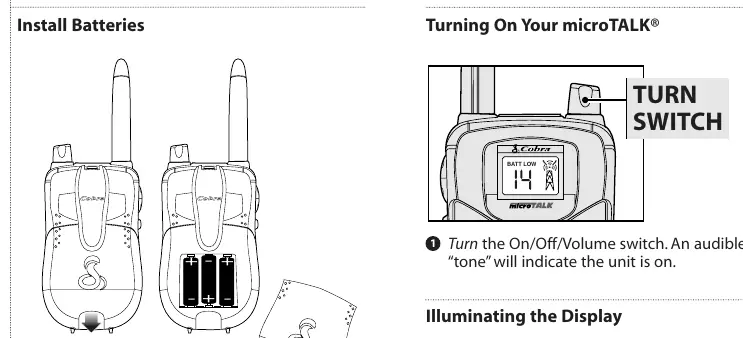
- Pull the lock tab down to remove the battery cover on the back of the unit.
- Insert three AA alkaline batteries, ensuring they are positioned according to the polarity markings.
- Replace the battery cover.
Operation
Turning On: Rotate the On/Off Volume switch. An audible tone indicates the unit is powered on.
Selecting Channels: Use the channel up or down buttons to select one of the 14 available channels. All units must be on the same channel to communicate.
Calling Another Party: Press and release the Call button to send a two-second ringing tone to other units on the same channel.
Talking: Press and hold the Talk button. Hold the microphone about 2 inches from your mouth and speak in a normal voice. Release the button to listen for a response.
Advanced Features
Auto Squelch: Automatically mutes weak transmissions and noise. This is active by default.
Maximum Range Extender: Press and hold the Light/Max Range button to temporarily disable Auto Squelch and allow all signals to be heard. For continuous monitoring, press and hold this button for five seconds until you hear two beeps.
Illuminating the Display: Press and release the Light/Max Range button to light up the display for ten seconds.
Maintenance
To ensure reliable service, handle the unit gently and keep it away from dust, water, and extreme temperatures. Do not modify internal components, as this may void the warranty.
Specifications
The radio operates on 14 FRS channels in the 462.5625 MHz to 467.7125 MHz range. It provides up to 2 miles of range depending on terrain and battery condition. It is powered by 3 AA batteries with an operating range of 3.2 - 4.5V.
Manufacturer information
Cobra Electronics
Practical help
Common problems
Unit will not turn on
Check that batteries are installed correctly and have sufficient charge.
Cannot communicate with other party
Ensure both units are turned on and tuned to the exact same channel number.
Weak signal or excessive noise
Use the Maximum Range Extender feature to hear weak signals or move to a location with fewer obstructions like buildings or hills.
Before use
- Install 3 high-quality AA alkaline batteries
- Ensure the battery cover is securely locked
- Verify that all radios in your group are set to the same channel
- Test the Talk button functionality
Specs in practice
- Auto Squelch
- Automatically shuts off weak transmissions and unwanted noise.
- Maximum Range Extender
- Allows the radio to receive weak signals by disabling the squelch.
Images and diagrams
- Controls and Indicators: Identifies the antenna, mic/speaker jack, volume switch, and buttons.
- Battery Installation: Shows how to open the compartment and insert batteries.
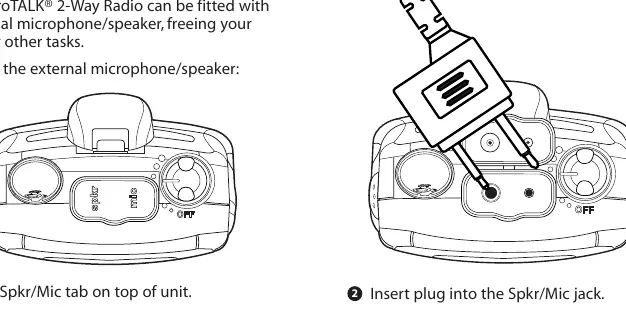
- External Mic/Speaker Connection: Illustrates how to open the tab and insert the plug.
Model compatibility
- Compatible with other FRS radios operating on the same channel.
- Supports external microphone/speaker headsets (sold separately).
- Supports optional NiMH rechargeable battery packs.

Manual page author
David Miller
Documentation analyst
Organizes user manual content into clear summaries, with attention to model details, product context, and everyday usability.