Automotive / Dash Cams
Cobra SC 200D Dash Cam Quick Start Guide
Quick start guide for the Cobra SC 200D Dash Cam. Learn how to install the camera, mount it to your windshield, connect the rear camera, use voice commands, and understand button functions.
Quick answers from the manual
Quick answer
- The Cobra SC 200D is a dash cam that supports front, rear, and cabin recording. Installation involves mounting the device to the windshield, connecting the 12V power, and inserting a MicroSD card. p. 1, 2
Key actions
- Install the camera p. 2
- Use voice commands p. 1
First start
- Attach GPS mount, remove protective film, attach to windshield, and connect to 12V power. p. 2
Maintenance and reset
- Use the Reset button located on the device to reset the camera. p. 2
Technical specifications
| Parameter | Value | Meaning | Pages |
|---|---|---|---|
| Storage | 16GB MicroSD Card | Included storage capacity for recordings. | p. 2 |
Where to find it in the PDF
- Quick Start Guide - Page 1 p. 1
- Quick Start Guide - Page 2 p. 2
Table of contents
Manual images
Click an image to enlargeQuick guide from the manual
This document provides the essential steps to install and operate your Cobra SC 200D Dash Cam. It covers the initial setup, mounting, rear camera connection, and basic operation including voice commands and button functions.
Installation
Follow these steps to set up your dash cam:
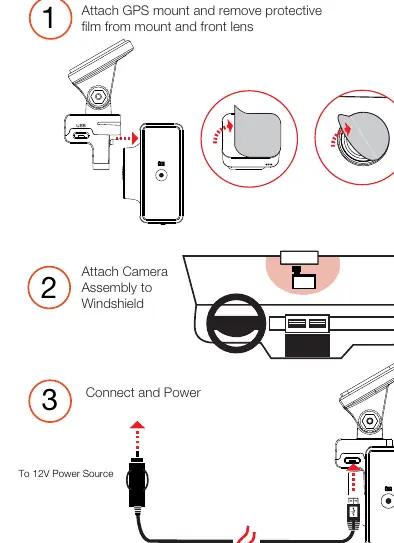
- Prepare the mount: Attach the GPS mount to the camera and remove the protective film from the mount and the front lens.
- Mount the camera: Attach the camera assembly securely to your vehicle's windshield.
- Power the device: Connect the device to a 12V power source using the provided vehicle charger.
Rear Camera Installation
To install the optional rear camera:
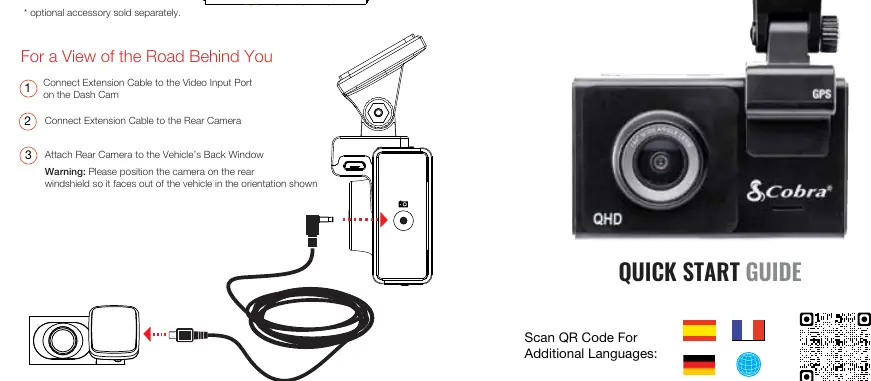
- Connect the extension cable to the Video Input Port on the dash cam.
- Connect the other end of the extension cable to the rear camera.
- Attach the rear camera to the vehicle's back window. Ensure it faces out of the vehicle in the orientation shown in the diagram.
Device Features
The Cobra SC 200D includes the following key components:
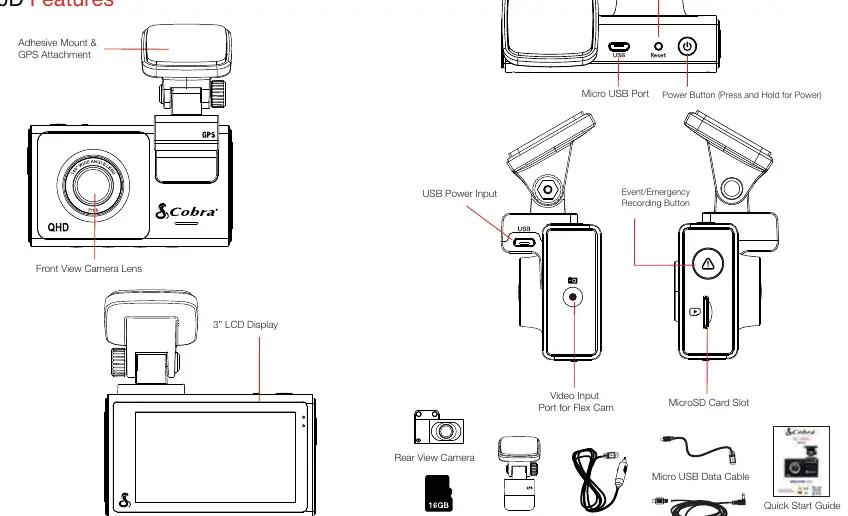
- Front View Camera Lens: Captures the road ahead.
- 3" LCD Display: For viewing recordings and settings.
- MicroSD Card Slot: For storage (16GB card included).
- USB Power Input: For powering the device.
- Video Input Port: For connecting the rear or cabin camera.
- Buttons: Includes a Power button, Reset button, and Event/Emergency Recording button.
Button Functions
Recording Stopped:
- Settings Button: Access the dash cam's Settings menu.
- Snapshot: Takes a photo and stores it in the Photo Folder.
- Playback: Enters the playback menu.
- Record: Begins loop recording.
While Recording:
- Microphone: Toggles the microphone on/off.
- Stop: Stops loop recording.
- Emergency Save: Saves the current clip from being overwritten.
Voice Commands
The SC 200D responds to specific voice commands to help you stay focused on the road:
- Front Video On: Displays front-view camera.
- Rear Video On: Displays rear-view camera.
- Record Video: Begins loop-recording.
- Lock Video: Locks the video and tags as Favorite.
- Screen On/Off: Turns the display on or off.
- Take Photo: Takes a photo and saves it to the Photos folder.
Manufacturer information
Cobra Electronics
Practical help
Common problems
Camera not recording
Ensure the MicroSD card is properly inserted and the device is connected to a 12V power source.
Rear camera not displaying
Verify that the extension cable is securely connected to both the dash cam's Video Input Port and the rear camera.
Voice commands not recognized
Ensure you are using the exact commands listed in the manual, such as 'Record Video' or 'Take Photo'.
Before use
- Remove protective film from the mount and front lens
- Insert the included 16GB MicroSD card
- Connect the device to a 12V power source
- Mount the camera securely to the windshield
Images and diagrams
- The device features a 3-inch LCD screen, MicroSD card slot, and a dedicated video input port for the rear/cabin camera.
- The GPS mount attaches to the top of the unit.
Model compatibility
- Rear camera functionality requires the optional accessory.
- The device is compatible with standard 12V vehicle power sources.

Manual page author
David Miller
Documentation analyst
Organizes user manual content into clear summaries, with attention to model details, product context, and everyday usability.