Home Appliances / Coffee Equipment
Cuisinart 14-Cup Programmable Coffee Maker DCC-3200 Series
Quick start guide and operating instructions for the Cuisinart 14-Cup Programmable Coffee Maker DCC-3200 Series. Learn how to program, brew, clean, and maintain your coffee maker.
Table of contents
Manual images
Click an image to enlargeQuick Start Guide
Before using your Cuisinart 14-Cup Programmable Coffee Maker for the first time, it is recommended to rinse the system. Fill the reservoir with water and run a brew cycle without coffee grounds. Additionally, prepare the charcoal water filter by soaking it in cold water for 15 minutes before installing it into the filter holder.

Features and Benefits
- Water Reservoir: Includes a water level indicator window.
- Charcoal Water Filter: Removes chlorine, bad tastes, and odors from tap water.
- Brew Pause Feature: Allows you to pour a cup of coffee mid-brew for up to 20 seconds.
- 14-Cup Glass Carafe: Features an ergonomic handle and drip-free spout.
- BPA Free: All parts in contact with coffee or liquids are BPA-free.
Control Panel Overview
The control panel allows for full customization of your brewing experience:
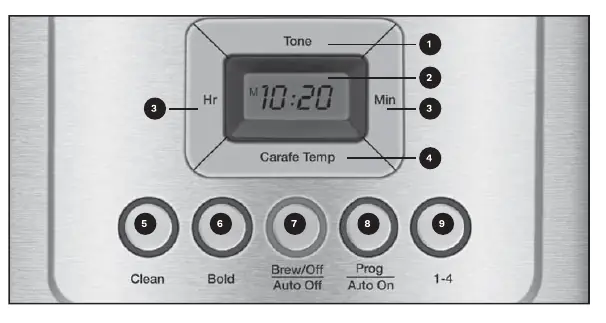
- Ready Tone Button: Turns the audible alert on or off.
- Hour and Minute Buttons: Used to set the time of day, Auto On, and Auto Off times.
- Carafe Temperature Button: Adjusts the warming plate temperature to Low, Medium, or High.
- Clean Button: Indicates when it is time to decalcify the unit.
- Bold Flavor Strength Button: Selects bold or regular coffee strength.
- Brew/Off & Auto Off Button: Turns the unit on/off and programs the auto-off time (0 to 4 hours).
- Prog/Auto On Button: Programs the coffee maker to start brewing automatically up to 24 hours in advance.
- 1-4 Cup Button: Maximizes flavor when brewing smaller batches (fewer than 5 cups).
Programming
Setting the Clock
When plugged in, the display will flash 12:00. Use the Hour and Minute buttons to set the current time. Ensure the PM indicator is set correctly if needed.
Setting Auto On
Press and hold the Prog/Auto On button for 2 seconds. The display will flash the default or previously set time. Use the Hour and Minute buttons to select your desired start time. The unit will automatically exit setup after 5 seconds of inactivity.
Setting Auto Off
Press and hold the Auto Off button for 2 seconds. Use the Hour and Minute buttons to program the shut-off time (0 to 4 hours after brewing).
Making Coffee
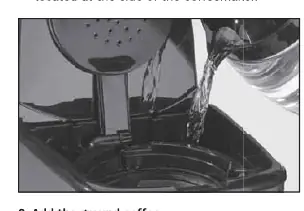
- Fill the water reservoir to the desired level.
- Insert a #4 paper filter or the included gold-tone permanent filter into the filter basket.
- Add 1 level scoop of ground coffee per cup.
- Ensure the carafe is on the heating plate and the lid is closed.
- Press the 1-4 Cup button if brewing a small batch.
- Press the Bold button if a stronger flavor is desired.
- Select the desired carafe temperature using the Carafe Temp button.
- Press the Brew/Off button to start the brewing cycle.
Cleaning and Maintenance
Always unplug the unit before cleaning. The filter basket and carafe are dishwasher safe (top rack). Wipe the base unit with a damp cloth; never immerse the base in water.
Decalcification
Over time, calcium deposits can accumulate. When the Clean indicator light illuminates, it is time to decalcify:
- Fill the water reservoir with a mixture of 1/3 white vinegar and 2/3 water.
- Press and hold the Clean button.
- When the cycle is complete, 5 beeps will sound.
- If the Clean indicator remains on, repeat the process with a fresh solution.
- Run one cycle with fresh, cold water to rinse the system.
Manufacturer information
Cuisinart
Practical help
Common problems
Coffee overflows from the filter basket
Ensure the filter basket is not clogged, do not use too much coffee, or ensure the grind is not too fine. Do not use two filters simultaneously.
Coffee is too weak or too strong
Adjust the amount of ground coffee used or use the 'Bold' button for stronger flavor.
Unit will not brew
Check that the unit is plugged in, the water reservoir is filled, and the Brew/Off button has been pressed.
Before use
- Rinse the system by running a brew cycle with water only.
- Soak the charcoal water filter in cold water for 15 minutes.
- Install the charcoal water filter into the holder.
- Set the clock to the current time.
- Ensure the carafe is properly positioned on the heating plate.
Specs in practice
- 1-4 Cup Button
- Optimizes flavor and temperature when brewing small batches.
Images and diagrams
- Control Panel: Features buttons for Clean, Bold, Brew/Off, Prog/Auto On, and 1-4 cup settings.
- Water Filter: Located inside the reservoir; requires soaking before first use.
Model compatibility
- Uses #4 paper filters or the included gold-tone permanent filter.
- Do not use two filters simultaneously.

Manual page author
Emily Carter
User documentation editor
Prepares concise manual descriptions and highlights the most useful setup, operation, and maintenance information for readers.