Computers / Laptops
LCD Screen Replacement Guide for Dell Latitude 3340
A step-by-step visual guide for replacing the LCD screen on the Dell Latitude 3340 laptop, including instructions for bezel removal, cable disconnection, and safety precautions.
Quick answers from the manual
Quick answer
- This guide outlines the 6-step process to remove and replace the LCD screen on a Dell Latitude 3340, including bezel removal and cable disconnection. p. 1
Key actions
- Remove bezel and screws p. 1
- Disconnect data and backlight cables p. 1
Where to find it in the PDF
- LCD Replacement Steps p. 1
Quick guide from the manual
This document provides a visual, step-by-step procedure for replacing the LCD screen on the Dell Latitude 3340 laptop. It covers the removal of the bezel, disconnection of internal cables, and the general process for screen replacement.
LCD Screen Replacement Procedure
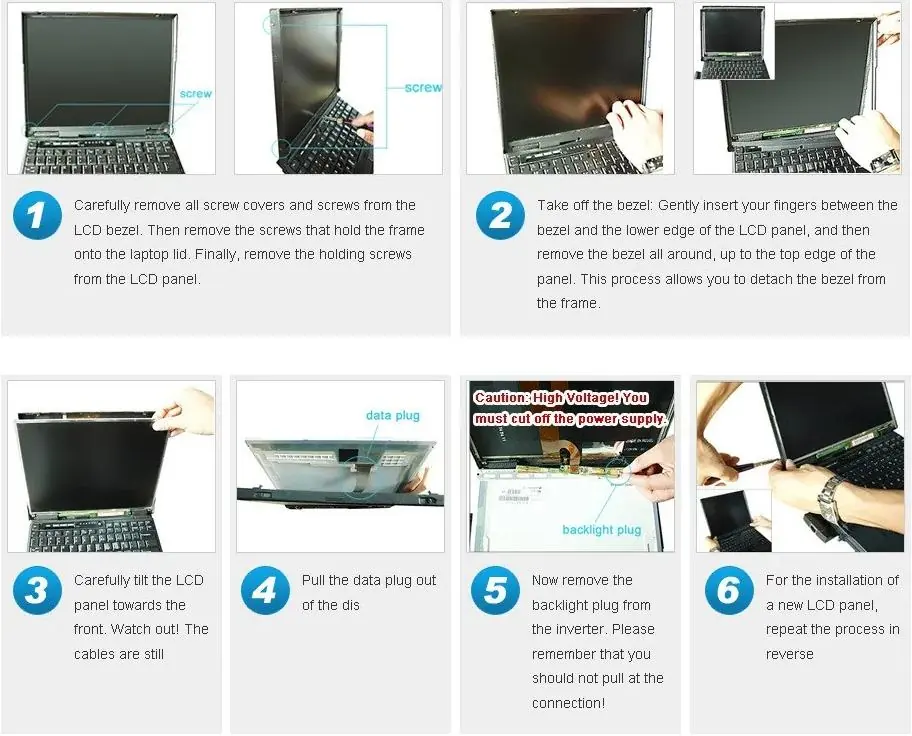
- Remove screws: Carefully remove all screw covers and screws from the LCD bezel. Then, remove the screws that hold the frame onto the laptop lid. Finally, remove the holding screws from the LCD panel.
- Remove the bezel: Gently insert your fingers between the bezel and the lower edge of the LCD panel, then remove the bezel all around, up to the top edge of the panel.
- Tilt the panel: Carefully tilt the LCD panel towards the front. Be cautious as the cables are still connected.
- Disconnect data plug: Pull the data plug out of the display.
- Disconnect backlight plug: Remove the backlight plug from the inverter. Warning: High Voltage! You must cut off the power supply before performing this step. Do not pull at the connection itself.
- Installation: For the installation of a new LCD panel, repeat the process in reverse.
Manufacturer information
Dell Inc.
Practical help
Common problems
High voltage risk during disassembly
You must cut off the power supply completely before disconnecting the backlight plug.
Before use
- Power off the laptop completely
- Disconnect the power supply
- Ensure you have the correct screwdrivers for the bezel and frame screws
Images and diagrams
- The manual provides a 6-step visual sequence showing the physical removal of the screen bezel, screws, and internal cables.
Model compatibility
- This guide is specifically for the Dell Latitude 3340 LCD screen replacement.

Manual page author
Emily Carter
User documentation editor
Prepares concise manual descriptions and highlights the most useful setup, operation, and maintenance information for readers.