Music / Guitar Effects
User Manual for DigiTech Red Special Pedal
Quick guide for the DigiTech Red Special Pedal. Learn how to set up your guitar, use the 7 effect models, calibrate the expression pedal, and configure output modes for amps and mixers.
Table of contents
Manual images
Click an image to enlargeQuick guide from the manual
The DigiTech Red Special Pedal is a guitar effects processor designed to replicate the unique tones of Brian May. Before using the device, ensure you have all included items: the pedal, gig bag, plectrum, PS0913B power supply, and documentation. The pedal requires the included 9V AC power supply and does not support battery operation.
Setup and connections
Follow these steps to connect your equipment:

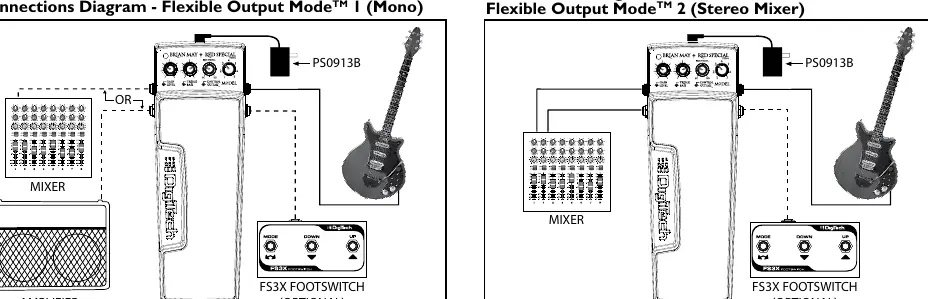

- Turn down the volume on your amplifier or mixer.
- Connect your guitar to the INPUT jack.
- Connect the pedal output (OUT 1 for Amp, OUT 2 for Mixer) to your amplifier or mixer input.
- Connect the included PS0913B power supply to the pedal.
- Turn up your amplifier or mixer volume to the desired level.
- Use the TOE or HEEL switch on the expression pedal to engage or bypass the selected model.
Controls and operation
The pedal features several knobs to shape your sound:
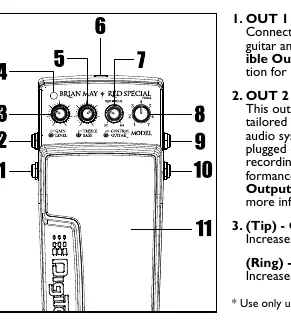
- GAIN/LEVEL: Adjusts the input gain and output level.
- TREBLE/BASS: Adjusts the high and low frequency response.
- CONTROL/GUITAR: The inner knob (CONTROL) is model-dependent, while the outer ring (GUITAR) uses modeling technology to match your guitar's pickups (SC for single coil, Red Special for replicas, HB for humbuckers).
- MODEL: Selects one of the seven built-in effect models.
- EXPRESSION PEDAL: Provides variable control for specific models and allows switching between Toe (Green LED) and Heel (Red LED) modes.
Effect models
The pedal includes seven models based on Queen's music:
- 1. Keep Yourself Alive: Features tape flanger effects.
- 2. Bohemian Rhapsody: Includes vocal-like and hard rock tones.
- 3. Tie Your Mother Down: Replicates the intro and solo tones.
- 4. We Will Rock You / We Are the Champions: Captures iconic solo tones.
- 5. Crazy Little Thing Called Love: Includes acoustic and rockabilly tones.
- 6. Brighton Rock Solo - Live: Features delay and orchestral harmonizer effects.
- 7. Deacy / A Winter’s Tale: Models the unique 'Deacy' amp tone.
Flexible output modes
The pedal offers three output modes:
- Mode 1 (Mono): Default mode when one cable is connected.
- Mode 2 (Stereo Mixer): Default stereo mode when two cables are connected.
- Mode 3 (Stereo Amp): Enabled via setup. To configure, select Model 7, hold the HEEL switch for 3 seconds until the LED flashes yellow, turn the MODEL knob to 6 (for Stereo Amp) or 7 (for Stereo Mixer), and press the TOE switch to exit.
Calibration and accessories
If the expression pedal range diminishes, recalibrate it:
- Disconnect power.
- Select Model 1.
- Insert a mono cable into the FOOTSWITCH jack.
- Connect power; the LED will flash yellow.
- Rock the pedal forward (toe down).
- Select Model 2; wait for the LED to flash green.
- Rock the pedal back (toe up).
- Select Model 3; the LED should flash green three times to confirm success.
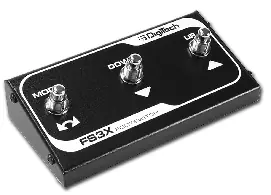
You can also connect an optional FS3X footswitch to the FOOTSWITCH jack for hands-free model selection and mode switching.
Specifications
- Input Impedance: 1M Ohms (varies with Treble Booster).
- Output Impedance: 200 Ohms.
- Power Consumption: 4.5 Watts.
- Dimensions: 10.14" x 3.84" x 2.47".
- Weight: 3.38 lbs.
Practical help
Common problems
Expression pedal range is diminished
Perform the calibration procedure described in the manual.
Cannot exit Flexible Output Mode Setup
Ensure the Model knob is set to Model 6 or 7; selecting other models prevents exiting the setup mode.
No sound or poor performance
Ensure you are using unbalanced TS instrument cables and that the included PS0913B power supply is connected.
Before use
- Turn down amplifier/mixer volume before connecting.
- Verify all included items (pedal, gig bag, plectrum, power supply) are present.
- Connect guitar to the INPUT jack.
- Connect pedal output to amplifier or mixer.
- Connect the included PS0913B power supply.
Specs in practice
- Input Impedance
- 1M Ohms (varies when Treble Booster effect is active).
- Power Consumption
- 4.5 Watts.
Images and diagrams
- Control layout diagram identifies 11 points including jacks, knobs, and switches.
- Connection diagrams illustrate Mono, Stereo Mixer, and Stereo Amp configurations.
- FS3X Footswitch diagram shows Mode, Down, and Up switch functions.
Model compatibility
- Requires included PS0913B power supply (9V AC); does not support battery power.
- Use only unbalanced TS instrument cables.
- Optional FS3X footswitch can be connected for hands-free control.

Manual page author
Emily Carter
User documentation editor
Prepares concise manual descriptions and highlights the most useful setup, operation, and maintenance information for readers.