Electronics / Network Adapters
User Manual for Digitus DA-10300 USB Charger
Quick guide for the Digitus DA-10300 20W USB charger. Learn about power distribution, technical specifications, and safety instructions for your device.
Quick answers from the manual
Quick answer
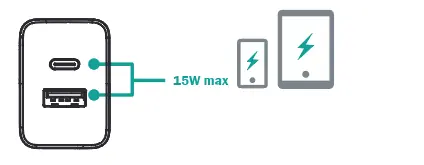
- The Digitus DA-10300 is a 20W USB charger with one USB-C and one USB-A port. It supports up to 20W via USB-C, 18W via USB-A, or 15W total when both are used simultaneously. p. 4, 5
Key actions
- Plug the charger into a wall outlet and connect your device using a compatible USB cable. p. 3
Problems and fixes
Damaged housing or cable
Do not use the product if the housing or cable is damaged.
p. 7Maintenance and reset
- Do not attempt to repair the device yourself. Contact the manufacturer if issues arise. p. 7
Technical specifications
| Parameter | Value | Meaning | Pages |
|---|---|---|---|
| Input | 100-240V / 0.8A / 50/60Hz | Standard AC input range. | p. 5 |
Where to find it in the PDF
- Introduction p. 3
- Specifications p. 4, 5
- Safety Instructions p. 6, 7
Table of contents
Manual images
Click an image to enlargeQuick Guide
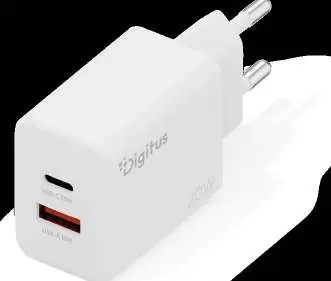
The Digitus DA-10300 is a compact 20W USB charger designed for efficiency and sustainability. It features one USB-C port and one USB-A port, allowing for versatile charging of smartphones, tablets, and Bluetooth headphones. The device is constructed with 98% recycled PCR material and comes in plastic-free packaging.
Power Distribution
The charger adjusts its power output based on how many devices are connected:
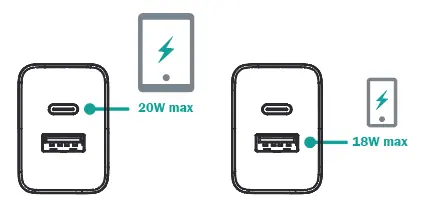
- USB-C only: Up to 20W max.
- USB-A only: Up to 18W max.
- Simultaneous use (USB-C + USB-A): 15W total max.
Technical Specifications
- Input: 100-240V / 0.8A / 50/60Hz
- Average Active Efficiency: 85.5%
- Standby Power Consumption: 0.1W
- Dimensions: 3.9 x 8.4 x 2.7 cm
- Weight: 57 g
- Protection: Overcurrent, short circuit, and overheating protection
Safety Instructions
To ensure safe operation, please adhere to the following guidelines:
- The device is intended for indoor use only.
- Keep the charger away from rain, moisture, and liquid containers.
- Do not disassemble or attempt to open the housing; contact with internal components can cause electric shock.
- Ensure the device is placed in an open area with proper air circulation to prevent overheating. Do not cover the charger.
- Do not expose the product to extreme heat.
- Always pull the charger straight out of the wall outlet; do not pull by the cable.
- If the housing or cable is damaged, discontinue use immediately.
- Do not attempt to repair the device yourself.
Practical help
Common problems
Device not charging
Ensure the charger is securely plugged into a working wall outlet and the USB cable is properly connected to both the charger and your device.
Slow charging speed
If both ports are in use, the total output is limited to 15W. For maximum charging speed, use only one port at a time.
Before use
- Verify the wall outlet provides 100-240V.
- Inspect the charging cable for any signs of damage.
- Ensure the environment is dry and suitable for indoor use.
- Check that the charger is not covered and has adequate ventilation.
Specs in practice
- USB-C Output
- Provides up to 20W for fast charging compatible devices.
- USB-A Output
- Provides up to 18W for standard USB devices.
- Combined Output
- When both ports are used, the total power is capped at 15W.
Images and diagrams
- The charger has two distinct ports: USB-C (top) and USB-A (bottom).
- Single-port usage diagrams indicate the maximum wattage available for that specific port.
- The dual-port diagram illustrates the shared 15W limit when both ports are occupied.
Model compatibility
- Compatible with smartphones, tablets, and Bluetooth headphones.
- Designed for universal USB charging.

Manual page author
David Miller
Documentation analyst
Organizes user manual content into clear summaries, with attention to model details, product context, and everyday usability.