Power / Power Distribution Units
User Manual for Digitus USB 2.0 CAT Extender DA-73120
Quick installation guide and user manual for the Digitus USB 2.0 CAT Extender (DA-73120). Includes connection diagrams, technical specifications, and troubleshooting tips for extending USB signals up to 150m.
Table of contents
Manual images
Click an image to enlargeQuick guide from the manual
The Digitus USB 2.0 CAT Extender (DA-73120) allows you to transmit USB signals over distances of up to 150 meters using a CAT 6 (or higher) network cable. It is designed for use in offices, conference rooms, and industrial environments. The system consists of a transmitter unit (TX) and a receiver unit (RX), supporting transfer rates of up to 480 Mbps and providing four USB-A ports on the receiver side.
Important Safety Instructions
- Ensure all apparatus is properly grounded to prevent electric shock.
- Place the device in a well-ventilated area and do not block ventilation openings.
- Do not expose the device to rain or place it near water.
- Do not place the device on uneven or unstable surfaces.
- Do not insert metallic objects into the device.
- If using a third-party power supply, ensure it meets the product requirements (DC 5V/1A).
Package Content
- 1x Transmitter
- 1x Receiver
- 1x Quick Installation Guide
- 1x USB-A 2.0 Cable (1.2m)
- 1x Power supply unit (DC 5V/1A, 1.5m)
Technical Features
- Extended Range: Up to 150m via CAT 6 or higher cable.
- Cascading: Extension up to 300m (2x 150m) is possible using a network switch.
- Power: Transmitter is powered via the host PC; Receiver requires the included DC 5V/1A power supply.
- Protection: Integrated ESD protection (up to 8kV), overvoltage, and short-circuit protection.
- Plug & Play: No software or drivers required.
Ports and Interfaces
Transmitter (TX):
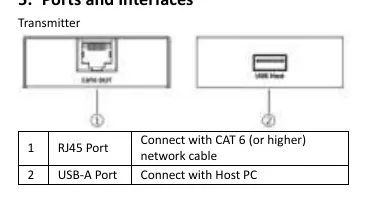
- RJ45 Port: Connects to the receiver via CAT 6 (or higher) network cable.
- USB-A Port: Connects to the host PC.
Receiver (RX):
- Reset Button: Press to restart the device.
- RJ45 Port: Connects to the transmitter via CAT 6 (or higher) network cable.
- Power Input: Connects to the DC 5V/1A power adapter.
- USB-A Ports: Four ports for connecting USB 2.0 devices (mouse, keyboard, printer, flash drive, etc.).
Connection Instructions
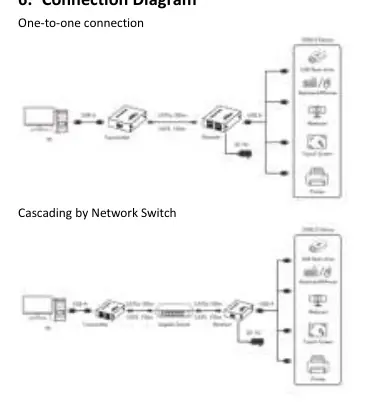
- Connect the transmitter to the host PC using the provided USB cable.
- Connect the transmitter and receiver using a CAT 6 (or higher) network cable.
- Connect your USB devices to the receiver's USB-A ports.
- Plug the power supply into the receiver to power on the system.
- Note: For distances over 150m, connect a network switch between the transmitter and receiver using two network cables.
Troubleshooting
If you experience issues, consider the following:
- No response after connecting a USB device: Verify that the network cable conforms to the IEEE-568B standard and is firmly connected. Try resetting the receiver using the reset button or power cycling the unit.
- Unstable connection with web camera: High-power USB devices may require additional power.
Specifications
- Maximum Range: 150m (via CAT 6 or higher).
- Transfer Rate: Up to 480 Mbps (USB 2.0).
- Operating Temperature: -20°C to 60°C.
- Housing Material: Metal.
- Dimensions (per unit): L 7.6 x W 6.0 x H 2.1 cm.
- Weight: TX 123g, RX 128g.
Practical help
Common problems
No response after connecting USB device
Check if the network cable conforms to IEEE-568B standard and is firmly connected. Reset the receiver by pressing the reset button or power cycling the unit.
Receiver is unstable when connected to an external web camera
High-power USB devices may require additional power supply.
Before use
- Ensure you have a CAT 6 (or higher) network cable (not included).
- Verify the host PC is available for connection.
- Ensure the power supply (DC 5V/1A) is available for the receiver.
- Check that the installation environment is well-ventilated.
Specs in practice
- Maximum range
- 150m using CAT 6 or higher cable.
- Transfer rate
- Up to 480 Mbps (USB 2.0 standard).
- Power consumption
- TX <= 2W, RX <= 2W.
Images and diagrams
- Transmitter: RJ45 port for network cable, USB-A port for host PC.
- Receiver: Reset button, RJ45 port, Power input, 4x USB-A ports for peripherals.
Model compatibility
- Requires CAT 6 or higher network cable.
- Cascading up to 300m possible using a network switch.

Manual page author
David Miller
Documentation analyst
Organizes user manual content into clear summaries, with attention to model details, product context, and everyday usability.