Electronics / USB Hubs & Docking
Digitus USB-C Docking Station 11-Port DA-70917
Quick installation guide and technical specifications for the Digitus 11-Port USB-C Docking Station (DA-70917). Learn about port layout, monitor setup, and system compatibility requirements.
Table of contents
Manual images
Click an image to enlargeQuick Guide
The Digitus USB-C Docking Station (DA-70917) is designed to expand your workstation connectivity. To ensure proper operation, connect the included power supply unit to the DC jack, as the docking station is not operational without external power. Ensure your host notebook's USB-C port supports DisplayPort Alternate Mode (DP-Alt Mode) and USB Power Delivery (PD) to utilize all features, including video output and charging.
Package Content
- 1x USB-C Docking Station, 11-Port
- 1x Quick Installation Guide
- 1x USB-C Cable (100 cm)
- 1x Power supply unit (21V/7.1A; 120 cm)
- 1x Power Cord (100 cm)
Features and Ports
- Video Output: 2x HDMI ports and 1x DP port supporting up to 4K/60Hz. Supports dual and triple monitor setups in MST (extend) or SST (mirror) modes.
- Data Transfer: 2x USB-A 3.2 Gen 2 ports (10 Gbit/s) and 1x USB-C 3.2 Gen 2 port (10 Gbit/s).
- Charging: One USB-A port and the USB-C port offer 1.5A charging for mobile devices.
- Network: 1x Gigabit Ethernet (RJ45) port.
- Audio/Storage: 1x 3.5mm audio jack and 2x card readers (SD/MicroSD) with transfer speeds up to 104 MBps.
- Security: Includes standard and nano anti-theft protection slots.
Connection Diagram
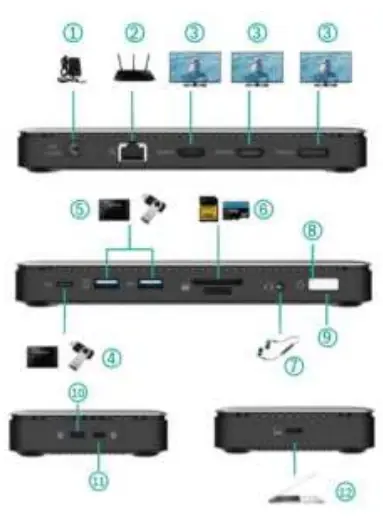
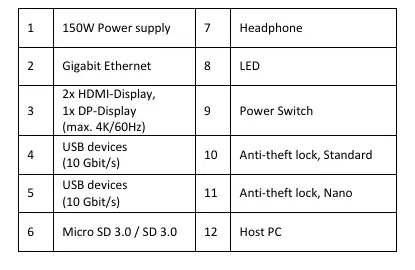
The docking station features a variety of ports for peripherals. Connect your host PC to the dedicated USB-C port. Connect monitors to the HDMI/DP ports. Connect network cables to the RJ45 port and power to the DC jack. Refer to the connection diagram in the manual for specific port numbering and identification.
System Requirements and Compatibility
The docking station is compatible with the following operating systems (up to their current versions):
- Windows 7 and later
- macOS 12 and later
- iPhone 15 (iOS) and later
- iPadOS 16 and later
- Android 14 and later
- ChromeOS 116.0.5845.120 and later
- Linux 22.04 LTS and later
Note: Video output capability depends on the graphics card of your notebook, the connected monitor, and the DP mode. Full functionality requires support for DP 1.4 Alt Mode.
Technical Specifications
- Power: 150W total (100W host charging, 50W for dock).
- Protection: Short-circuit, overcurrent, and overvoltage protection.
- Dimensions: L 18 x W 8 x H 2.3 cm.
- Weight: 282 g.
- Operating Temperature: 0°C to +45°C.
- Housing: Aluminium / Plastic.
Practical help
Common problems
Docking station not working
Ensure the power supply unit is connected to the DC jack; the station is not operational without external power.
Video output issues
Verify your notebook's USB-C port supports DisplayPort Alternate Mode (DP-Alt Mode) and USB Power Delivery (PD).
Resolution limitations
Actual resolution depends on the notebook's graphics card, the connected monitor, and the DP mode.
Before use
- Connect the power supply unit to the DC jack.
- Ensure your host device supports DP 1.4 Alt Mode for full functionality.
- Verify your operating system version (Windows 7+, macOS 12+, etc.).
- Connect the provided USB-C cable to your host PC.
Specs in practice
- 100W Host Charging
- The docking station provides up to 100W of power to charge your connected notebook.
Images and diagrams
- 1: 150W Power supply input
- 2: Gigabit Ethernet port
- 3: Video outputs (2x HDMI, 1x DP)
- 4-5: USB 3.2 Gen 2 ports
- 6: SD/MicroSD card slots
Model compatibility
- Requires USB-C port with DP-Alt Mode and Power Delivery.
- Supports Windows 7+, macOS 12+, iOS/iPadOS 16+, Android 14+, ChromeOS 116+, Linux 22.04+.

Manual page author
Michael Turner
Technical manual editor
Reviews PDF manuals for structure, safety notes, and practical product details so readers can find the right information quickly.