Electronics / USB Hubs & Docking
User Manual for Digitus 11-Port USB-C Docking Station DA-70896
Quick installation guide for the Digitus 11-Port USB-C Docking Station (DA-70896). Learn about M.2 SSD installation, connection diagrams, compatibility, and technical specifications.
Table of contents
Quick guide from the manual
This document provides installation and usage instructions for the Digitus 11-Port USB-C Docking Station with SSD Enclosure (Model: DA-70896). This device allows you to expand your notebook, tablet, or smartphone connectivity with multiple interfaces and an integrated M.2 SSD slot.
Features
- M.2 SSD Slot: Located on the underside, supports Key M modules in 2280, 2260, and 2242 formats.
- Video Output: HDMI supports UHD 4K (3840 x 2160 @ 30 Hz); VGA supports up to 1080P @ 60 Hz.
- Connectivity: 4 x USB 3.2 Gen 1 (5 Gbps) Type A ports, Gigabit Ethernet (RJ45), and SD/TF card reader.
- Power Delivery: Supports PD 3.0 for charging your notebook via the docking station.
Important Notices
- Connection Stability: If the device is disconnected during use, data may be lost. The connection will restore automatically after a few seconds.
- Power Requirements: PD charging is required when connecting high-power devices like large-capacity portable hard disks.
- USB Ports: Recommended for data transmission. Do not use for high-current output unless the hub is connected to a power supply.
- Mirror Mode: When using HDMI and VGA simultaneously, the resolution is limited to 1080P.
- Operating Temperature: Approximately 45°C, with a maximum of 55°C at full load.
Compatibility
The docking station is compatible with various Type-C 3.1 devices, including MacBook (12", Pro, Air), iPad Pro 2018, Chromebook, Huawei Mate series, HP Spectre Pavilion, Samsung S9/Note series, and Dell XPS series. Note: Your notebook's USB-C port must support DisplayPort Alternate Mode (DP Alt Mode) and USB Power Delivery (PD) for full functionality.
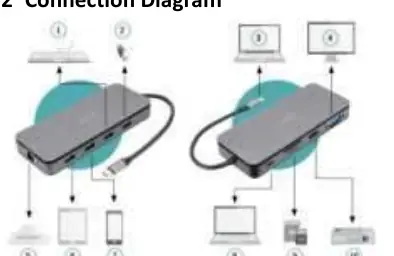
Connection Diagram
The docking station connects to your host device via the integrated USB-C cable. You can connect peripherals such as keyboards, USB sticks, monitors (HDMI/VGA), network cables, and memory cards to the available ports on the hub.
Practical help
Common problems
Device disconnects during use
Data may be lost during disconnection; the connection will restore automatically after a few seconds.
Low resolution when using multiple monitors
When connecting HDMI and VGA at the same time, the resolution is uniform to 1080P.
High-power device not functioning
Ensure PD charging is connected to the docking station to provide sufficient power.
Before use
- Ensure your notebook's USB-C port supports DisplayPort Alternate Mode (DP Alt Mode).
- Ensure your notebook's USB-C port supports USB Power Delivery (PD).
- Verify your M.2 SSD is a Key M module in 2280, 2260, or 2242 format.
Specs in practice
- USB 3.2 Gen 1
- Provides data transfer speeds up to 5 Gbps.
Images and diagrams
- The docking station features an integrated USB-C cable for host connection.
- Ports include HDMI, VGA, 4x USB-A, Gigabit Ethernet, SD/TF card reader, and an M.2 SSD slot.
Model compatibility
- Requires a host device with a USB-C 3.1 port.
- Video output capabilities depend on the notebook's graphics card and the connected monitor.

Manual page author
David Miller
Documentation analyst
Organizes user manual content into clear summaries, with attention to model details, product context, and everyday usability.