Power / Portable Power Stations
User Manual for Nature Power 1000 Watt Puresine Solar Power Generator
Quick guide for the Nature Power 1000 Watt Puresine Solar Power Generator. Learn how to charge, operate, and troubleshoot your portable power station safely.
Table of contents
Manual images
Click an image to enlargeQuick Guide from the Manual
The Nature Power 1000 Watt Puresine Solar Power Generator is a portable energy storage device. Before first use, ensure you read all safety instructions. If the unit emits abnormal smells, smoke, or heat, stop use immediately. For technical support, contact 1-800-588-0590 or email [email protected].
Product Overview
The generator features a high-strength composite resin shell with a built-in 21700 lithium-ion battery and BMS (Battery Management System). Key components include:
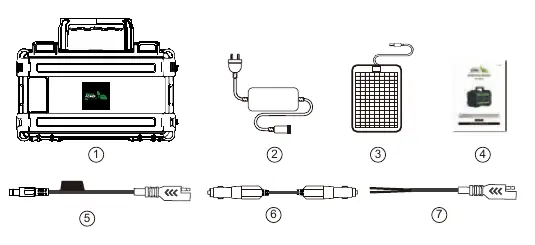
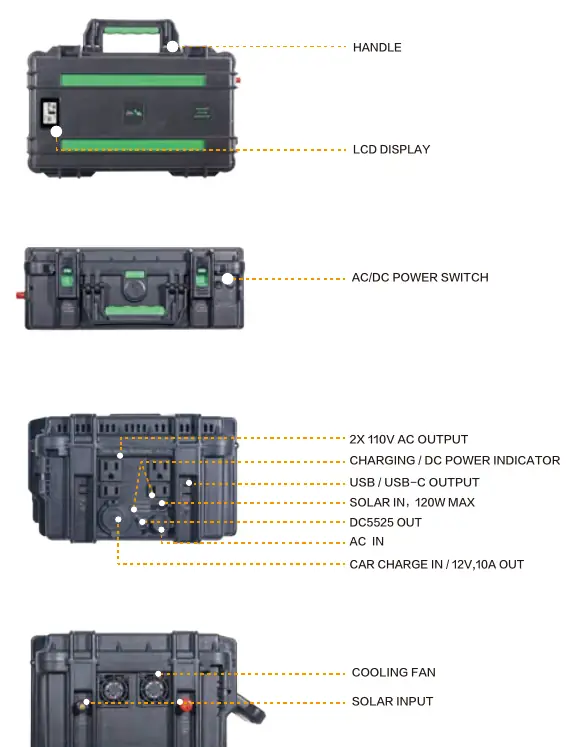
- LCD Display: Shows battery level, solar charging current, and AC output power.
- AC/DC Power Switch: Controls power output.
- Outputs: 2x 110V AC outlets, USB/USB-C ports, DC5525 port, and a cigarette lighter port.
- Inputs: AC charging port, solar input, and car charging input.
Charging the Generator
The generator has four charging ports. It supports simultaneous charge and discharge, provided the output power is less than the input power.
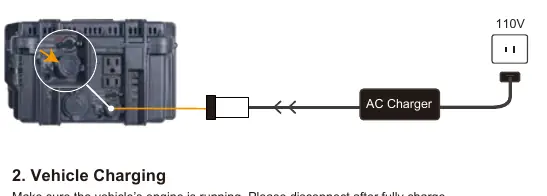
- AC Charging: Connect the AC charger to the AC input. The adapter light turns red while charging and green when fully charged.
- Vehicle Charging: Ensure the vehicle engine is running. The DC Power switch must be set to ON.
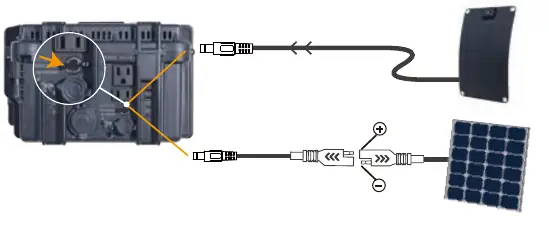
- Solar Charging (Under 120W): Use the included DC socket connector or SAE-DC cable. The LCD will show zero charging current if input is under 0.5A.
- Solar Charging (Over 120W): Use the bare end connector. Supports up to 400W maximum. Ensure solar panel Voc is less than 26V and current is under 20A.
Using Outputs
The generator provides power through three areas:
- AC Output: Turn on the AC power switch. The buzzer will beep, the fan will run for 3 seconds, and the AC function will activate.
- DC Output: Turn on the DC power switch. Includes cigarette port (max 120W) and DC5525 port (max 60W).
- USB/Type-C Output: Turn on the DC power switch to activate.
Safety and Maintenance
- Storage: For long-term storage (over 1 month), charge to about 70%. Store in a low humidity environment between -10 and 35°C.
- Temperature Protection: The system will shut down if internal temperatures exceed 50°C.
- Battery: The internal battery is not user-replaceable.
Practical help
Common problems
Generator will not turn on or has no output
Remove all loads, charge the unit for 5-10 minutes, and reboot.
Accidental shutdown during use
The internal protection system may have triggered due to overload, over-temperature, or short circuit. Remove electrical equipment, ensure the unit is in a normal temperature range, and charge for 5-10 minutes.
Solar charging not working
Check that the solar panel Voc is less than 26V and the current is under 20A. Ensure the SAE connector polarity is correct (Female Positive).
Vehicle charging not working
Check the fuse of the charging cable and ensure the DC Power switch is set to ON.
Before use
- Read all assembly and operation instructions.
- Charge the generator before first use.
- Ensure the environment is dry and free of corrosive gases.
- Verify that the solar panel is covered with an opaque material during installation to avoid shock hazards.
- Check that the DC Power switch is ON for vehicle charging.
Specs in practice
- 1000W Rate / 2000W Peak
- The generator provides 1000W of continuous power and can handle surges up to 2000W.
- BMS Protection
- Battery Management System that protects against over-current, over-charge, over-discharge, and short circuits.
Images and diagrams
- The LCD display provides real-time monitoring of battery percentage, solar input current, and AC output wattage.
- The rear panel features cooling fans and solar input ports.
- The front panel houses the AC outlets, USB ports, and DC charging inputs.
Model compatibility
- Solar panels over 120W require the bare end connector.
- DC5521 input port is limited to 120W maximum.
- Some electrical devices may not be compatible if their rated power exceeds the generator's capacity.

Manual page author
Michael Turner
Technical manual editor
Reviews PDF manuals for structure, safety notes, and practical product details so readers can find the right information quickly.