Electronics / Security Systems
DMP 1100R Series Wireless Repeater Installation Guide
Installation and programming guide for the DMP 1100R Series Wireless Repeater. Includes detailed steps for panel programming, mounting, wiring, tamper configuration, and battery maintenance.
Table of contents
Manual images
Click an image to enlargeQuick Guide from the Manual
The DMP 1100R Series Wireless Repeater is designed to extend the communication range of DMP wireless systems. It is compatible with all DMP 1100 Series Wireless Receivers (Version 106 or higher) and panels with built-in wireless receivers. The device includes a 24-hour backup battery and supports 128-bit AES encryption (requires panel version 183+ and receiver version 300+). Note that it is not compatible with the 1100T Wireless Translator.
Programming the Panel
Before installation, the panel must be programmed to recognize the repeater. Ensure you have the panel programming guide available.
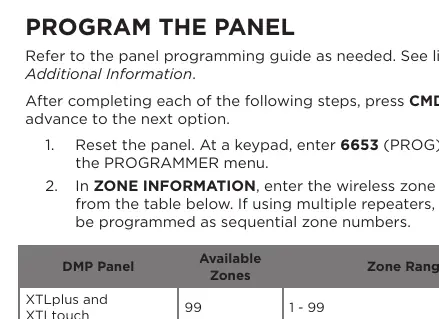
- Reset the panel and enter 6653 (PROG) at a keypad to access the PROGRAMMER menu.
- Navigate to ZONE INFORMATION and enter the wireless zone number based on your panel type (refer to the programming table in the manual).
- Enter a name for the repeater at the *UNUSED* prompt.
- Select AUX 1 as the ZONE TYPE.
- Select YES for WIRELESS.
- Enter the eight-digit serial number of the repeater.
- Set the supervision time (default is 240).
- Select NO at the NEXT ZONE prompt for further options.
- Program ARMED OPEN and DISARMED OPEN as TROUBLE to receive power trouble alerts.
- Program ARMED SHORT and DISARMED SHORT as ALARM to receive tamper alerts.
- Press CMD until STOP displays, then save the programming.
Tamper Configuration
The 1100R features a case and wall tamper. To enable or disable the wall tamper, locate the two-position header on the circuit board:
- Enable Tamper: Place the jumper on the top two pins.
- Disable Tamper: Place the jumper on the bottom two pins.
When the housing cover is removed, the tamper activates and sends a trouble signal to the panel.
Mounting the Repeater
For optimal performance, mount the repeater on a flat surface away from large metal objects. It should be positioned between the wireless receiver and the transmitters that are out of range.
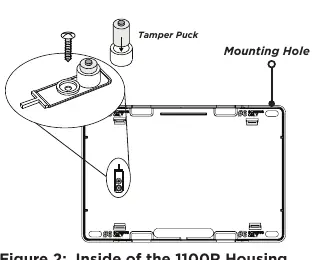
- Remove the housing cover.
- Secure the repeater to the wall using the supplied screws in the mounting hole locations.
- If the wall tamper is enabled, ensure a screw is placed through the 5th hole behind the circuit board to secure the carbon spacer to the wall.
- The DMP logo LED will turn green if the signal strength is good. If red, relocate the device.
Powering the Repeater
The 1100R can be powered by a 12 VDC external power supply (such as the included 376L or optional 505-12).
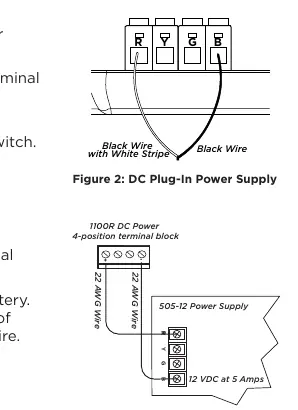
- Plug-In DC Power Supply (376L): Connect the black wire with the white stripe to the R (red) terminal and the black wire to the B (black) terminal. Plug into a non-switched outlet.
- External Power Supply (505-12): Observe positive and negative polarity. Use 22 AWG wire to connect the DC power terminal block to the DC terminal on the power supply PCB.
Maintenance and Battery Replacement
The 1100R includes a rechargeable battery for up to 24 hours of backup power. Replace the battery every three years using only the DMP Model 1100RBAT800/8.
- Remove the housing cover.
- Disconnect the battery lead connector from the BAT header and remove the PCB.
- Remove the old battery from the double-sided tape.
- Secure the new battery with double-sided sticky tape.
- Reconnect the battery lead and replace the PCB and housing cover.
Practical help
Common problems
DMP logo LED is red
The signal strength is poor. Relocate the repeater to a position that allows the LED to remain green.
Power failure indicated
Check the DC power source connection. Power failure is indicated as an open condition on the repeater zone.
Low battery condition
Ensure the battery is properly plugged into the battery connector or replace the battery if it is older than three years.
Before use
- Verify panel compatibility (Version 106+ for receivers, 183+ for encryption).
- Ensure the repeater is not mounted on or near large metal objects.
- Have the 8-digit serial number ready for programming.
- Check that the power supply is not controlled by a switch.
- Ensure the backup battery is connected during installation.
Specs in practice
- Primary Operating Voltage
- 12 VDC, 30 mA.
- Frequency Range
- 905-924 MHz.
- Backup Battery
- 3.7 VDC, 800 mAh Lithium Polymer; provides up to 24 hours of backup.
Images and diagrams
- Figure 1: Repeater overview showing wall tamper and battery connector.
- Figure 2: Mounting hole locations and tamper puck.
- Figure 3: Wiring diagram for plug-in power supply (R/B terminals).
- Figure 4: Wiring diagram for external 12VDC power supply.
Model compatibility
- Not compatible with 1100T Wireless Translator.
- Requires DMP 1100 Series Wireless Receivers (Version 106 or higher).

Manual page author
Michael Turner
Technical manual editor
Reviews PDF manuals for structure, safety notes, and practical product details so readers can find the right information quickly.