Lighting / LED Drivers
Installation Manual for Domus Line X-DRIVER LED Power Supply
Quick guide for the Domus Line X-DRIVER LED power supply. Includes installation steps, wiring diagrams, pairing instructions for remote controls, and app configuration.
Table of contents
Manual images
Click an image to enlargeQuick guide from the manual
The Domus Line X-DRIVER is a power supply unit designed exclusively for LED lamps. It features built-in protection against short circuits, overloads, and overheating. The device supports various control modules, including IR and PIR sensors, remote controls, and the Domus 4U App. Always disconnect mains power before performing any installation or maintenance.
Technical Specifications
- Input voltage: 100-120VAC, 220-240Vac (100-120VAC for North America only)
- Input frequency: 50/60Hz
- Output voltage: 12-24Vdc (varies by model)
- Rated output power: 0-15W, 0-30W, 0-60W, 0-96W
- Dimming range: 2%-100%
- Operation mode: PWM+PFM
- Ambient temperature: -20 to +40°C
- IP protection: IP20
Installation and Wiring
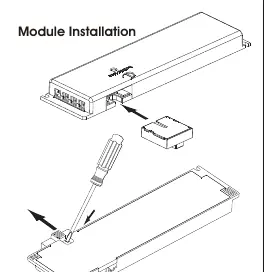
The X-DRIVER is designed for independent installation. Ensure the device is installed in a location with adequate ventilation. To install control modules (CM1-XD, CM2-XD, CM3-XD, CM4-XD), insert the module into the designated slot on the driver housing. Note that the CM4-XD module is not compatible with the X-DRIVER 15W model.
Control Modules and Sensors
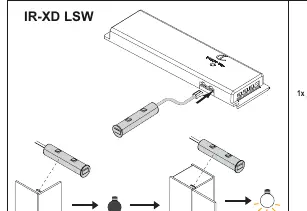
IR-XD LSW/DSW: These sensors allow for touchless or touch-based dimming and switching. Ensure the sensor is installed within the specified distance (min 1mm) from the surface.
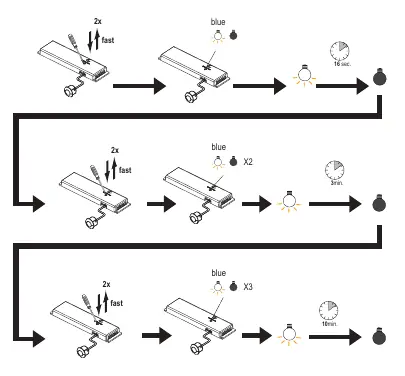
PIR XD: This motion sensor automatically turns lights on when motion is detected. It features adjustable timers (16 sec, 3 min, 10 min) which can be configured by pressing the button on the driver.
Remote Control Pairing
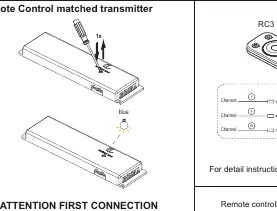
To pair a remote control (RC1, RC3, or Call-ME V17):
- Disconnect the power supply and wait 60 seconds.
- Reconnect the power.
- Within the specified time, perform the pairing sequence as indicated for your specific remote model (usually involving holding a button for 1-5 seconds until the light flashes).
- The light will flash to confirm successful pairing.
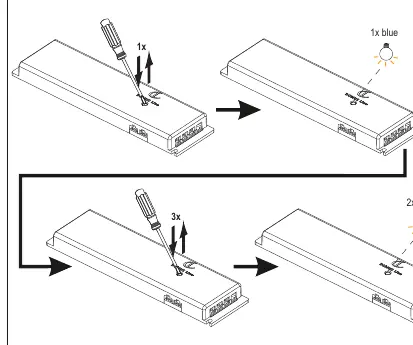
To reset a matched transmitter, perform the reset sequence by pressing the button on the driver housing according to the specific flash pattern indicated in the manual.
App Configuration
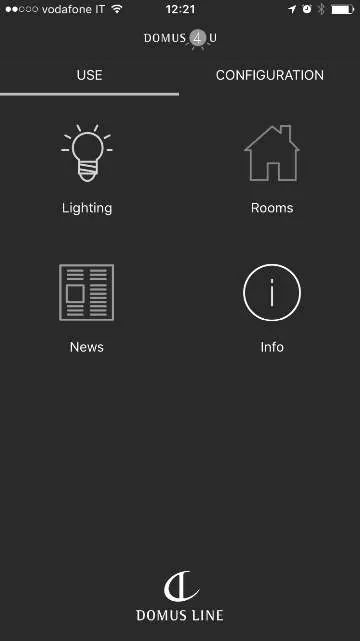
The Domus 4U App allows control of up to 5 X-DRIVER devices via Bluetooth. Download the app, search for devices, and follow the on-screen instructions to rename and manage your lighting zones.
Safety and Protection
The device is a Class II insulation product and does not require earthing. It is thermally protected at 110°C. If the protection circuit triggers due to a fault, the X-DRIVER will restart automatically once the issue is resolved.
Practical help
Common problems
Power supply turns off unexpectedly
The built-in protection circuit has triggered due to a short circuit, overload, or overheating. The device will restart automatically once the problem is resolved.
Remote control not responding
Ensure the remote is paired correctly. If necessary, perform the reset procedure and re-pair the transmitter.
Before use
- Ensure mains power is disconnected before starting installation.
- Verify that environmental conditions are suitable for the product.
- Check that the LED lamp is compatible with the power supply.
- Ensure the correct control module is used for your specific X-DRIVER model.
Images and diagrams
- Wiring diagram: Shows connection of power cable to the driver and LED lights to the output ports.
- Module installation: Shows the insertion of control modules into the side of the driver housing.
Model compatibility
- CM4-XD module is not compatible with X-DRIVER 15W.
- Compatible with IR, PIR sensors, remote controls, and Domus 4U App.
- Max 7 controllers can be connected to one smart driver.

Manual page author
David Miller
Documentation analyst
Organizes user manual content into clear summaries, with attention to model details, product context, and everyday usability.