Lighting / Controllers & Dimmers
User Manual for Sunricher 100W 24V DALI DT6 NFC LED Driver
Comprehensive user guide for the Sunricher 100W 24V DALI DT6 NFC LED Driver. Includes installation instructions, wiring diagrams for DALI and Push Dimmer, NFC programming steps, and technical specifications.
Table of contents
Manual images
Click an image to enlargeQuick Guide
This LED driver is designed for indoor lighting applications. Before installation, ensure the power is disconnected. The device supports DALI-2, DT6 commands, and NFC programming. Key installation steps include proper wiring according to the diagram, configuring parameters via the SR NFC Tool app, and verifying compatibility with your DALI master controller.
Safety and Warnings
- Do not install the device while power is applied.
- Do not expose the device to moisture.
- Ensure the wiring is performed by a qualified professional.
- The device is IP20 rated, suitable for indoor use only.
Wiring and Installation
The driver supports two primary connection methods:
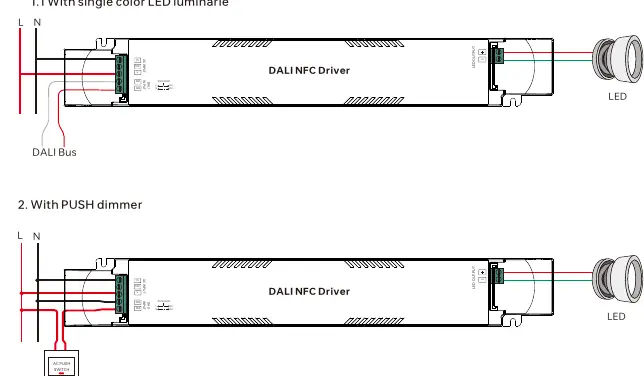
With DALI Bus
Connect the DALI bus to the DALI input terminals. The driver is compatible with universal DALI masters that support DT6 commands. The DALI address is assigned automatically by the DALI Master controller.
With PUSH Dimmer
Connect the AC Push switch to the PUSH DIM terminals. This allows for manual control of the light intensity.
NFC Programming
You can configure parameters using the "SR NFC Tool" app on your mobile device.
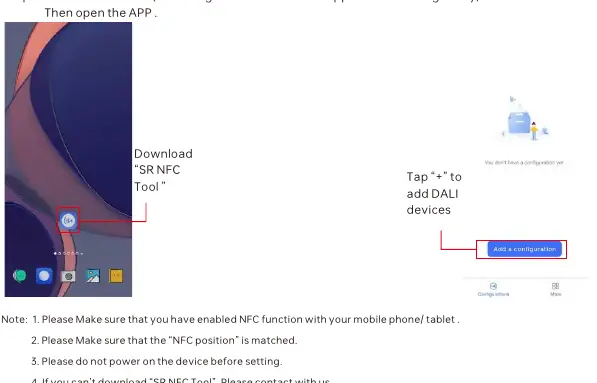
- Download and open the "SR NFC Tool" app.
- Enable NFC on your mobile phone or tablet.
- Ensure the device is not powered on during the setting process.
- Tap the "+" icon in the app to add the DALI device.
- Follow the on-screen instructions to unlock the device and configure parameters such as dimming range, fade time, and PWM frequency.
AC Push Function
The AC Push function allows for manual control:
- Switch ON/OFF: Click the button.
- Adjust Intensity: Press and hold the button to increase or decrease light intensity. Release at the desired level. Repeat the operation to reverse the dimming direction. The dimming range is 1% to 100%.
Technical Specifications
- Output: 24VDC, Max 4.17A, 100W.
- Input: 220-240VAC/220-240VDC.
- Dimming Interface: DALI Device Type 6 / AC Push.
- PWM Frequency: Selectable (Recommended: 1.5kHz/3.3kHz for residential, 9.9kHz for high-end/luxury).
- Protection: Short circuit, Over current, Over temperature (all require removing fault and re-powering).
Practical help
Common problems
Device not responding to DALI commands
Ensure the DALI master is compatible with DT6 commands and that the DALI bus is wired correctly.
Short circuit, Over current, or Over temperature protection triggered
Remove the fault condition and re-power the device to reset.
NFC programming not working
Ensure NFC is enabled on your phone, the device is not powered on, and the NFC position on the phone is correctly aligned with the driver.
Before use
- Verify the input voltage matches 220-240VAC.
- Ensure the LED load is 24VDC.
- Check that the NFC function is enabled on your mobile device.
- Ensure the device is powered OFF before attempting NFC configuration.
- Confirm the wiring matches the intended control method (DALI or Push Dimmer).
Specs in practice
- PWM Frequency
- Adjustable frequency for dimming; higher frequencies (9.9kHz) are better for high-end/luxury lighting to prevent flicker.
Images and diagrams
- Wiring diagram shows separate terminals for AC Input, DALI Input, and LED Output.
- The Push Dimmer diagram shows the AC Push switch connected to the PUSH DIM terminals.
Model compatibility
- Compatible with universal DALI masters that support DT6 commands.
- Requires SR NFC Tool app for advanced parameter configuration.

Manual page author
David Miller
Documentation analyst
Organizes user manual content into clear summaries, with attention to model details, product context, and everyday usability.