Power / Batteries & Chargers
User Manual for Eco-Worthy 12V 20A Smart Battery Charger
Quick guide for the Eco-Worthy 12V 20A Smart Battery Charger. Learn how to connect, select charging modes, adjust current, and troubleshoot common issues.
Table of contents
Manual images
Click an image to enlargeQuick guide from the manual
The Eco-Worthy 12V 20A Smart Battery Charger is designed for various battery types, including LiFePO4, AGM, and standard lead-acid batteries. It features automatic 12V/24V recognition and manual current selection. Safety Warning: Do not disassemble the charger, do not immerse it in water, and keep it away from flammable materials. Always confirm the correct charging mode before operation.
Product Description
The charger features a digital display showing battery voltage, charging current, and State of Charge (SOC). Controls include a Mode Switch Button for battery types/modes and a Current Switch Button for adjusting amperage (5A, 10A, 15A, 20A).
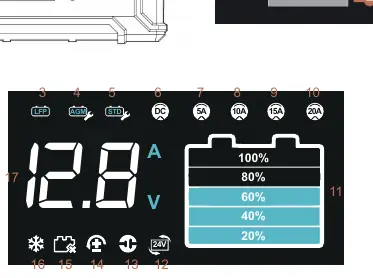
Charging Modes
- LFP: For LiFePO4 battery charging.
- AGM: For AGM battery charging.
- STD: For standard lead-acid battery charging.
- DC: 12V/24V DC power supply mode.
- Recovery Modes (AGM/STD): Used to repair old, damaged, or sulfated 12V lead-acid batteries using pulse charging.
- Low-Temperature Charging: Uses a small current (2A) initially for lead-acid batteries.
- Lithium Battery Activation: Automatically activates lithium batteries.
How to Use
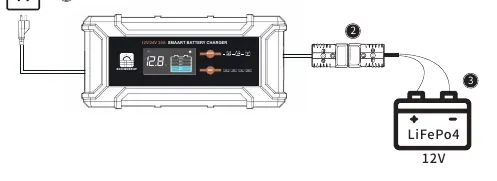
- Connect the charger's AC interface to mains power. The charger enters standby mode.
- Press the MODE button to select the battery type/mode and the AMP button to set the desired current.
- Connect the battery to the Anderson cables (Red for positive, Black for negative).
- The screen will display voltage and current once charging begins.
- To disconnect: Unplug the AC connector first, then disconnect the Anderson connector, and finally remove the battery cables.
Troubleshooting
- Screen won't turn on: Check the AC power connection.
- Screen on but no charging current: Ensure the battery is connected and not faulty.
- Charging icon won't light up: The battery may be faulty, there may be a short circuit, or the charger's capacity is insufficient for the battery.
- Charging current 0A with alarm icon: The connection to the battery terminals is reversed.
Technical Specifications
The charger operates on 100-240 VAC input and provides 300W output power. It is compatible with 12V/24V batteries and operates in ambient temperatures between -10°C and 40°C.
Manufacturer information
ECO-WORTHY
Practical help
Common problems
Screen won't turn on
Check and ensure the AC power connection is correct.
Screen is on but has no charging current
No battery is connected or the battery is faulty.
Charger is working but the charging icon won't light up
The battery may be faulty, there is a potential short-circuit, or the charger efficiency is insufficient for the battery capacity.
Charging current is 0A and the screen shows an alarm icon
The connection from the charger to the battery terminals is reversed and needs correction.
Before use
- Ensure the battery voltage is 12V or 24V.
- Verify the battery type (LiFePO4, AGM, or STD).
- Check that the charger is not wet or immersed in water.
- Connect the AC power first.
- Connect the Anderson cables (Red to positive, Black to negative).
Specs in practice
- Input Voltage
- 100-240 VAC, 50-60Hz
- Output Power
- 300W
- Ambient Temperature
- -10°C to 40°C (14°F to 104°F)
Images and diagrams
- The display shows battery voltage, charging current, and SOC (State of Charge) levels.
- Anderson connectors are used for battery connection (Red=Positive, Black=Negative).
Model compatibility
- Compatible with 12V/24V batteries.
- Recovery modes (AGM/STD) are only applicable to 12V lead-acid batteries.
- Low-temperature charging mode is only for 12V/24V lead-acid batteries.

Manual page author
David Miller
Documentation analyst
Organizes user manual content into clear summaries, with attention to model details, product context, and everyday usability.