Power / Solar Charge Controllers
User Manual for Eco-Worthy 12V/24V 30A Solar Charge Controller
Quick guide for the Eco-Worthy 12V/24V 30A Solar Charge Controller (Model EC0525-U). Includes installation steps, wiring instructions, battery settings, error codes, and troubleshooting.
Table of contents
Manual images
Click an image to enlargeQuick Guide
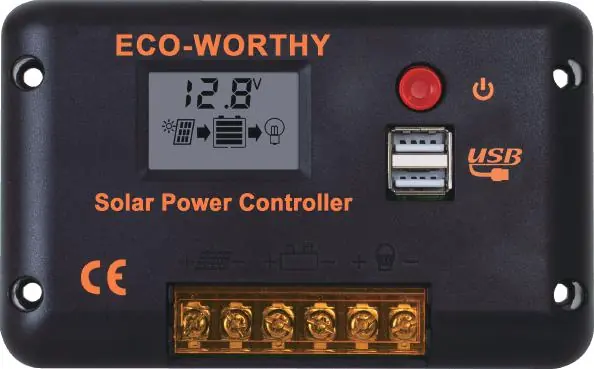
This solar charge controller is designed for 12V/24V systems with automatic recognition. Important: Always connect the battery to the controller first, then connect the solar panels. The controller will start automatically.
Installation
The controller should be installed indoors in a dry, well-ventilated area by a qualified electrician. Do not wear jewelry during installation and ensure the power supply is cut off before starting.
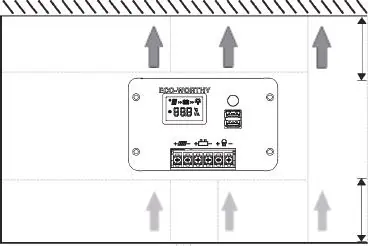

- Measure and drill 4x6mm holes on the wall.
- Install the controller using M4 self-drilling screws.
- Ensure proper airflow around the unit as it may get warm during operation.
Wiring
Follow the wiring sequence carefully to avoid damage:
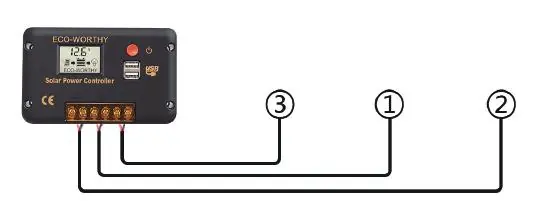
- Connect the battery to the controller.
- Connect the solar panels to the controller.
- Connect the DC load (if applicable).
Operation and Settings
The controller features an LCD display and a button for configuration. To enter settings, long-press the button for 3 seconds. Short-press to navigate, long-press to select/edit, and long-press to save changes.
Battery Types: The controller supports AGM, GEL, and LiFePO4 batteries. Note that settings for 12V batteries must be doubled when using a 24V battery system.
DC Output Modes:
- All day mode: Load is on all day.
- Automatic mode: Load turns on when there is no PV input and turns off when PV input starts (3-minute delay).
- Manual mode: Double-click the button to turn the load on or off.
Troubleshooting
If the controller displays an error code, refer to the following:
- E01: Battery voltage too high.
- E02: Battery voltage too low.
- E03: PV input voltage too high.
- E04: PV input current too high.
- E05: Output current too high.
- E06: Internal temperature too high.
- E07: Load short-circuit protection.
- E08: PV short-circuit protection.
Specifications
- Model: EC0525-U
- Max Charge/Output Current: 30A
- System Voltage: 12V/24V auto-recognition
- Max PV Input Voltage: 50V
- USB Port: 5V/2A
- Protection Level: IP32
- Operating Temperature: -20 to +60°C
Technical Support
If you experience technical issues, contact Eco-Worthy support:
Phone (US): 1-866 939 8222Phone (UK): +44 20 7570 0328Phone (DE): +49 693 1090 113Email: [email protected]Website: www.eco-worthy.com
Official resources from the manual
Manufacturer information
ECO-WORTHY
Practical help
Common problems
Screen and LED indicator won't turn on
Test battery terminal voltage with a multimeter (should be 10-60V). Check wiring, fuse, and breaker.
Controller is not charging
Check wiring, fuse, and breaker. Ensure PV input voltage is higher than battery voltage.
Battery SOC is too low
Add more solar panels to the system or increase battery bank capacity.
Before use
- Install indoors in a dry, well-ventilated area.
- Ensure a qualified electrician performs the installation.
- Do not wear jewelry during installation.
- Cut off power supply before installing.
- Connect battery to the controller first, then solar panels.
Specs in practice
- System Voltage
- 12V/24V auto-recognition.
- Max. Charge Current
- 30A.
- Max. PV Input Voltage
- 50V.
- Protection Level
- IP32 (protected against solid objects over 2.5mm and spraying water).
Images and diagrams
- Wiring sequence: 1. Battery, 2. Solar Panels, 3. Load.
- Mounting: Drill 4x6mm holes for M4 screws.
Model compatibility
- Compatible with AGM, GEL, and LiFePO4 batteries.
- Settings for 12V batteries must be doubled for 24V systems.

Manual page author
David Miller
Documentation analyst
Organizes user manual content into clear summaries, with attention to model details, product context, and everyday usability.