Electronics / Security Cameras
User Manual for EKO Robot Wifi 1080p Surveillance Camera
Quick guide for the EKO Robot Wifi 1080p Surveillance Camera. Learn how to set up, pair with the Yoosee app, configure Wi-Fi, and use motion detection features.
Table of contents
Manual images
Click an image to enlargeQuick Guide
This surveillance camera requires a 2.4GHz Wi-Fi connection to operate. It is designed for indoor use and supports motion detection, night vision, and remote access via the Yoosee application. Ensure your SD card (up to 128GB) is formatted to FAT32 before insertion.
Product Features
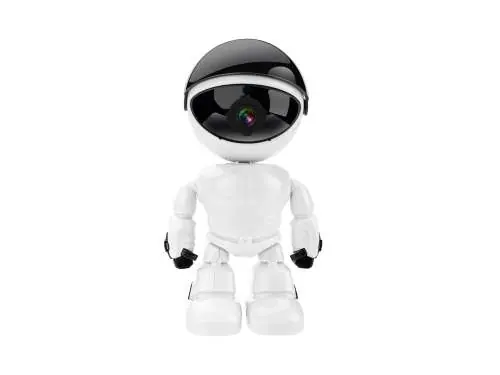
- Connectivity: Supports 2.4GHz Wi-Fi networks only.
- Motorized Control: 355° horizontal and 45° vertical rotation.
- Recording: Continuous or motion-triggered recording with programmable schedules.
- Storage: Supports SD cards up to 128GB (must be FAT32).
- App: Managed via the Yoosee application.
Safety Instructions
- Use the product in a dry environment; avoid humidity and liquid contact.
- Do not expose the device to direct sunlight or high temperatures for extended periods.
- Do not use during thunderstorms.
- Keep sharp or metallic objects away from the device.
- The battery is integrated and non-removable; do not attempt to disassemble.
- Use only the provided cable for charging.
Getting Started
App Installation: Download the Yoosee application from the Apple Store or Google Play. Register an account before proceeding.
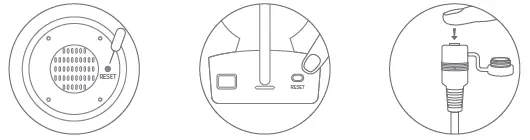
Powering On: Connect the device to power. A sound (Du du) should occur within 30 seconds. If you do not hear the sound, use the provided pin to press the Reset button until a sound is heard.
Pairing with the App
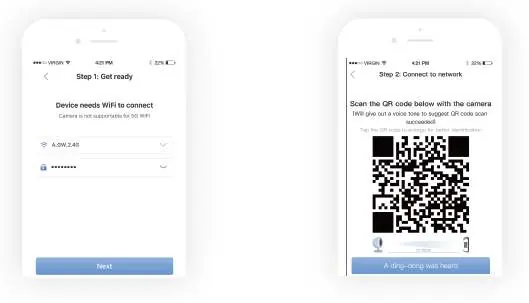
- Connect your smartphone to your 2.4GHz Wi-Fi network.
- Open the Yoosee app, go to Device, tap the + icon, and select Scan QR code to add device.
- Scan the QR code found on the camera.
- Enter your Wi-Fi password and tap Next.
- Align the camera 10-20cm from the QR code displayed on your phone screen. Once you hear a confirmation sound, complete the connection in the app.
Sharing Access
The primary owner can share camera access with others:
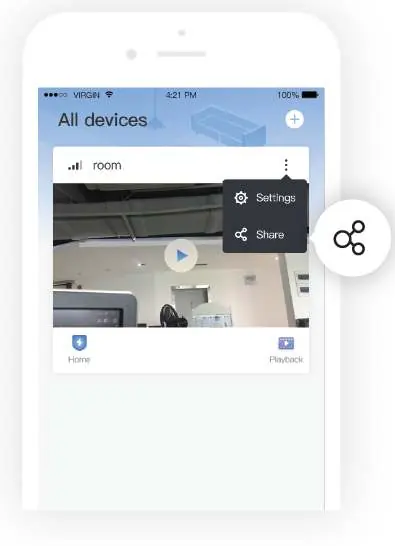
- Ensure friends have downloaded and registered on the Yoosee app.
- The owner can tap Share in the app settings.
- Follow the in-app instructions to configure guest rights and finalize the sharing process.
Practical help
Common problems
No sound heard during power-on
Use the reset pin to press the Reset button until a sound is heard.
Pairing fails
Ensure your phone is connected to a 2.4GHz Wi-Fi network; 5GHz networks are not supported.
SD card not recognized
Ensure the card is 128GB or smaller and formatted to FAT32.
Before use
- Ensure Wi-Fi network is 2.4GHz
- Download and register on the Yoosee app
- Format SD card to FAT32 (if using)
- Keep camera in a dry, indoor environment
- Use the provided charging cable
Images and diagrams
- Reset button location on the device
- QR code pairing process via smartphone
- Sharing interface in the Yoosee app
Model compatibility
- Requires 2.4GHz Wi-Fi
- Requires Yoosee App
- Indoor use only

Manual page author
Michael Turner
Technical manual editor
Reviews PDF manuals for structure, safety notes, and practical product details so readers can find the right information quickly.