Lighting / Stage Lighting
User Manual for Elation Professional Pixel Tape 16IP
Quick guide for the Elation Professional Pixel Tape 16IP. Includes technical specifications, connection diagrams for Pixel Drivers, and installation guidelines.
Quick answers from the manual
Quick answer
- The Pixel Tape 16IP is an outdoor-rated (IP65) LED tape that requires a compatible Elation Pixel Driver (170, 1000IP, or 4000 V2) and a DC24V power supply to operate. p. 1
Key actions
- Connect the Pixel Tape 16IP to a compatible Pixel Driver. p. 1, 3
Problems and fixes
Power or control issues
Check connections to the Pixel Driver and ensure DC24V power is supplied.
p. 1, 3Technical specifications
| Parameter | Value | Meaning | Pages |
|---|---|---|---|
| Operating Voltage | DC24V | Required power input | p. 1 |
| Power Consumption | 35W Max | Maximum power usage | p. 1 |
| IP Rating | IP65 | Ingress protection rating | p. 1 |
Where to find it in the PDF
- Specifications and Product Description p. 1
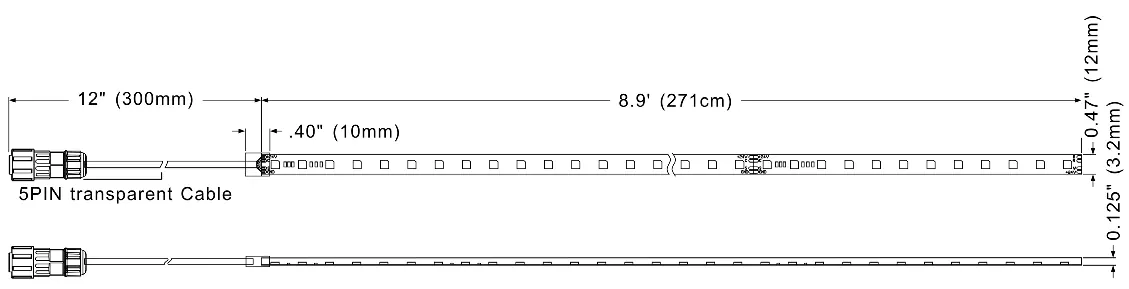
- Dimensions and Contact Info p. 2
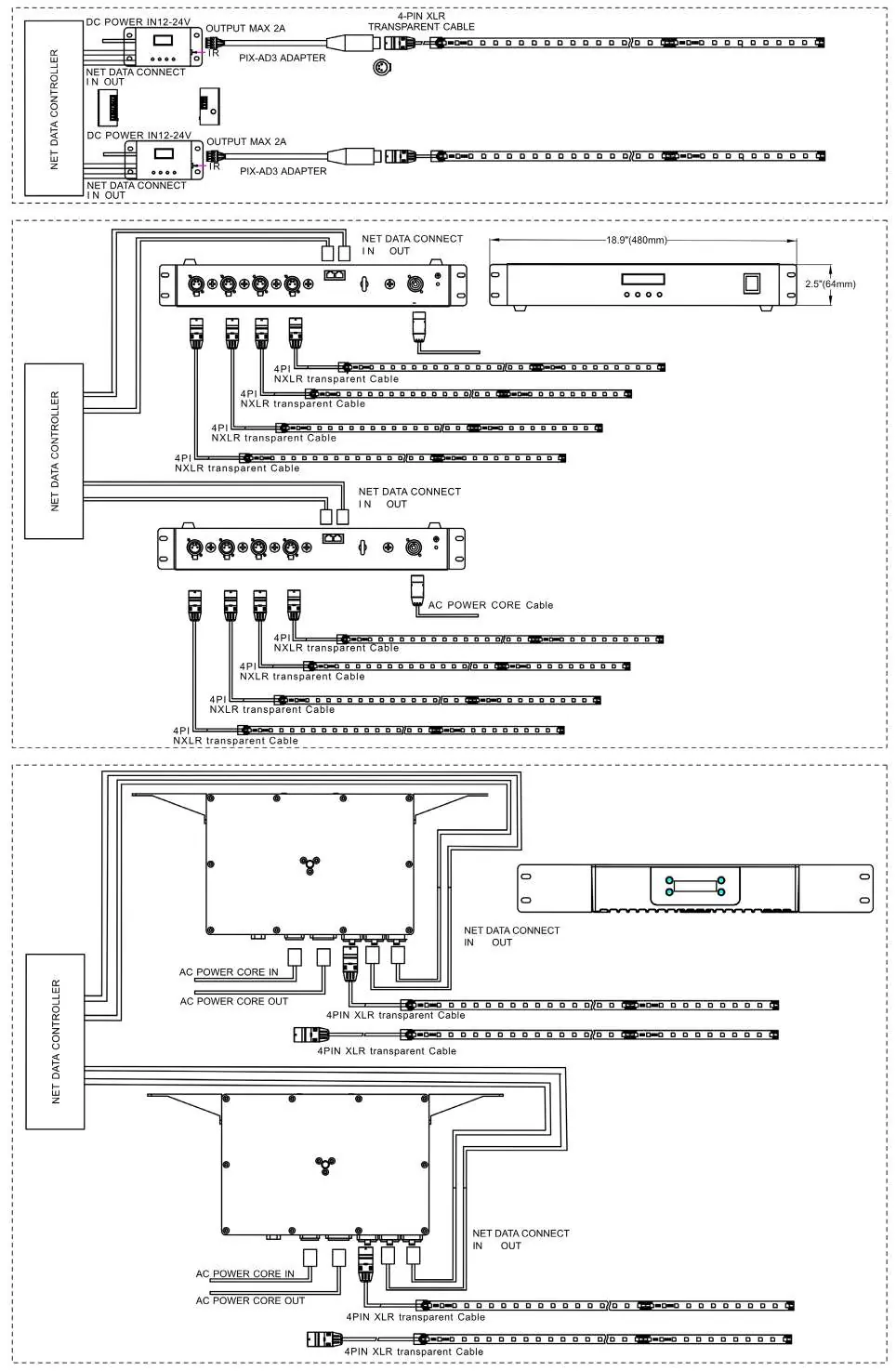
- Connection Diagrams p. 3
Table of contents
Manual images
Click an image to enlargeQuick guide from the manual
The Elation Professional Pixel Tape 16IP is an outdoor-rated, flexible LED pixel tape designed for professional lighting applications. To operate this device, you must connect it to a compatible Elation Pixel Driver (Pixel Driver 170, Pixel Driver 1000IP, or Pixel Driver 4000 V2). The tape is rated IP65, making it suitable for outdoor environments where it is protected against dust and low-pressure water jets.
Product Overview
The Pixel Tape 16IP features 170 RGB SMD tri-color LED pixels, providing 510 total DMX channels and over 1 billion color possibilities. It has a 120-degree viewing angle and comes with 3M outdoor adhesive for mounting.
Technical Specifications
- Source: APA102/RGB
- Light Output: 455 Lumens
- Operating Voltage: DC24V
- Power Consumption: 35W Max
- LED Spacing: 16mm
- LED Quantity: 170 pieces per tape
- Maximum Tape Runs: 3 Tapes
- Control Systems: DMX512, ARTNET, sACN, and KlingNet
- IP Rating: IP65
Connection Diagrams
The Pixel Tape 16IP must be connected to a compatible driver. Refer to the connection diagrams provided in the manual to ensure proper wiring between the Net Data Controller, the Pixel Driver, and the LED tape. Ensure you are using the correct cables (e.g., 4-pin XLR transparent cable or PIX-AD3 adapter depending on the driver model).
Safety and IP Rating
The IP65 rating indicates that the fixture is protected against the ingress of dust (6) and low-pressure water jets from any direction (5). Ensure the installation environment complies with these ratings to maintain the integrity of the product.
Contact Information
For support, contact Elation Professional:
Elation Professional USA: 6122 S. Eastern Ave., Los Angeles, CA. 90040. Phone: 323-582-3322. Email: [email protected]
Elation Professional B.V.: Junostraat 2, 6468 EW Kerkrade, The Netherlands. Phone: +31 45 546 85 66. Email: [email protected]
Elation Professional Mexico: AV Santa Ana 30, Parque Industrial Lerma, Lerma, Mexico 52000. Phone: +52 (728) 282-7070
Practical help
Common problems
Tape not lighting up
Verify the connection to the Pixel Driver (170, 1000IP, or 4000 V2) and ensure the power supply is providing DC24V.
Exceeding maximum tape runs
Do not exceed the limit of 3 tapes per run as specified in the technical data.
Before use
- Verify compatibility with your Pixel Driver model (170, 1000IP, or 4000 V2).
- Ensure the power source is DC24V.
- Confirm the installation environment is suitable for IP65 rated equipment.
- Check that you have the correct cables for your specific driver model.
Images and diagrams
- The manual provides specific connection diagrams for Pixel Driver 170, Pixel Driver 4000 V2, and Pixel Driver 1000IP.
- Diagrams illustrate the connection path from the Net Data Controller to the Driver and finally to the LED tape.
Model compatibility
- Compatible with DMX512, ARTNET, sACN, and KlingNet control systems.
- Requires Elation Pixel Driver 170, 1000IP, or 4000 V2.

Manual page author
Michael Turner
Technical manual editor
Reviews PDF manuals for structure, safety notes, and practical product details so readers can find the right information quickly.