Electronics / Remote Controls
User Manual for elero MonoTel 2 Remote Control
Quick guide for the elero MonoTel 2 remote control. Learn how to program the transmitter, replace batteries, mount the wall bracket, and troubleshoot common issues.
Table of contents
Manual images
Click an image to enlargeQuick guide from the manual
The elero MonoTel 2 is a single-channel transmitter used for controlling roller shutters, blinds, and awnings. It supports both bidirectional and unidirectional radio systems. To begin, ensure the receiver is in programming mode (usually by cycling the power at the circuit breaker). The transmitter is activated by pressing any button, which illuminates the status display.
Device explanation
The front of the device features the following controls:
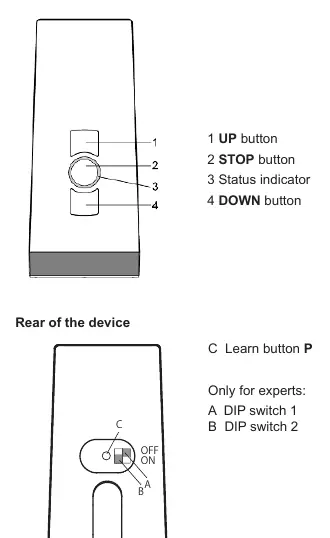
- 1 UP button: Moves the blind/shutter up.
- 2 STOP button: Stops movement.
- 3 Status indicator: LED ring showing operational status.
- 4 DOWN button: Moves the blind/shutter down.
The rear of the device contains the Learn button P for programming and two DIP switches (1 and 2) for expert settings.
Mounting of wall bracket
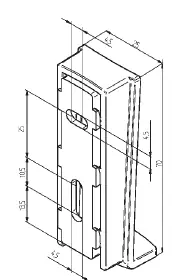
Ensure the wall bracket is installed in a location where it does not interfere with electric cables. Attach the bracket to the wall using the provided wall plugs and screws. The top part of the bracket is adjustable.
Programming the transmitter
Initial Programming:
- Switch the circuit breaker off and on again to put the receiver in programming mode (active for approx. 5 minutes).
- Press the P button on the rear of the transmitter briefly. The blind will move up and down to confirm programming mode.
- Press the UP button within 1 second of the blind moving in the Open direction.
- Immediately press the DOWN button when the curtain starts moving downwards. The transmitter is now programmed.
Programming additional transmitters:
- Press the UP, DOWN, and P buttons simultaneously for 3 seconds on an already programmed transmitter.
- Press the P button on the new transmitter until the status display lights up.
- Follow the same UP/DOWN confirmation steps as in initial programming.
Operation and settings
The device allows for setting intermediate positions and ventilation/turning positions. To program an intermediate position, move the blind to the desired position, then press the DOWN and STOP buttons simultaneously. To delete positions or transmitters, specific button combinations (e.g., STOP + DOWN or STOP + P) are required as detailed in the full manual.
Battery Replacement
If the status display flashes red, the batteries are weak. To replace them:
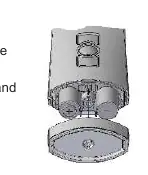
- Unscrew the underside of the device and open the housing.
- Remove the old batteries.
- Insert new batteries (2 x LR06 AA mignon) in the correct position.
- Reassemble the device.
Troubleshooting
If the drive is not running, check if the batteries are low or incorrectly installed. If the status display flashes red or orange, the receiver may be out of range, faulty, or not programmed. If the drive runs in the wrong direction, delete the transmitter and reprogram it.
Practical help
Common problems
Drive not running, status display does not light up
Batteries are low or incorrectly installed. Insert new batteries or check polarity.
Drive not running, status display flashes red or orange
Receiver may be out of radio range, faulty, or not programmed. Reduce distance to receiver or reprogram.
Drive runs in the wrong direction
Directions are incorrectly allocated. Delete the transmitter and reprogram.
Before use
- Ensure the receiver is in programming mode (cycle power at circuit breaker).
- Check that the transmitter is within range of the receiver.
- Verify batteries are installed correctly (2 x LR06 AA).
- Ensure the wall bracket is mounted securely without damaging electric cables.
Specs in practice
- Operating voltage
- 3 V DC (requires 2 x LR06 AA batteries).
- Radio frequency
- 867/868 MHz (standard) or 915 MHz (USA/Canada/Australia/South America).
- Temperature range
- 0 to +50 °C.
Images and diagrams
- The front panel contains the UP, STOP, and DOWN buttons with a central status LED.
- The rear panel houses the Learn button (P) and DIP switches for expert configuration.
- The wall bracket is designed for simple screw-in mounting.
Model compatibility
- Compatible with elero radio receivers.
- Can be used unidirectionally (ProLine range) or bidirectionally.
- Not suitable for areas with high interference like hospitals or airports.

Manual page author
Michael Turner
Technical manual editor
Reviews PDF manuals for structure, safety notes, and practical product details so readers can find the right information quickly.