Power / Batteries & Chargers
User Manual for Silvercrest 10-in-1 Remote Control KH 2159
Quick guide and user manual for the Silvercrest 10-in-1 Remote Control KH 2159. Learn how to program, set up macros, use the learning function, and troubleshoot your device.
Table of contents
Manual images
Click an image to enlargeQuick guide from the manual
The Silvercrest 10-in-1 Remote Control KH 2159 is designed to replace up to ten original remote controls for entertainment electronics with infrared receivers. Key operations include programming via brand code, manual code input, or automatic code search. The device features an LCD display for status and setup, macro functionality for command chains, and a learning function to copy signals from original remotes.
Safety instructions
- Batteries: Keep away from children. If swallowed, seek medical help immediately. Do not throw into fire or subject to high temperatures. Do not recharge non-rechargeable batteries.
- Device: Contains an infrared diode of laser class 1; do not look at it with optical devices. If the device is defective, do not attempt to repair it yourself; contact the manufacturer's service hotline.
Getting started
Unpacking: Ensure the package contains the remote, operating instructions, manufacturer's directory with device code list, and 2 x 1.5V AAA/LR03 batteries.
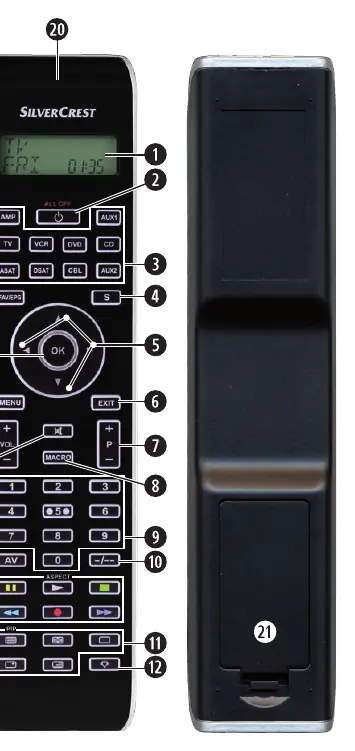
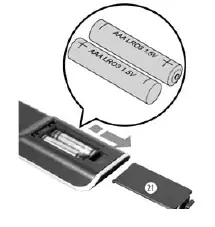
Inserting batteries: Open the battery compartment cover on the back. Insert two 1.5V AAA/LR03 batteries, ensuring correct polarity. Replace the cover. Settings are saved for approximately 1 minute during battery changes.
Programming the remote
There are three methods to program the remote:
- Brand code search: Select the brand and code directly via the LCD display. Hold the S button for 3 seconds, select "CODE SETUP", then "BRAND CODE". Use the arrow buttons to select the brand and confirm with OK.
- Manual code input: If you have the specific code from the manufacturer's directory, hold the S button for 3 seconds, select "CODE SETUP", then "ENTER CODE". Enter the four-digit code using the number buttons.
- Automatic code search: Use this if the device is not listed. Hold the S button for 3 seconds, select "CODE SETUP", then "SEARCH CODE". Point the remote at the device and press OK. The remote will cycle through codes until the device reacts. Press OK immediately to save.
System settings
Access the system menu by holding the S button for 3 seconds and selecting "SYSTEM SETUP". Available settings include:
- Time and Date: Set the current time (12/24h format) and date.
- Contrast: Adjust the LCD display contrast (0-15).
- Backlight: Set the duration the display and buttons remain illuminated (0-60 seconds).
- Global Volume/Mute: Assign volume control to a specific device regardless of the selected mode.
- Lock function: Block access to setup menus.
- System reset: Restore factory default settings.
Advanced features
- Timer Setup: Includes a sleep timer (1-99 minutes) and 4 event timers for specific button sequences at designated times.
- Learn Setup: Teach the remote commands from an original remote. Place both remotes 20-50mm apart, select "LEARN SETUP" on the Silvercrest, press the target button, and then the button on the original remote.
- Macro Setup: Program up to 16 button commands into a single macro button. There are 6 memory slots available.
- Favourites: Save preferred channels to 4 memory slots for quick access.
Troubleshooting
- Device does not react: Check batteries, ensure the correct device button is pressed, and verify the correct code is programmed.
- Commands incorrect: Ensure the remote is in the correct mode, batteries are fresh, and the correct code is used.
- LCD display blank: Check batteries or increase the contrast setting.
Technical data
- Controllable devices: 10
- Dimensions: 217 x 50 x 22 mm
- Weight: 102 g (without batteries)
- Power supply: 2 x 1.5 V, type AAA/LR03
- Operating temperature: +5 to +35°C
Manufacturer information
Silvercrest
Practical help
Common problems
Device does not react to the remote
Check batteries, ensure the correct device button is pressed, and verify the correct code is programmed.
Remote transmits commands incorrectly
Ensure the remote is in the correct mode, batteries are fresh, and try a different code.
LCD display is blank
Check battery installation and voltage, or increase the contrast setting.
Before use
- Insert 2x AAA/LR03 batteries
- Ensure a clear line of sight between the remote and the target device
- Have the original remote control available if using the learning function
Specs in practice
- Controllable devices
- The remote can be programmed to control up to 10 different devices.
- Operating temperature
- The device should be used in environments between +5°C and +35°C.
- Infrared LED
- Laser class 1; do not view directly with optical instruments.
Images and diagrams
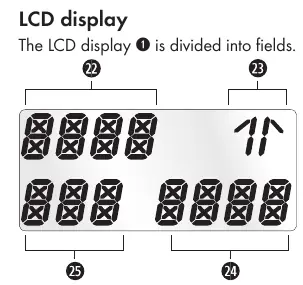
- The LCD display shows the selected device, time, and status icons.
- The battery compartment is located on the back of the remote.
- Device buttons (TV, VCR, DVD, etc.) are used to switch control modes.
Model compatibility
- Compatible with entertainment electronics equipped with infrared receivers.
- Not suitable for commercial use.
- Teletext functions require a TV with a teletext module.

Manual page author
David Miller
Documentation analyst
Organizes user manual content into clear summaries, with attention to model details, product context, and everyday usability.