Industrial / Valves
Emerson Supervisory Control Platform Firmware 2.19F01 Update Guide
Official update advisory for Emerson Supervisory Control Platform firmware version 2.19F01. Includes compatibility requirements, new features, bug fixes, and upgrade paths.
Table of contents
Manual images
Click an image to enlargeQuick Guide for Firmware Update
This document provides release notes and update instructions for the Emerson Supervisory Control Platform firmware version 2.19F01. Before proceeding with the update, ensure your system meets the minimum requirements. The Supervisory controller version 2.19F01 requires Connect+ version 1.5.3 or greater. It is recommended to install the latest version of Connect+ for best practices. If communication with Connect+ is required, upgrade Connect+ to the latest version first, then update the Supervisory controllers.
Compatibility
The 2.19F01 firmware is compatible with E3 and Site Supervisor controllers. Refer to the firmware platform mapping table to ensure the correct firmware file is used for your specific hardware platform.
New Features
The 2.19F01 update introduces several enhancements:
- Offline Programming: Allows configuration of Site Supervisor/E3 without hardware via a website.
- Layout Manager: Users can move views up and down within a panel and between other panels.
- Floor Plan Match Check: Verify unit types are matched after installing a floorplan using the Floorplan Match Info window.
- 16AI Board Application: Sensor units now support Ohms and Volts.
- UI Engineering Units: Differential (Delta) Pressure EU is now supported.
Key Fixes
This firmware release addresses various issues, including:
- Alarm Communications: Corrected content format in the Confirmation page and relay behavior.
- Graphing: Saved graphing points are no longer removed when leaving and returning to the app.
- Floorplan: Improved installation from USB, fixed widget display issues, and corrected scroll bar functionality.
- Network Settings: DNS Server value updates correctly when switching tabs.
- Circuit Applications: Case Defrost Schedule Summary will not display if no Circuit Applications are licensed.
- UI Enhancements: Improved process bars, error messages, and graph time filter behavior.
Upgrade Path and Support
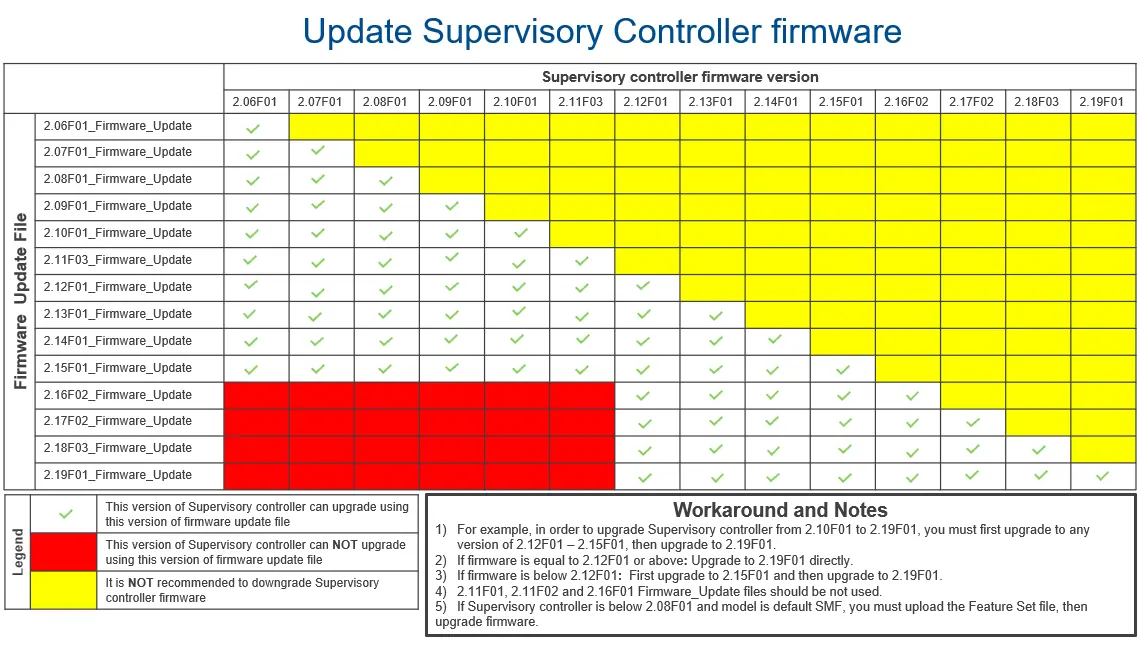
Follow the firmware upgrade matrix provided in the document to determine the correct upgrade path based on your current firmware version. If you require assistance, contact Emerson Digital Cold Chain Technical Support at 833-409-7505 or via email at [email protected].
Practical help
Common problems
Connect+ version is too old
Upgrade Connect+ to version 1.5.3 or greater before updating the Supervisory controller firmware.
Firmware upgrade path is unclear
Consult the Firmware Upgrade Matrix on page 6 to identify the required intermediate upgrade steps.
Device changes from Online to Unknown after upgrade
This issue has been resolved in the 2.19F01 firmware; ensure the update is applied correctly.
Before use
- Verify current Supervisory controller firmware version.
- Check current Connect+ version (must be 1.5.3 or higher).
- Review the Firmware Platform Mapping table to select the correct file.
- Consult the Firmware Upgrade Matrix to determine if an intermediate upgrade is required.
- Ensure all necessary data is backed up before starting the update.
Specs in practice
- Firmware 2.19F01
- The latest general release version of the Supervisory controller firmware.
- Connect+ 1.5.3
- Minimum required version of the Connect+ software to support firmware 2.19F01.
Images and diagrams
- The Firmware Upgrade Matrix (page 6) uses a color-coded grid to show which firmware versions can be upgraded directly to 2.19F01 and which require intermediate steps.
- The Firmware Platform Mapping table (page 2) identifies which firmware files are specific to E3 controllers, Site Supervisor controllers, or both.
Model compatibility
- E3_#.#####_Display_Update is for E3 only.
- E3_#.#####_Firmware_Update is for E3 and Site Supervisor.
- SS_#.#####_Firmware_Update is for Site Supervisor only.

Manual page author
David Miller
Documentation analyst
Organizes user manual content into clear summaries, with attention to model details, product context, and everyday usability.