Electronics / Security Cameras
User Manual for eufy Security S3 Pro eufyCam 2-Cam Kit
Comprehensive user guide for the eufy Security S3 Pro eufyCam 2-Cam Kit. Includes setup instructions, HomeBase storage expansion, camera mounting, solar panel installation, and technical specifications.
Quick answers from the manual
Quick answer
- To set up the eufyCam S3 Pro, download the eufy Security app, connect the HomeBase to your router, sync the cameras within 1 meter, and mount them in a location with direct sunlight. p. 2, 3
Key actions
- Expand storage p. 3, 4
- Mounting cameras p. 5, 6, 7
First start
- Power on HomeBase and connect to router p. 2
Problems and fixes
Camera battery low
Ensure solar panel receives 1.5 hours of direct sunlight daily or charge via cable.
p. 5Maintenance and reset
- Resetting/Reconfiguring p. 8
Technical specifications
| Parameter | Value | Meaning | Pages |
|---|---|---|---|
| HomeBase Model | T8030 | HomeBase S380 | p. 2, 9 |
| Camera Model | T8162 | eufyCam S3 Pro | p. 2, 8 |
Where to find it in the PDF
- What's in the Box p. 1
- Device Overview p. 2
- HDD Installation p. 4
Table of contents
Manual images
Click an image to enlargeQuick guide from the manual
To set up your eufy Security S3 Pro eufyCam system, follow these steps:
- Download the eufy Security app and create an account.
- Power on the HomeBase and connect it to your router using the provided Ethernet cable.
- Wait for the HomeBase LED to turn blue.
- Sync the cameras with the HomeBase, keeping them within 1 meter during the process.
- Fully charge the cameras before mounting them outdoors.
- Mount the cameras and solar panels in locations with direct sunlight and strong Wi-Fi signal.
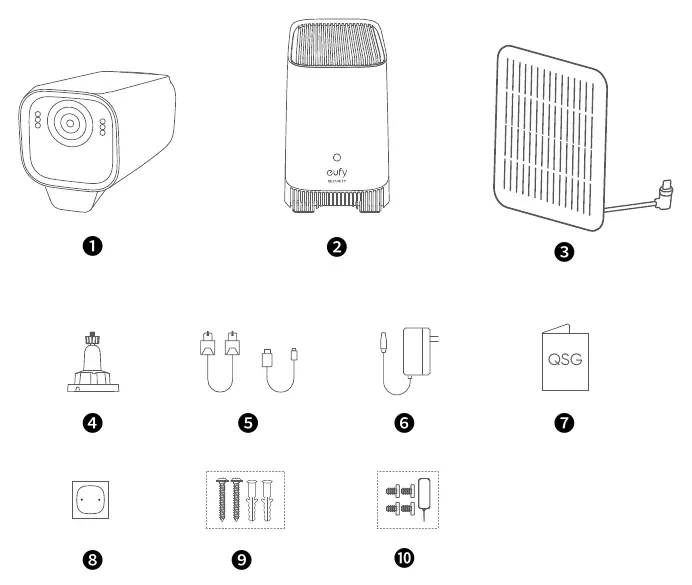
What's in the Box
Ensure all components are present based on your kit type. The kit typically includes the eufyCam S3 Pro cameras, HomeBase S380, backup solar panels, mounting brackets, positioning stickers, screw packs, and a reset needle.
Device Overview
eufyCam S3 Pro (T8162)
The camera features a spotlight, lens, motion sensor, LED indicator, microphone, built-in solar panel, speaker, SYNC button, and a USB-C charging port. Ensure the USB-C port is protected by the waterproof cover after charging.
HomeBase S380 (T8030)
The HomeBase includes a status LED, reset hole, speaker, hard drive bracket, SYNC/ALARM OFF button, USB ports, Ethernet port, and DC power port.
Storage Expansion
The HomeBase S380 comes with 16 GB of internal storage. You can expand this by adding a 2.5-inch SATA HDD or SSD. Important: The HomeBase must be powered off before installing or removing a hard drive. New drives must be initialized via the eufy Security app.
Mounting Guide
Choosing a Location
For optimal performance, mount cameras at a height of 2-3 meters with a field of view of 12 meters. Ensure the solar panel area is fully exposed to direct sunlight for at least 1.5 hours per day and that the camera has a strong Wi-Fi signal.
Installation
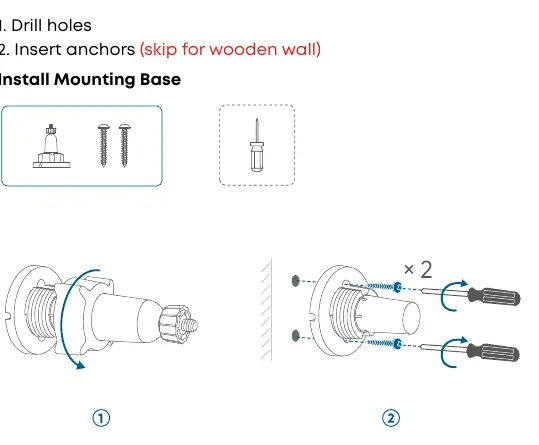
- Drill holes using the positioning stickers.
- Insert anchors (skip for wooden walls).
- Install the mounting base.
- Attach the camera to the bracket and tighten the knobs to secure the angle.
- Mount the backup solar panel and connect it to the camera.
Technical Specifications
The system operates on 2.4GHz Wi-Fi. The HomeBase (T8030) requires a 12V/2A power adapter. Cameras (T8162) should be fully charged before outdoor installation. The system supports up to 16 eufyCams.
Practical help
Common problems
Camera not syncing with HomeBase
Ensure the camera is within 1 meter of the HomeBase during the synchronization process.
Hard drive not recognized
Ensure the HomeBase was powered off during installation and initialize the new drive through the eufy Security app.
Low battery alarm
The camera uses solar charging; ensure the solar panel is exposed to direct sunlight for at least 1.5 hours daily. Charge via cable only if the low battery alarm persists.
Before use
- Download the eufy Security app.
- Charge cameras to 100% battery level before mounting.
- Ensure HomeBase is connected to the router via Ethernet.
- Verify the waterproof cover is securely protecting the USB-C port.
- Check that the mounting location has a strong Wi-Fi signal.
Specs in practice
- HDD/SSD Compatibility
- Supports 2.5-inch SATA hard drives or solid-state drives for storage expansion.
- HomeBase Placement
- Place on a table or shelf 1-1.5 meters high, away from walls for better wireless range.
- Sync Distance
- Keep cameras within 1 meter of the HomeBase during initial setup.
Images and diagrams
- The HomeBase layout shows the location of the hard drive bracket under the top lid.
- Mounting diagrams illustrate the use of anchors and screws for wall installation.
- Camera adjustment diagrams show how to tighten the knobs to fix the field of view.
Model compatibility
- Supports up to 16 eufyCams per HomeBase.
- Hard drive capacity is unlimited, provided it is a 2.5-inch SATA drive.

Manual page author
Michael Turner
Technical manual editor
Reviews PDF manuals for structure, safety notes, and practical product details so readers can find the right information quickly.