Electronics / Security Cameras
User Guide for Ring Spotlight Cam Battery
A comprehensive guide for the Ring Spotlight Cam Battery. Includes instructions for battery charging, app setup, wall and eave mounting, solar panel installation, and troubleshooting.
Quick answers from the manual
Quick answer
- The Ring Spotlight Cam Battery is a wire-free security camera. Setup involves charging the battery, using the Ring app to configure the device, and mounting it using the included bracket. p. 1, 2
Key actions
- Charge the battery p. 1
- Mount the camera p. 1, 2
First start
- Charge battery, insert into camera, open Ring app, follow in-app instructions. p. 1
Problems and fixes
White light flashing
The device is updating its software. Do not remove the battery.
p. 1Technical specifications
| Parameter | Value | Meaning | Pages |
|---|---|---|---|
| Operating Temperature | 5°F to 122°F (-20°C to 50°C) | Safe operating range | p. 3 |
| Battery | 3.65Vdc, 6040mAh | Battery specifications | p. 3 |
Where to find it in the PDF
- Quick Start & Mounting p. 1
- Solar Panel & Camera Adjustment p. 2
- Safety & Regulatory p. 3
Table of contents
Manual images
Click an image to enlargeQuick Start Guide
To begin using your Ring Spotlight Cam Battery, follow these essential steps:
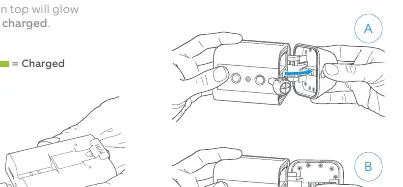
- Charge the battery: Plug the battery into a power source using the provided USB cable. The light on top will glow green when fully charged.
- Download the app: Install the Ring app from your app store or visit ring.com/app.
- Setup: Open the Ring app, select Set Up a Device, and scan the QR code on your device. Follow the in-app instructions to connect the camera to your Wi-Fi.
- Test: Before permanent installation, test the video quality in the location where you intend to mount the camera.
Installation
The Spotlight Cam can be mounted on a wall or an eave (overhang).
Wall Mounting
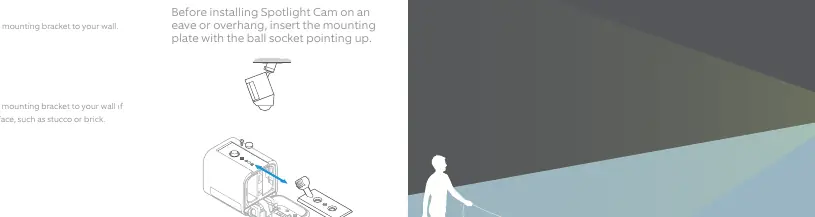
Insert the mounting plate with the ball socket pointing down. Use the included screws and wall anchors (if installing on hard surfaces like stucco or brick) to secure the mounting bracket.
Eave Mounting
Insert the mounting plate with the ball socket pointing up. Ensure the bracket is securely attached to the overhang.
Attaching the Camera
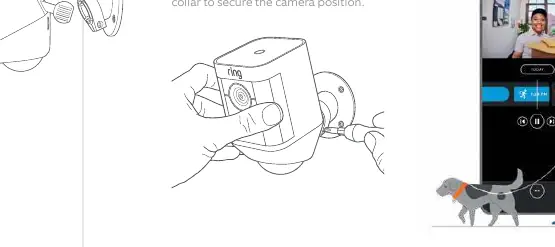
Loosen the metal collar on the bracket, push the camera ball into the socket until it snaps into place, and then tighten the collar to secure the desired angle.
Solar Panel Installation
If you have a Ring Solar Panel, it can provide continuous charging for your battery.
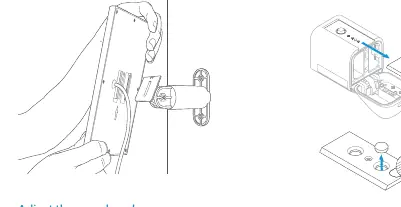
- Mark the holes using the mounting arm as a template.
- Install wall anchors if necessary and screw in the mounting arm.
- Slot the Solar Panel onto the arm and adjust the angle.
- Remove the weatherproofing seal on the rear of the Spotlight Cam.
- Plug the Solar Panel cable into the power port on the rear of the camera.
Troubleshooting
- White light flashing: The camera is updating its software. Do not remove the battery during this process.
- Video quality issues: Ensure the camera is positioned correctly and check your Wi-Fi connection.
- Something not right: If you encounter issues, refer to the troubleshooting section in the Ring app or visit ring.com/help.
Safety Information
Handle the lithium-ion battery with care. Do not disassemble, crush, or expose the battery to water or extreme heat. Only use the battery specified for this system. If the device or battery is dropped, do not attempt to repair it; contact Ring Customer Service.
Official resources from the manual
Manufacturer information
Ring
Practical help
Common problems
White light flashing
The device is updating its software. Do not remove the battery until the light stops flashing.
Video quality issues
Test the video quality in the desired location before permanently mounting the camera.
Before use
- Fully charge the battery using the provided USB cable.
- Download the Ring app and create an account.
- Set up the device near your router before installing it outside.
- Ensure you have a 1/4" drill bit if installing on hard surfaces like stucco or brick.
Specs in practice
- Operating Temperature
- 5°F to 122°F (-20°C to 50°C)
- Electrical Rating
- 3.65Vdc, 6040mAh (Quick-Release Battery)
Images and diagrams
- Mounting plate orientation: Ball socket must point down for wall installation and up for eave installation.
- Solar panel installation: Ensure the panel gets at least 1 hour of direct sunlight a day.
Model compatibility
- Ring Solar Panel charges the battery but does not replace it.

Manual page author
Michael Turner
Technical manual editor
Reviews PDF manuals for structure, safety notes, and practical product details so readers can find the right information quickly.