Smart Home / Smart Plugs & Strips
User Guide for Eve Door & Window Wireless Contact Sensor
Complete user guide for the Eve Door & Window wireless contact sensor. Includes instructions for battery installation, HomeKit setup, device reset, and maintenance.
Quick answers from the manual
Quick answer
- The Eve Door & Window is a wireless contact sensor for monitoring doors and windows via Apple HomeKit. It requires a 1/2 AA (ER14250 3.6 V) battery and the Eve app for setup. p. 1, 2, 3
Key actions
- Install battery and position sensor p. 2
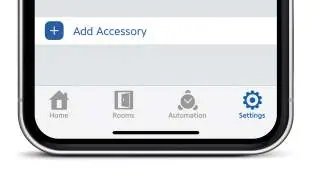
- Add accessory to HomeKit p. 6
- Reset the device p. 14
First start
- Insert battery, download Eve app, and follow in-app instructions to add the accessory. p. 2, 4, 6
Problems and fixes
Device reset
Use a paperclip to press the reset button for 10 seconds until the LED flashes 5 times.
p. 14Maintenance and reset
- Reset the device by holding the reset button for 10 seconds. p. 14
Technical specifications
| Parameter | Value | Meaning | Pages |
|---|---|---|---|
| Battery | 1/2 AA (ER14250 3.6 V) | Required battery type | p. 3 |
| Frequency | 2402 - 2480 MHz (BLE) / 2405 – 2480 MHz (Thread) | Wireless frequency range | p. 13 |
| Temperature | 0 °C - 40 °C | Operating temperature range | p. 13 |
Where to find it in the PDF
- Installation p. 2
Table of contents
Manual images
Click an image to enlargeQuick guide from the manual
The Eve Door & Window is a wireless contact sensor designed to monitor the open/closed state of doors and windows. To get started, insert the included 1/2 AA battery, download the Eve app, and follow the in-app instructions to add the accessory to your Apple HomeKit home.
Installation
To install the sensor:

- Insert the included 1/2 AA (ER14250 3.6 V) battery into the device.
- Place the sensor on your door or window frame.
- Ensure the areas marked with dots on both the main sensor and the smaller magnet element are facing each other.
- Use the included spacers if necessary to align the small element to the ideal height.
- The built-in LED will light up when the sensor detects a state change, allowing you to verify positioning before applying the adhesive firmly.
Setup and Configuration
To add the device to your home:
- Download the Eve app from the App Store.
- Open the Eve app and tap Add Accessory.
- Follow the on-screen instructions to complete the setup process.
- If you have already set up another accessory, you can add the Eve Door & Window via the Eve settings menu.
Usage and Features
Once connected, you can access the sensor via the Eve app, the Home app, and Siri. Key features include:
- Status Monitoring: View the current open/closed state of your door or window.
- Statistics: Track time and duration statistics for when doors or windows were opened.
- Automation: Configure rules and notifications based on the sensor state.
- Remote Access: Securely access the sensor while away from home using an Apple TV HD, Apple TV 4K, or HomePod as a home hub.
Maintenance and Reset
Battery Replacement: To replace the battery, pull the larger element downwards. There is no need to remove the adhesive backing.
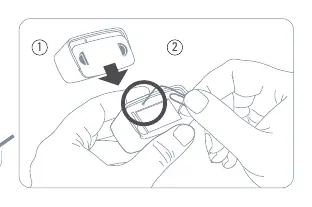
Reset Procedure: If you need to reset the device:
- Locate the reset button inside the battery compartment.
- Use a paperclip to press and hold the reset button for 10 seconds.
- The LED will flash 5 times to confirm the reset.
Privacy and Compliance
Eve is designed to protect your personal data. All data is fully encrypted and transferred directly between the sensor and your iPhone, iPad, or home hub. There is no Eve cloud, no registration, and no profiling.
Manufacturer information
Eve Systems
Practical help
Common problems
Device not responding or not detected
Check the battery level and ensure the device is within range of your home hub. Perform a reset if necessary.
Sensor not detecting state changes
Ensure the dots on the main sensor and the magnet element are aligned and facing each other. Use the included spacers to adjust height if needed.
Before use
- Ensure you have a 1/2 AA (ER14250 3.6 V) battery.
- Download the Eve app from the App Store.
- Ensure your iPhone is connected to the network.
- Verify the sensor and magnet are aligned correctly before applying adhesive.
Specs in practice
- Frequency Range
- 2402 - 2480 MHz (BLE) / 2405 – 2480 MHz (Thread)
- Operating Temperature
- 0 °C - 40 °C
Images and diagrams
- Alignment: The dots on the sensor and magnet must face each other.
- Reset: Use a paperclip to press the button inside the battery compartment for 10 seconds.
- Battery Access: Pull the larger element downwards to access the battery compartment.
Model compatibility
- Requires Apple HomeKit.
- Remote access requires an Apple TV HD, Apple TV 4K, or HomePod as a home hub.

Manual page author
David Miller
Documentation analyst
Organizes user manual content into clear summaries, with attention to model details, product context, and everyday usability.