Lighting / Stage Lighting
User Manual for Flash LED PAR 64 18x12 RGBWA+UV FLAT
Quick guide for the Flash LED PAR 64 18x12 RGBWA+UV FLAT. Includes installation instructions, DMX connection diagrams, safety warnings, and technical specifications.
Quick answers from the manual
Quick answer
- The Flash LED PAR 64 18x12 RGBWA+UV FLAT is a professional lighting fixture supporting DMX512, manual, auto, sound-controlled, and master/slave modes. It requires professional installation with safety cables and proper DMX termination. p. 4, 5
Key actions
- Mounting the fixture p. 4
- Terminating DMX signal p. 5
Problems and fixes
Cable damage
Do not attempt to repair. Replacement or repair must be done by the manufacturer or authorized personnel.
p. 6Technical specifications
| Parameter | Value | Meaning | Pages |
|---|---|---|---|
| Power consumption | 120W | Total power consumption | p. 4 |
| IP Rating | IP20 | Ingress protection rating | p. 4 |
Where to find it in the PDF
- Safety Information p. 2, 3
- Installation p. 4
- Connection p. 5, 6
- DMX Chart p. 8
Table of contents
Manual images
Click an image to enlargeQuick guide from the manual
This document provides essential information for the safe installation and operation of the Flash LED PAR 64 18x12 RGBWA+UV FLAT. Key requirements include professional installation, the use of safety cables, and proper DMX termination to ensure reliable performance.
Safety Information

- Grounding: Always ground the yellow/green conductor to prevent electric shock.
- Environment: Do not expose the fixture to rain or moisture. Maximum ambient temperature is 40°C.
- Operation: Do not connect to any dimmer pack. Do not look directly at the light source while the fixture is on.
- Maintenance: Disconnect main power before servicing. Repairs must be performed by qualified personnel.
- Sunlight Warning: Do not expose the front lens to direct sunlight or strong light sources, as it can focus rays and cause fire hazards.
Installation
The fixture must be mounted by professionals. Ensure the mounting structure can support at least 10 times the weight of the unit. Always use a safety cable capable of holding 12 times the weight of the fixture when installing overhead.
Connection
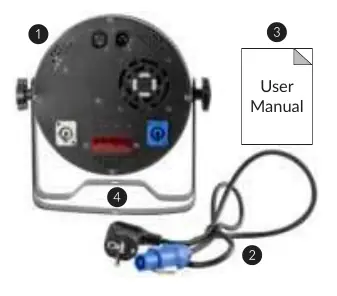
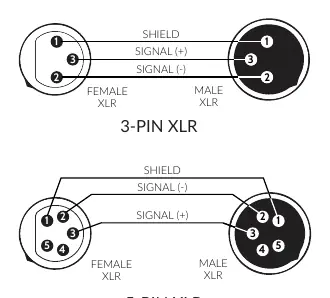
The device features DMX (in/out) via XLR 3(5)-pin sockets and power via PowerCon connectors. A maximum of 10 devices can be connected in series via the power cable.
DMX Termination
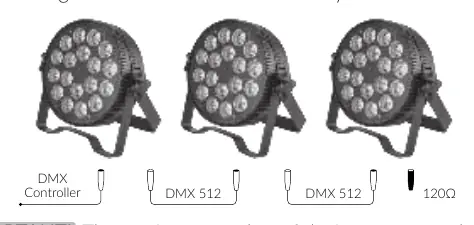
At the last fixture in the DMX chain, the signal must be terminated. Solder a 120Ω resistor between signal (-) and signal (+) in an XLR plug and connect it to the DMX output of the last fixture.
Control Menu
The fixture supports multiple operating modes, including DMX512, Manual, Auto, Sound-controlled, and Master/Slave. DMX channel modes include 6CH, 10A, and 10B.
Practical help
Common problems
Fixture does not turn on
Verify that the power supply voltage and frequency match the fixture requirements (100-240V, 50/60Hz).
DMX signal issues
Ensure the last fixture in the chain is terminated with a 120Ω resistor between signal (-) and (+).
Shortened lamp life
Ensure power voltage fluctuations are within ±10%. Avoid frequent switching.
Before use
- Unpack and check for transportation damage.
- Verify power supply voltage matches the fixture.
- Ensure the yellow/green conductor is grounded.
- Install safety cable capable of holding 12x the fixture weight.
- Ensure mounting structure supports 10x the fixture weight.
Specs in practice
- Power Consumption
- 120W total power draw.
- DMX Channels
- Supports 6, 10A, and 10B channel modes.
Images and diagrams
- Figure 1: Warning against exposing the lens to direct sunlight.
- XLR Pinout: Wiring diagram for 3-pin and 5-pin DMX connectors.
- DMX Connection: Daisy-chaining multiple fixtures with a terminator at the end.
Model compatibility
- Do not connect to any dimmer pack.
- Maximum 10 devices can be connected in series via power cable.
- Use only authorized spare parts.

Manual page author
Michael Turner
Technical manual editor
Reviews PDF manuals for structure, safety notes, and practical product details so readers can find the right information quickly.