Power / Solar Inverters
LCD Firmware Update Guide for Fortress Power 10KW Inverter
Quick guide for updating the LCD firmware on your Fortress Power 10KW Inverter. Includes USB formatting requirements, file structure, and step-by-step update instructions.
Table of contents
Manual images
Click an image to enlargeQuick guide from the manual
This document provides instructions for updating the LCD firmware on the Fortress Power 10KW Inverter. This update is recommended to access new inverter functionalities.
USB Flash Drive Preparation
Before starting the update, prepare your USB flash drive according to these specifications:
- Capacity: Use a USB flash drive with a capacity of 16GB or less (16GB, 8GB, 4GB, or 2GB are accepted).
- Formatting: Plug the drive into your PC and format it.
- File System: Set the file system to FAT32.
- Allocation Unit: Set the allocation unit size to 4096 Bytes.
- File Path: Extract the firmware zip file and copy the extracted folder to the USB drive. The folder name must be exactly DWIN_SET.
Firmware Update Procedure
- Power off the inverter by turning off the PV disconnect and all breakers.
- Connect the prepared USB flash drive to the USB2 port on the interface board.
- Power on the inverter.
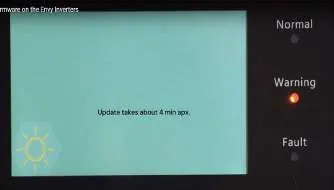
- The screen will display the update status. It will remain on this page for approximately 4 minutes before restarting automatically.
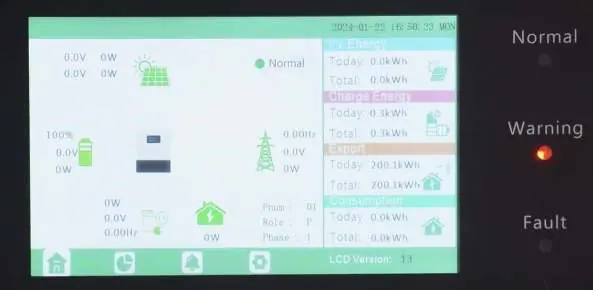
- If the update is successful, the normal home page will appear.
- Unplug the USB flash drive (the USB2 port supports hot-plugging).
- Verify the update by checking the LCD version code in the bottom right corner of the display or under the Device Info page.
Technical Support
If you encounter issues during the update, contact Fortress Power technical support:
- Phone (Tech Support): (877) 497-6937
- Phone (Spanish Support): (215) 710-8960
- Support Tickets: https://www.fortresspower.com/support/
- Warranty Submittal: https://www.fortresspower.com/warranty/
Official resources from the manual
Practical help
Common problems
Update fails or does not start
Ensure the USB drive is 16GB or smaller, formatted to FAT32, and the allocation unit size is set to 4096 Bytes.
Inverter does not recognize firmware
Verify the folder name on the USB drive is exactly 'DWIN_SET' and contains the extracted files.
Before use
- USB flash drive (16GB or smaller)
- Laptop computer for file preparation
- Inverter powered off (PV disconnect and breakers turned off)
Specs in practice
- USB File System
- Must be set to FAT32 for compatibility.
- Allocation Unit Size
- Must be set to 4096 Bytes.
- Max USB Capacity
- 16GB is the maximum supported size.
Images and diagrams
- USB2 Port: Located on the interface board, used for firmware updates.
- Update Screen: Displays progress and status during the 4-minute update process.
Model compatibility
- The USB2 port supports hot-plugging, allowing the drive to be removed after the update is complete.

Manual page author
David Miller
Documentation analyst
Organizes user manual content into clear summaries, with attention to model details, product context, and everyday usability.