Health / Laboratory Equipment
User Manual for HACH LT 200 / DRB 200 Dry Thermostat
Quick guide for the HACH LT 200 / DRB 200 Dry Thermostat. Includes installation, operation, maintenance, and troubleshooting instructions.
Quick answers from the manual
Quick answer
- The HACH LT 200 / DRB 200 is a dry thermostat used to heat solutions in round sample cells to a specified temperature for a set time period. p. 5
Key actions
- To turn on the instrument, connect the power cord and push the power switch on the back. p. 9
First start
- Upon first startup, the language selection screen is shown. Hold the left key while turning the instrument on to select the language. p. 9
Problems and fixes
BLOCK IS TOO HOT! PLEASE WAIT
Wait until the temperature of the heating block decreases.
p. 13Technical specifications
| Parameter | Value | Meaning | Pages |
|---|---|---|---|
| Temperature range | LT 200: 37 to 150 °C; DRB 200: 37 to 165 °C | Operating temperature range | p. 4 |
Where to find it in the PDF
- Specifications p. 4
- Installation p. 6
- Operation p. 9
- Maintenance p. 12
- Troubleshooting p. 13
Table of contents
Manual images
Click an image to enlargeQuick guide from the manual
The HACH LT 200 / DRB 200 is a dry thermostat designed to heat solutions in round sample cells to a specified temperature for a set time period. This guide provides essential information for setup, operation, and maintenance.
Product Overview
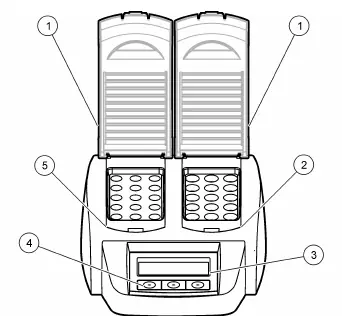
The instrument features one or two heating blocks. The LT 200 includes three stored temperature programs and six user-configurable programs. The DRB 200 includes six stored temperature programs and three user-configurable programs.
Installation
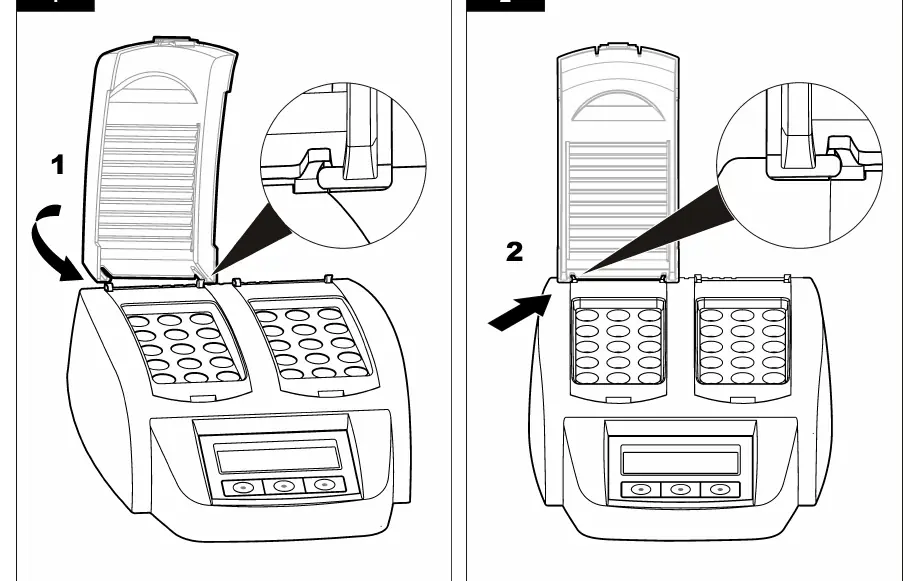
Install the protective covers: The protective cover must be installed to prevent personal injury and burns. Refer to the illustrated steps in the manual to install the covers correctly.
Startup
Turning on the instrument: Place the instrument on a stable, level, heat-resistant surface. Connect the power cord to the back of the instrument and then to a grounded power socket. Push the power switch on the back to turn it on.
Language selection: Upon first startup, the language selection screen appears. Hold down the left key while turning the instrument on to select the language.
Display contrast: Hold down the middle key while turning the instrument on, then use the up/down arrow keys to adjust the contrast and press OK to save.
Operation
Routine operation:
- Prepare test sample cells as specified in the analysis procedure.
- Close the sample cells with the cap and dry the outside fully.
- Turn the instrument on and open the protective cover.
- If using 16 mm tubes with a 20 mm heating block, insert reducing adapters.
- Place the sample cells in the correct heating block and close the protective cover.
- Select the desired temperature program using the keys and press Start.
Maintenance
Cleaning the instrument: Keep the instrument clean for accurate operation. Turn off and disconnect the power cord. Once cool, clean the surface with a soft, moist cloth and a weak soap solution. Do not allow water to enter the instrument. Do not use flammable cleaning agents or products like turpentine or acetone.
Troubleshooting
If an error occurs, refer to the error messages table in the manual. Common errors include 'BLOCK IS TOO HOT! PLEASE WAIT' (wait for the block to cool) or 'INIT ERROR' (contact customer service).
Practical help
Common problems
BLOCK IS TOO HOT! PLEASE WAIT
The heating block temperature is higher than the selected temperature. Wait until the temperature decreases.
INIT ERROR
The instrument is defective. Contact Customer Service.
Before use
- Place on a stable, level, heat-resistant surface.
- Connect power cord to the back of the instrument.
- Connect to a power socket with earthing contact.
- Ensure protective covers are installed.
- Dry the outside of sample cells fully.
Specs in practice
- Temperature range
- LT 200: 37 to 150 °C; DRB 200: 37 to 165 °C
- Heating rate
- 10 minutes to reach target temperature
- Enclosure rating
- IP20 (Indoor use)
Images and diagrams
- Figure 1: Front view showing protective covers, heating blocks, display, and keys.
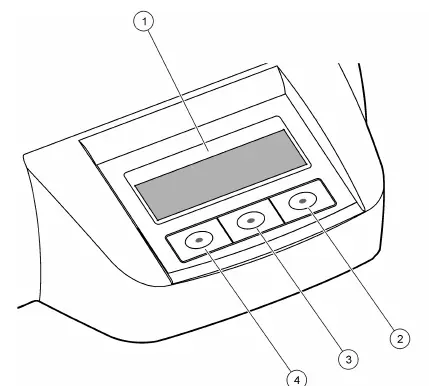
- Figure 2: Keypad description.
- Figure 3: Screen display when a program is active.
Model compatibility
- LT 200: 3 stored programs, 6 user-configurable programs.
- DRB 200: 6 stored programs, 3 user-configurable programs.

Manual page author
Michael Turner
Technical manual editor
Reviews PDF manuals for structure, safety notes, and practical product details so readers can find the right information quickly.