Tools / Hand Tools
Hilti NCT PS 085-A22 Cable Cutter User Manual
Quick guide for the Hilti NCT PS 085-A22 cable cutter. Includes setup, operation, maintenance, safety, and troubleshooting steps.
Table of contents
Manual images
Click an image to enlargeQuick guide from the manual
The Hilti NCT PS 085-A22 is a cordless, electro-hydraulic cutting tool designed for cutting copper (Cu) and aluminum (Al) cables. Before use, ensure all live cables in the work area are switched off. If this is not possible, implement appropriate safety precautions for working near live parts.
Product Overview
The tool features a cutting head, a control switch, a manual piston return switch, and a battery interface. A white LED illuminates the working area. The tool is compatible with Hilti B 22 series Li-ion batteries.
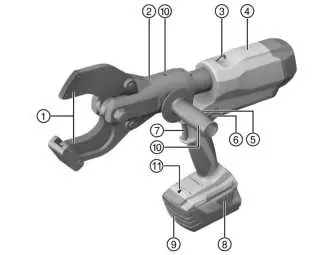
Operation
Battery Preparation: Charge the battery fully before first use. Ensure contacts on both the battery and the tool are clean and dry. Insert the battery until it clicks audibly into place.

Cutting Process:
- Rotate the cutting head to the desired working position.
- Place the cable to be cut into the cutting head or guide the head over the cable.
- Ensure the cable is fully inserted into the cutting head. Do not exceed the maximum cutting capacity of 85 mm.
- Press the control switch and hold it until the tool releases pressure, accompanied by an audible "pop".
- The tool will automatically return to its initial position after the cut.
Note: In cold weather, hydraulic oil may thicken. Perform 5 to 10 empty pressing operations to warm up the tool.
Care and Maintenance
Always remove the battery before performing any maintenance. Clean the housing with a slightly damp cloth and use a dry, soft brush for air vents. Do not use silicone-based cleaning agents. Keep battery contacts free of oil and grease.
Troubleshooting
The tool indicates status and malfunctions via the battery's LED display. If the tool is not working, check if the battery is correctly inserted, charged, or if it is too hot/cold. If the red LED lights up continuously with a warning tone, a technical problem exists; contact Hilti Service.
Safety
Do not use the tool in heavy rain or underwater. Do not use the tool for cutting steel. Always wear protective glasses and appropriate personal protective equipment. After approximately 100 consecutive cuts, allow the tool to cool down for about 15 minutes to prevent overheating.
Manufacturer information
Hilti Corporation
Practical help
Common problems
LEDs on battery show nothing
Battery is not inserted correctly or is discharged. Push the battery in until it engages with a double click or charge the battery.
1 LED on battery blinks
Battery is discharged or is too hot/cold. Charge the battery or allow it to reach room temperature.
Red LED lights continuously with warning tone
Technical problem. Incorrect operation is possible. Contact Hilti Service.
Tool overheated
Allow the product to cool down.
Before use
- Ensure the battery is fully charged.
- Check that battery contacts are clean and dry.
- Verify the tool is in perfect working order.
- Ensure the cable to be cut is within the maximum diameter (85mm).
- Switch off all live cables in the work area.
Specs in practice
- Max. cable diameter
- 85 mm
Images and diagrams
- 1: Cutting edge
- 2: Cutting head
- 7: Control switch
Model compatibility
- Use only Hilti B 22 series Li-ion batteries.
- Use only Hilti-approved battery chargers.

Manual page author
David Miller
Documentation analyst
Organizes user manual content into clear summaries, with attention to model details, product context, and everyday usability.