Toys / RC Components
User Manual for Hobbywing Platinum 180A HV SBEC V5 ESC
Comprehensive user guide for the Hobbywing Platinum 180A HV SBEC V5 electronic speed controller. Includes detailed instructions on wiring, throttle calibration, programming parameters, speed governor configuration, and troubleshooting LED...
Quick answers from the manual
Quick answer
- To calibrate the throttle, turn on your transmitter, set the throttle to maximum, connect the battery, wait for the beeps, and then move the throttle to the minimum position. p. 1
Key actions
- Calibrate throttle range p. 1
- Program ESC parameters p. 1
First start
- Ensure throttle is at minimum, connect battery, and wait for calibration beeps. p. 1
Problems and fixes
Red LED flashing
Check input voltage, throttle signal, or temperature based on the flashing pattern.
p. 1Error codes
| Code | Meaning | Action | Pages |
|---|---|---|---|
| Red LED flashing | Input voltage not within the input voltage range | Check battery voltage | p. 1 |
Technical specifications
| Parameter | Value | Meaning | Pages |
|---|---|---|---|
| Continuous/Peak Current | 180A/300A | Maximum current handling capability | p. 1 |
| Input Voltage | 5-12S LiPo | Supported battery voltage | p. 1 |
Where to find it in the PDF
- User Manual p. 1
Table of contents
Quick Guide from the Manual
The Hobbywing Platinum 180A HV SBEC V5 is a high-performance electronic speed controller (ESC) designed for RC helicopters and aircraft. Before first use, ensure the throttle range is calibrated to your transmitter. The ESC supports programming via an LCD Program Box or OTA module. Always verify battery voltage and motor connections before powering on.
Wiring and Installation
Proper wiring is critical for safe operation:
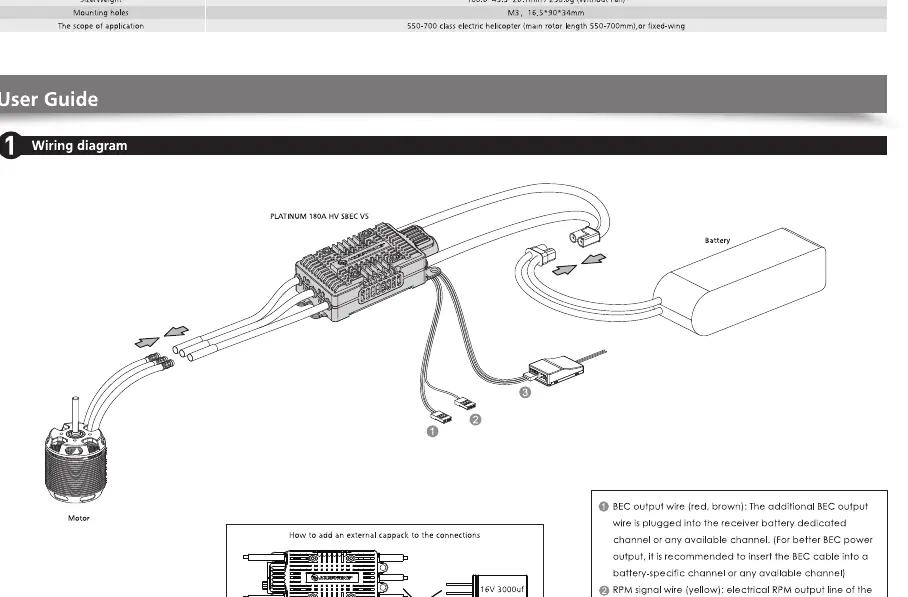
- Battery: Connect the battery to the ESC input leads. Ensure correct polarity.
- Motor: Connect the three motor wires to the ESC output wires. If the motor rotates in the wrong direction, swap any two of the three motor wires.
- Receiver: Connect the throttle signal cable to the throttle channel on your receiver.
- Fan: Connect the cooling fan to the designated port on the ESC.
- External Capacitor (Cappack): If using the optional Cappack, connect it to the ESC's BEC output or any available channel on the receiver.
Normal Boot Process and Throttle Calibration
To calibrate the throttle range:
- Turn on the transmitter and set the throttle stick to the maximum position.
- Connect the battery to the ESC.
- The motor will emit a series of beeps indicating the ESC is powered on and the throttle range is being set.
- Move the throttle stick to the minimum position.
- The ESC will emit a long beep, confirming the throttle range is calibrated and the ESC is ready for use.
Programming
The ESC parameters can be customized using the Hobbywing LCD Program Box or the OTA module. Connect the device to the ESC's programming port. Ensure the battery is connected to the ESC during programming. You can adjust settings such as Governor mode, Brake, BEC voltage, and Timing.
Speed Governor Function
The ESC features a sophisticated Speed Governor mode. To use it, ensure the throttle curve is set to a flat value (e.g., 50% to 100%). The ESC will maintain the set RPM regardless of load changes. Note that the "Governor Store" mode requires a specific calibration process to learn the motor's RPM at full throttle.
Protection Functions
The ESC includes several built-in protections:
- Start-up Protection: Prevents the motor from starting if the throttle is not at the lowest position.
- Over-temperature Protection: Reduces power if the ESC temperature exceeds 125 degrees Celsius.
- Over-voltage Protection: Monitors input voltage to prevent damage.
- Over-current Protection: Limits current to prevent damage during extreme loads.
Manufacturer information
Hobbywing
Practical help
Common problems
Motor does not start after power-on
Check if the throttle stick is at the minimum position. Ensure the throttle signal cable is correctly connected to the receiver.
Red LED flashing
Indicates an error. Check input voltage, throttle signal, or temperature. Refer to the LED indicator table for specific meanings.
Motor rotates in the wrong direction
Swap any two of the three motor wires connected to the ESC.
Before use
- Verify battery voltage is within the supported 5-12S LiPo range.
- Ensure all wiring connections are secure and insulated.
- Calibrate the throttle range before the first flight.
- Ensure the cooling fan is unobstructed.
- Check that the transmitter throttle curve is set correctly for the desired mode.
Images and diagrams
- The wiring diagram illustrates the connection between the battery, ESC, motor, receiver, and cooling fan.
- The programming diagram shows how to connect the LCD Program Box or OTA module to the ESC's programming port.
Model compatibility
- Compatible with Hobbywing LCD Program Box and OTA module for configuration.
- Designed for RC helicopters and aircraft.

Manual page author
Michael Turner
Technical manual editor
Reviews PDF manuals for structure, safety notes, and practical product details so readers can find the right information quickly.