Electronics / Microphones
User Manual for Hollyland LARK A1 Wireless Microphone System
Quick guide for the Hollyland LARK A1 wireless microphone system. Learn how to pair, use noise cancellation, check battery status, and configure settings via the LarkSound app.
Quick answers from the manual
Quick answer
- To pair the Hollyland LARK A1, ensure the TX is in the off state, then press and hold the button for 6 seconds to enter pairing mode. For the RX, press and hold the button for 3 seconds. p. 2, 4
Key actions
- Toggle Noise Cancellation p. 2, 4
- Mute Microphone p. 2, 4
First start
- Remove TX from charging case to automatically power on. p. 5
Problems and fixes
Blue light flashing slowly
The device is disconnected. Re-pair the devices.
p. 3, 4Maintenance and reset
- Firmware can be updated via the LarkSound app. p. 12
Technical specifications
| Parameter | Value | Meaning | Pages |
|---|---|---|---|
| Transmission Range | 200m | Maximum operating distance | p. 13 |
| Operating Time | Approx. 9 hours | Battery life for TX | p. 13 |
Where to find it in the PDF
- Product Overview p. 2, 4
- Specifications p. 13
Table of contents
Manual images
Click an image to enlargeQuick Guide
The Hollyland LARK A1 is a wireless microphone system designed for mobile devices. To get started, ensure the devices are charged, pair the transmitter (TX) and receiver (RX) if necessary, and connect the RX to your mobile device. Use the LarkSound app for advanced configuration, including noise cancellation levels, volume gain, and firmware updates.
Product Overview
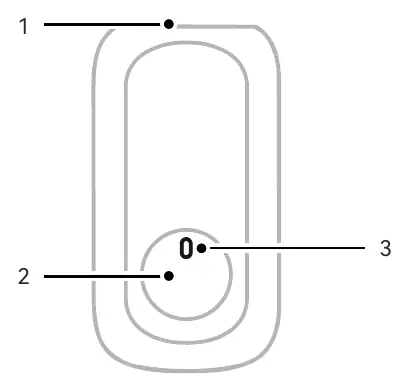
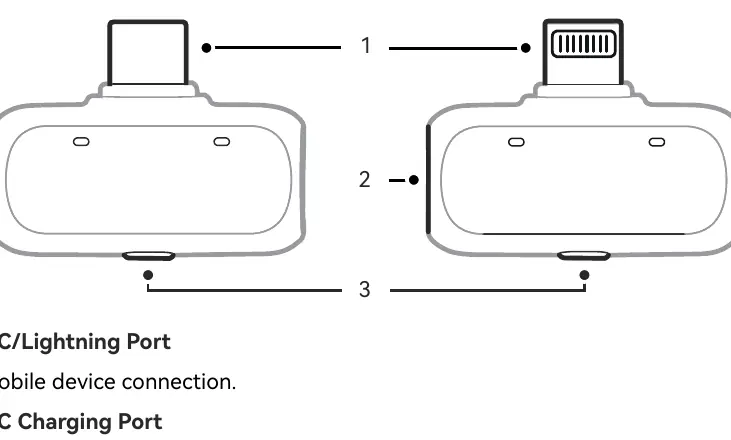
Transmitter (TX)
- Microphone Pickup Hole: Position upward during wear for optimal sound.
- Button Functions:
- Power On/Off: Press and hold for 3 seconds.
- Pairing Mode: In off state, press and hold for 6 seconds.
- Noise Cancellation: Single-click to toggle.
- Mute: Double-click to toggle.
- Recording Control: Triple-click (when connected to mobile RX).
Receiver (RX)
- USB-C/Lightning Port: For mobile device connection.
- USB-C Charging Port: Supports charging while in use.
- Button Functions:
- Pairing: Press and hold for 3 seconds.
- Noise Cancellation: Single-click to toggle.
- TX 1 Mute: Double-click.
- TX 2 Mute: Triple-click.
LED Indicators and Battery Status
The LED lights provide status updates for connection, pairing, and battery levels.
- Blue (Slow Flash): Disconnected.
- Blue (Fast Flash): Pairing.
- Blue (Solid): Connected.
- Green (Solid): Noise cancellation on.
- Red (Solid): Muted.
Battery status is indicated by color and flashing patterns on the TX and Charging Case. Generally, red indicates low battery (0-10%), while green indicates high battery (71-100%).
Wearing Instructions
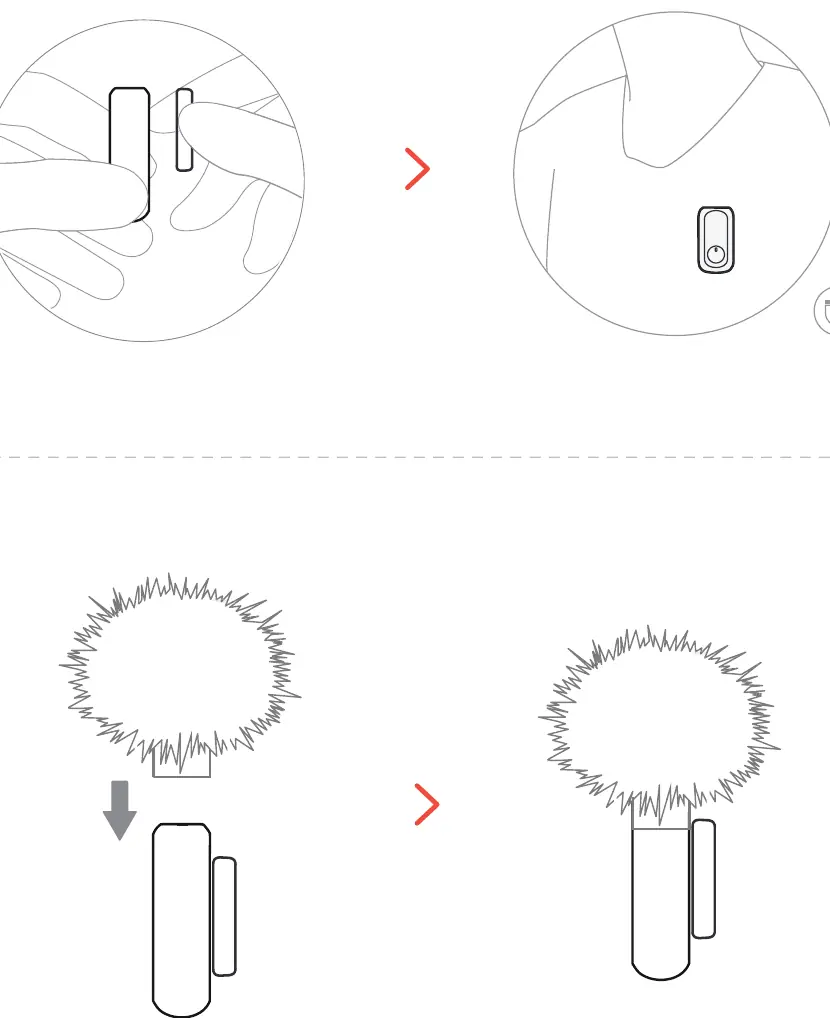
Attach the transmitter to your clothing using the provided clip. Ensure the microphone pickup hole is facing upward to capture sound effectively. You may also use the included furry windscreen for outdoor recording.
Connection and Charging
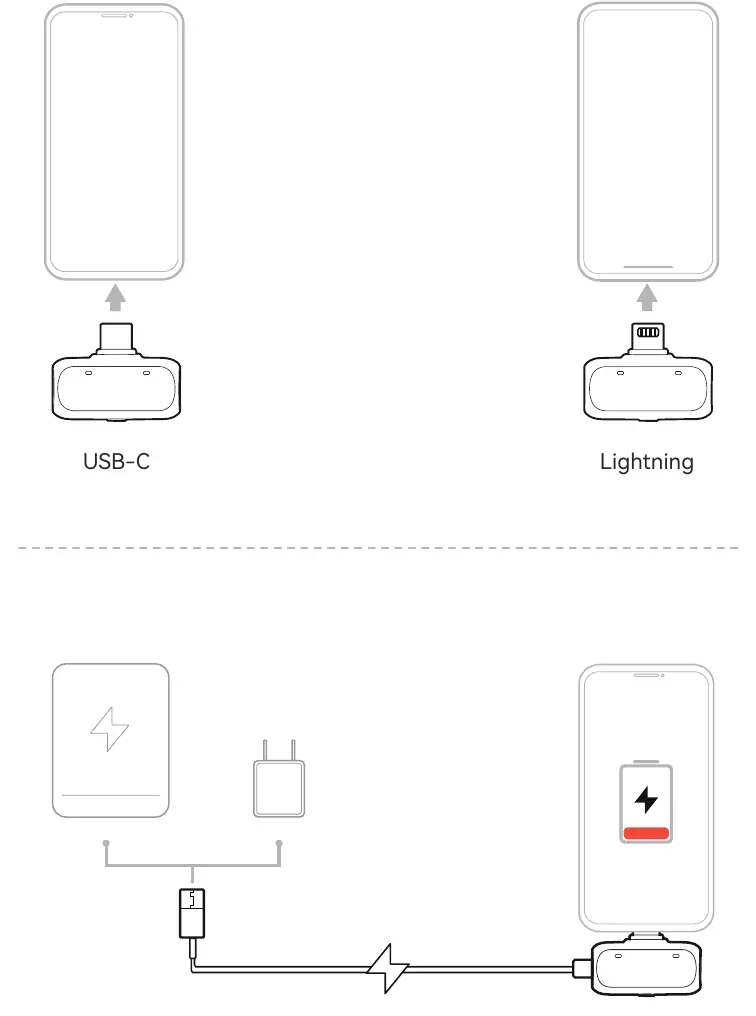
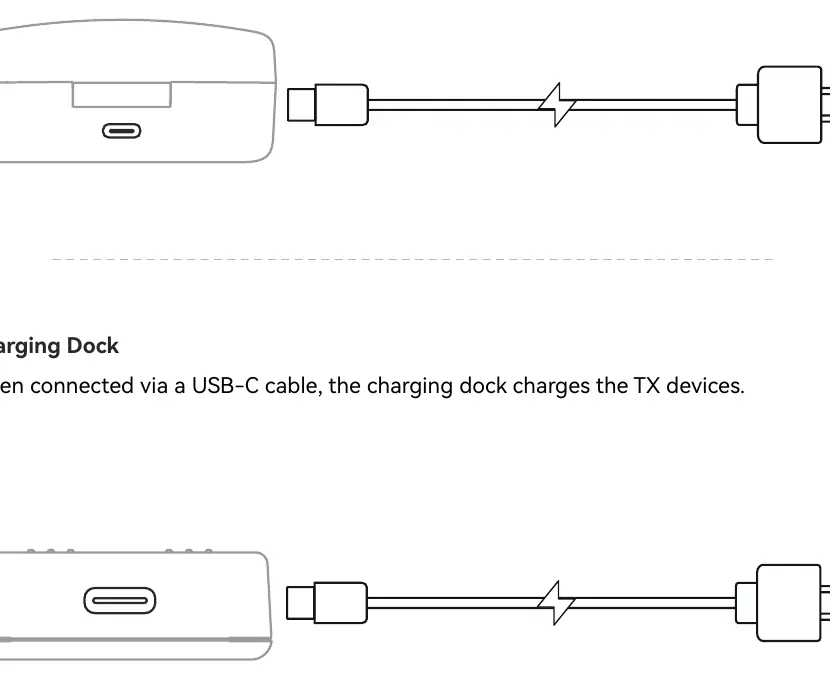
Connect the RX directly to your smartphone via the USB-C or Lightning port. The system supports charging the smartphone via the RX port if the phone battery is low (compatible models only). Charge the TX and charging case using a USB-C cable.
Functionality and App Control
Download the LarkSound app to configure advanced settings:
- Noise Cancellation: Three levels (Low 10dB, Medium 15dB, High 20dB). Default is High.
- Volume Gain Control: 6 adjustable levels.
- Audio Channel Mode: Stereo or Mono.
- EQ Modes: Equalization, Low, Bright.
- Reverb: Light, Medium, Large.
Firmware Update
Connect the TX to the mobile RX and use the LarkSound app to perform firmware updates. Do not disconnect the RX during the process. The device will reboot automatically after a successful update.
Specifications
- Transmission Range: 200m.
- Frequency Response: 20Hz-20KHz.
- Battery Life (TX): Approx. 9 hours.
- Charging Time:<1.5 hours.
- Sample Rate: 48kHz/24Bit.
Practical help
Common problems
Device not connected
Check if the blue light is flashing slowly. If so, re-pair the devices by holding the pairing button for 6 seconds on the TX and 3 seconds on the RX.
Audio is muted
Check if the LED indicator is solid red. Double-click the TX button (or RX button for TX1) to toggle mute off.
Firmware update failed
Ensure the RX is not disconnected during the process. Place the TX back in the charging case and retry via the app.
Before use
- Charge the TX and charging case fully.
- Download the LarkSound app for advanced settings.
- Ensure the microphone pickup hole is facing upward when worn.
- Check compatibility of your mobile device for charging via RX.
Specs in practice
- Transmission Range
- Maximum distance between TX and RX is 200 meters.
- Noise Cancellation
- Three levels available: Low (10dB), Medium (15dB), High (20dB).
- Battery Life
- The transmitter provides approximately 9 hours of operation.
Images and diagrams
- The TX unit features a microphone pickup hole at the top and a multi-function button.
- The RX unit features a mobile connector (USB-C or Lightning) and a charging port.
- The charging case automatically powers on/off the TX units when removed or inserted.
Model compatibility
- Supports charging the smartphone via RX on compatible models only.
- LarkSound app requires iOS 12.0+ or Android 8.0+.

Manual page author
Emily Carter
User documentation editor
Prepares concise manual descriptions and highlights the most useful setup, operation, and maintenance information for readers.