HVAC / Parts & Accessories
User Manual for Honeywell KNX 10.1-inch Touchscreen
Quick guide for the Honeywell KNX 10.1-inch Touchscreen. Learn about installation, technical specifications, network connectivity, and smart home control features.
Table of contents
Manual images
Click an image to enlargeQuick Guide
The Honeywell KNX 10.1-inch Touchscreen is a high-resolution control panel designed for smart building management. It features a 1280x800 MIPI display, integrated microphones, and speakers. The device supports KNX bus communication, WiFi, Bluetooth, and Ethernet connectivity. It is suitable for home, office, and control room environments.
Product Overview
The device serves as a central interface for smart home systems. It includes:
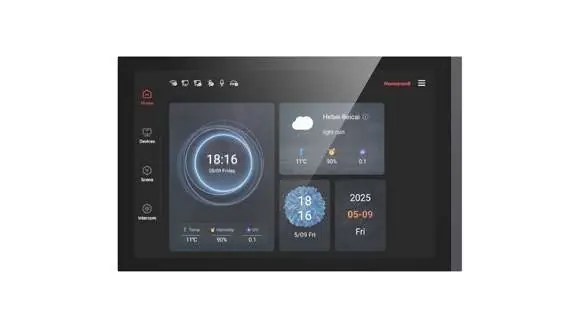
- Display: 10.1-inch MIPI color touchscreen with 1280x800 resolution.
- Audio/Video: 4 microphones and 2 speakers for intercom functionality.
- Connectivity: Two network ports (ETH0 with 48V PoE for Video-Intercom, ETH1 for external network), WiFi, and Bluetooth.
- Sensors: Integrated temperature, humidity, proximity, and brightness sensors.
Features and Functions
The touchscreen provides extensive control capabilities:
- KNX Control: Supports 240 KNX channels for switching, dimming, blind control, and HVAC management.
- Automation: Includes 16 schedules, 8 scene group functions, 8 logic functions, and 30 KNX scene functions.
- Intercom: Compatible with SIP and cloud-based intercom systems.
- Smart Integration: Supports integration with external voice assistants like Amazon Alexa and Google Assistant.
- Security: Includes security monitoring, IP camera access, and alarm functions.
Installation
The device is designed for flush mounting. Ensure the following requirements are met:
- Wall Box: Use a 1G BS-type junction box with 2 tabs (without N-S tabs) with a minimum depth of 47 mm, or an EU-standard DIN 49200 2G junction box with a minimum depth of 45 mm.
- Power Supply: The device can be powered via the KNX bus (21-30V DC) or an auxiliary power supply (22-30V DC).
- Network: Connect ETH0 for Video-Intercom (supports 48V PoE) and ETH1 for general network access.
Technical Specifications
Key technical parameters for the device:
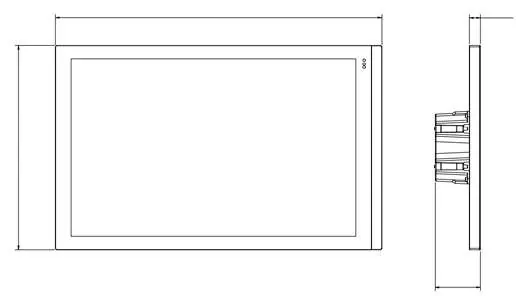
- Power Supply (KNX): 21-30V DC.
- Auxiliary Power: 22-30V DC.
- Dimensions: 248 mm x 154.6 mm x 34.4 mm.
- Weight: 0.8 kg.
- Operating Temperature: -5 °C to +45 °C.
- Storage Temperature: -25 °C to +55 °C.
- Humidity:<95% (non-condensing).
Manufacturer information
Honeywell International Inc.
Practical help
Common problems
Device does not power on
Verify that the KNX bus voltage (21-30V DC) or auxiliary power (22-30V DC) is correctly connected.
Intercom video not working
Ensure the network cable is connected to the ETH0 port, which supports 48V PoE, and not the ETH1 port.
Before use
- Verify the wall box type (1G BS or DIN 49200 2G) and minimum depth (45-47mm).
- Ensure the power supply (KNX bus or auxiliary) is within the 21-30V DC range.
- Confirm network cabling: ETH0 for Intercom/PoE, ETH1 for external network.
- Check that the environment temperature is between -5 °C and +45 °C.
Images and diagrams
- The device features a 10.1-inch touchscreen interface with a home screen for device, area, and intercom control.
- Physical dimensions are 248mm width, 154.6mm height, and 34.4mm depth.
Model compatibility
- Compatible with SIP and cloud-based intercom systems.
- Supports integration with Amazon Alexa and Google Assistant.
- Supports KNX Data Secure.

Manual page author
Michael Turner
Technical manual editor
Reviews PDF manuals for structure, safety notes, and practical product details so readers can find the right information quickly.