Documents / Warranty Safety
User Guide for HP 17bII+ Financial Calculator
Comprehensive user guide for the HP 17bII+ financial calculator. Learn how to perform financial calculations, use the equation solver, manage memory, and troubleshoot common issues.
Table of contents
Manual images
Click an image to enlargeQuick guide from the manual
The HP 17bII+ is a financial calculator designed for business and financial tasks. To turn the calculator on, press the CLR key. To turn it off, press the Shift key followed by the CLR key. The calculator features a two-line display and supports both Algebraic (ALG) and Reverse Polish Notation (RPN) entry logic. You can adjust the display contrast by holding the CLR key and pressing the + or - keys.
Getting Started
The calculator uses a menu-driven interface. The bottom line of the display shows menu labels corresponding to the six keys directly below them. The MAIN menu is the starting point for all other functions. You can change the display language via the MODES menu.
Arithmetic and Modes
The calculator supports two modes: Algebraic (ALG) and Reverse Polish Notation (RPN). You can switch between these modes in the MODES menu. RPN mode uses a stack to store intermediate results, eliminating the need for parentheses in many calculations.
Financial Applications
The calculator includes built-in applications for:
- Time Value of Money (TVM): Used for loans, savings, leasing, and amortization.
- Cash Flows (CFLO): Stores and analyzes cash flows of unequal amounts.
- Bonds: Calculates yield to maturity, price, and accrued interest.
- Depreciation: Supports Declining Balance, Sum-of-the-years' digits, Straight Line, and ACRS methods.
Statistics and Curve Fitting
The SUM menu allows you to enter sets of numbers to calculate the mean, median, standard deviation, and range. You can also perform curve-fitting and forecasting using two SUM lists with linear, exponential, logarithmic, or power models.
Equation Solver
The Equation Solver allows you to define your own equations. You can type in equations using the ALPHA menu, edit them, and store them in a list. Once an equation is verified, the Solver creates a custom menu for the variables involved.
Time and Appointments
The TIME menu includes a clock, calendar, and appointment manager. You can record up to ten appointments, each with an alarm and an optional message.
Printing
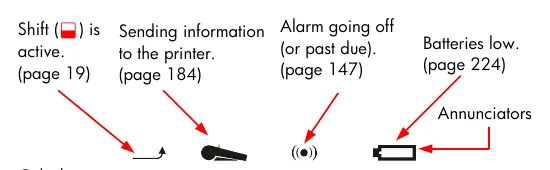
The calculator can print information using the HP 82240 Infrared Printer. The PRINTER menu allows you to print variables, lists, appointments, and the history stack.
Maintenance and Troubleshooting
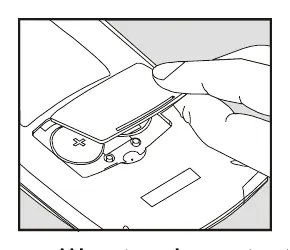
The calculator is powered by two 3-volt lithium coin batteries (CR2032). If the calculator does not respond, try resetting it by holding the CLR key while pressing the third menu key from the left. If you encounter an error message, refer to the Error Messages section in the manual for specific solutions.
Manufacturer information
HP Inc.
Practical help
Common problems
Insufficient Memory
Clear unnecessary lists, delete unused Solver variables or equations, or shorten appointment messages.
Wrong answer in TVM calculations
Ensure all five TVM variables are set (use 0 if necessary), check the payment mode (Begin/End), and verify that money paid out is entered as a negative number.
Beeper not working
Check the beeper mode in the MODES menu.
Calculator operating slowly
The calculator may be in trace printing mode. Press the PRINTER key, then TRACE, then EXIT to turn it off.
Before use
- Check that batteries are installed correctly.
- Set the desired language in the MODES menu.
- Choose between RPN or ALG mode based on your preference.
- Adjust the display contrast if necessary.
- Ensure the printer (if used) is turned on and within range.
Images and diagrams
- Cash flow diagrams represent time lines divided into equal periods.
- Arrows pointing up indicate money received (positive).
- Arrows pointing down indicate money paid out (negative).
Model compatibility
- Compatible with HP 82240 Infrared Printer.

Manual page author
Emily Carter
User documentation editor
Prepares concise manual descriptions and highlights the most useful setup, operation, and maintenance information for readers.