Electronics / Two-Way Radios
User Manual for Inrico 2-T529A Intelligent Two Way Radio
Comprehensive user guide for the Inrico 2-T529A Intelligent Two Way Radio. Includes setup instructions, battery management, operation procedures, and troubleshooting tips.
Quick answers from the manual
Quick answer
- The Inrico 2-T529A is an Android-based intelligent two-way radio. It requires a SIM card for network connectivity and supports GPS, 2G/3G/4G, and Wi-Fi. p. 8, 9
Key actions
- Power on/off p. 8
- Switching groups p. 8
First start
- Insert SIM card p. 9
- Charge battery p. 3, 4
Maintenance and reset
- Battery storage p. 4
Where to find it in the PDF
- Contents p. 2
- Installation p. 4, 5, 6
Table of contents
Manual images
Click an image to enlargeQuick guide from the manual
The Inrico 2-T529A is an Android-based intelligent two-way radio. Before use, ensure the battery is charged and a valid SIM card is inserted. The recommended usage pattern is 1 minute of emission and 4 minutes of reception to prevent overheating. Do not modify the device or expose it to extreme heat, moisture, or unstable surfaces.
Unpacking and accessories
Ensure the package contains the following items:
- Handset
- Lithium battery
- Charger
- Power adaptor
- Antenna
- Sling
- Belt clip
- User manual
Battery management
Charging: Connect the AC adapter to charge. The indicator will show red while charging. If the indicator turns off, the temperature may be improper, or the connection is poor.
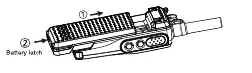
Installation/Removal: Point the four dents of the battery to the corresponding guides on the back of the radio. Push the battery along the guides until the latch clicks. To remove, pull down the latch and push the battery backwards.
Installation
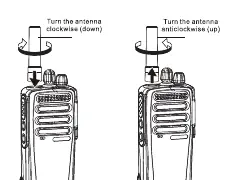
Antenna: Screw the antenna into the connector on the top of the radio and turn clockwise to fasten. Turn anticlockwise to remove.
Belt clip: If needed, screw the belt clip onto the back of the handset using the two screw holes provided.
Sling: Thread the sling through the oval hole on the back of the handset.
Headset: Open the cover on the top of the device to access the headset socket. The headset will work immediately upon connection.
Basic operation
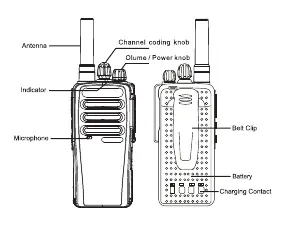
Power on/off: Turn the volume/power knob clockwise to power on (wait for the boot program) and anticlockwise to power off.
Calling: Press the PTT key to start talking. If the network is unavailable, the device will indicate "no network". If the channel is occupied, the device will prompt "du, du". Maximum talking time is 60 seconds.
Group switching: Turn the channel coding knob to switch channels. The device will broadcast the current group.
Troubleshooting
If you encounter issues, check the following:
- Poor reception: Signal may be weak (e.g., basement) or the network is busy. Move to an area with better signal.
- Echo or noise: The network service provider quality may be flawed. Restart the radio to force a network search.
- Less duration: High temperatures or weak signal areas can reduce battery life.
- Unable to connect: Check if the SIM card is effective and if you are in a network service area.
Technical specifications
- Operating system: Android
- Support: GPS/2G/3G/4G/BT/Wi-Fi
- Working temperature: 0-40°C
- Voltage: 3.8 V
- Sound output power: 2W@10%distortion
Indicator light interpretation
- Power on: Green (On)
- Searching for network: Green (Flash every 1 sec)
- Standing by: Green (Flash every 5 secs)
- PTT successful: Red (On)
- Answer call: Green (On)
- Low battery (<15%): Red (Flash every 3 secs)
Practical help
Common problems
Poor reception
Signal is weak or network is busy. Move to a location with better signal or wait.
Echo or noise
Network service provider issue. Restart the radio to search for a better network.
Less battery duration
High temperature or weak signal area. Switch off the handset if in a weak signal area.
Unable to connect to network
SIM card not effective or poor signal. Replace SIM card or move to an open area.
Before use
- Charge the battery fully before first use
- Insert a valid SIM card
- Install the antenna
- Install the battery correctly
- Check indicator light status
Specs in practice
- Operating system
- Android
- Working temperature
- 0-40°C
- Sound output power
- 2W@10%distortion
Images and diagrams
- Overview of buttons and ports
- Battery installation and removal steps
- Antenna and belt clip attachment
Model compatibility
- Requires a valid SIM card for network radio functionality

Manual page author
Emily Carter
User documentation editor
Prepares concise manual descriptions and highlights the most useful setup, operation, and maintenance information for readers.