Power / USB Chargers
Insignia 12-Cup Programmable Coffee Maker User Guide
Quick start guide and user manual for the Insignia 12-Cup Programmable Coffee Maker (NS-CMSS12). Includes setup, brewing instructions, cleaning, and maintenance.
Table of contents
Manual images
Click an image to enlargeQuick guide from the manual
The Insignia 12-Cup Programmable Coffee Maker (NS-CMSS12) is designed for household use. Before first use, it is essential to run a cleaning cycle with water only. The device features a programmable clock, delayed brew function, and an automatic two-hour shut-off. Always ensure the filter basket and coffee filter are correctly seated before brewing.
Product description
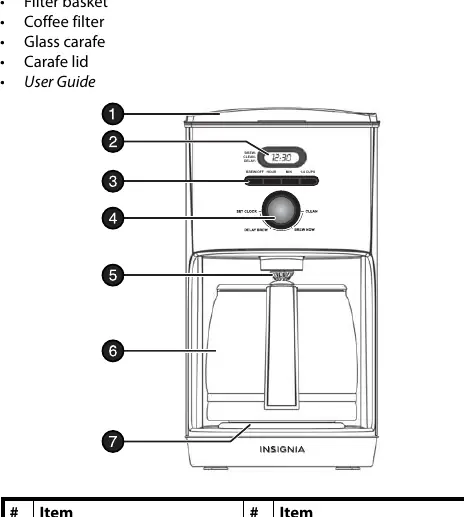
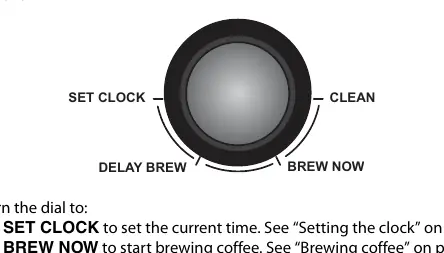
The coffee maker includes a 12-cup glass carafe, a flip-top brew basket, and a non-stick warming plate. The control panel features a function selection dial (Set Clock, Brew Now, Clean, Delay Brew) and buttons for Brew/Off, Hour, Min, and 1-4 Cups. A water level window is located on the side for easy monitoring.
Unpacking and preparation
Before using the coffee maker for the first time:
- Carefully unpack the unit and remove all tape, labels, and packaging materials.
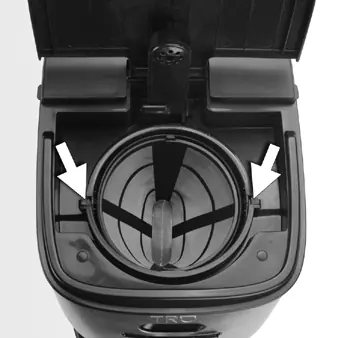
- Wash the filter basket, coffee filter, glass carafe, and carafe lid with warm, soapy water. Rinse and dry thoroughly. Do not use a dishwasher.
- Wipe the exterior surfaces with a soft, moist cloth.
- Place the unit on a solid, level, heat-resistant surface.
- Run a cleaning cycle: Fill the carafe with cool water, pour into the reservoir, turn the dial to CLEAN, and press BREW/OFF.
Setting the clock
Setting the clock is optional but required for the delayed brew feature.
- Turn the control dial to SET CLOCK. The display will flash.
- Press the HOUR button to set the hour (note AM/PM indicator).
- Press the MIN button to set the minutes.
- Wait three seconds for the display to stop flashing.
- Turn the dial away from the SET CLOCK position.
Brewing coffee
Brewing a full pot:
- Fill the carafe with cool water to the desired level and pour into the reservoir.
- Ensure the filter basket and filter are seated correctly.
- Add coffee grounds to the filter.
- Turn the dial to BREW NOW and press the BREW/OFF button.
Brewing 1-4 cups:
- Fill the carafe to the 4-cup line and pour into the reservoir.
- Add coffee grounds.
- Turn the dial to BREW NOW.
- Press the 1-4 CUPS button, then press the BREW/OFF button.
Using delayed brewing
- Prepare the coffee maker with water and coffee as described above.
- Turn the control dial to DELAY BREW. The display will flash.
- Set the desired start time using the HOUR and MIN buttons.
- Wait three seconds to save the setting.
- Press the BREW/OFF button (or 1-4 CUPS then BREW/OFF) to activate the delay.
Maintenance and cleaning
Regular cleaning prolongs the life of the coffee maker. After each use, empty the filter and wipe the unit. To perform a deep clean:
- Fill the reservoir with cool water.
- Turn the dial to CLEAN and press BREW/OFF.
- The cycle takes five minutes. The unit will beep twice when complete.
- If a second cycle is needed, turn the dial away from CLEAN and back to CLEAN, then press BREW/OFF again.
Safety precautions
- Do not immerse the power cord, plug, or coffee maker in water.
- Do not touch hot surfaces; use handles or knobs.
- Do not use the glass carafe on a range top or in a microwave.
- Do not operate if the power cord is damaged.
- The unit is for household use only.
Practical help
Common problems
Coffee maker stops brewing
If you press any buttons or turn the control dial while brewing, the cycle stops. To restart, empty the carafe and filter, add fresh coffee, and check the water level.
Plug does not fit into outlet
The coffee maker has a polarized plug (one blade wider than the other). Try reversing the plug. If it still does not fit, contact a qualified electrician.
Brewing cycle takes too long
A full pot takes about 12 minutes. A 1-4 cup brew takes about 3 to 4 minutes.
Before use
- Remove all tape, labels, and packaging materials.
- Wash the filter basket, coffee filter, glass carafe, and lid with warm, soapy water.
- Wipe the exterior surfaces with a soft, moist cloth.
- Place the unit on a solid, level, heat-resistant surface.
- Run a cleaning cycle with water only before the first use.
Specs in practice
- 12-Cup Capacity
- The maximum volume of water the reservoir holds for brewing.
- Pause and Serve
- Allows you to remove the carafe mid-brew to pour a cup without dripping on the warming plate.
- Auto Shut-off
- The coffee maker automatically turns off two hours after brewing is complete.
Images and diagrams
- Control Dial: Used to select between SET CLOCK, BREW NOW, CLEAN, and DELAY BREW modes.
- Display: Shows current time, brew status, clean status, and delay status.
- Water Level Window: Located on the side of the unit to monitor water volume.
Model compatibility
- You can use a #4 paper cone filter instead of the included reusable coffee filter.

Manual page author
Emily Carter
User documentation editor
Prepares concise manual descriptions and highlights the most useful setup, operation, and maintenance information for readers.